

 proycon
Problems with Arabic text
Hello,
If I cannot open a ticket that is mostly support, please close it(and I apologize in advance for doing so).
My goal: I am attempting to recreate something similar to http://corpus.quran.com using FLAT
The bug I am facing: After creating a .rst file and converting to folia XML, the annotation editor is not behaving as expected. When I hover over text, it highlights the entire sentence, not each word. If I attempt to categorize a word(by removing all the other words and giving the single word an annotation), it breaks the sentence and shifts all the other words to another line.
Bug screenshot:
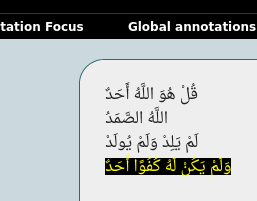
Steps to reproduce:
- Copy the following text to a .rst file (I cannot upload .rst files)
قُلْ هُوَ اللَّهُ أَحَدٌ
اللَّهُ الصَّمَدُ
لَمْ يَلِدْ وَلَمْ يُولَدْ
وَلَمْ يَكُنْ لَهُ كُفُوًا أَحَدٌ
- Convert the file to folia XML using:
rst2folia --docid=ikhlas ikhlas.rst > ikhlas.xml
- Import ikhlas.xml into FLAT to see the bug
My goal is to reproduce each line of the above (which is from the Quran) into something that has the same details as the following(each link corresponds to each line above):
http://corpus.quran.com/treebank.jsp?chapter=112&verse=1 http://corpus.quran.com/treebank.jsp?chapter=112&verse=2 http://corpus.quran.com/treebank.jsp?chapter=112&verse=3 http://corpus.quran.com/treebank.jsp?chapter=112&verse=4
The links contain: Syntax, Morphology and dependency trees
The GitHub page of FLAT shows right-to-left support for Arabic and shows per-word highlighting, but something I am doing above is not allowing me to reproduce it.

Hi, you're at the right place with your ticket.
I think I understand the confusion, because you used rst2folia you get a FoLiA file with untokenised text, that means that there is no notion of words and that the editor can't show the word-level to you. FLAT doesn't do any extra automatic processing on the document.
What you need in this case is a tokeniser, we have a tokeniser ucto that can output FoLiA XML, but it does not have specific arabic support.
You could try to give it a shot with the generic tokeniser in ucto, which will basically just split on whitespace and punctuation (including arabic punctuation).
ucto -Lgeneric test.txt test.folia.xml
I wonder if it is sufficient for your purposes or if you need a more sophisticated tokeniser that splits on takes morphology into account, for example if you want a word like "بيته" (his house) to expand to two tokens rather than one.
It is also possible to construct specialised arabic configuration for ucto if the tokenisation rules can be captured by regular expressions (which may be a bit difficult for arabic because there will be a lot of ambiguity) .
If you know of another better arabic tokeniser already, then you should use that and the only task will be getting the output to FoLiA, which could be accomplished by for instance a simple Python script using the foliapy library.

Thanks for the reply.
I attempted to use ucto first but it doesn't work because it adjusts the right-to-left tokenized words into left-to-right.
I found this option instead: https://docs.cltk.org/en/latest/arabic.html#word-tokenization
Here is my script:
from cltk.tokenize.word import WordTokenizer
import folia.main as folia

word_tokenizer = WordTokenizer('arabic')

file1 = open('ikhlas.txt', 'r')

file1_lines = file1.readlines() #read each line from the document

doc = folia.Document(id='example')
text = doc.add(folia.Text)
paragraph = text.add(folia.Paragraph)
sentence = paragraph.add(folia.Sentence)

my_token_list = []

for line in file1_lines:
    my_token = word_tokenizer.tokenize(line)
    my_token_list.append(my_token)

for mylist in my_token_list:
    for token_word in mylist:
        sentence.add(folia.Word, token_word)

print(doc)
#printing the doc object shows the correct output, but no document is being created

file1.close()
The big issue in the script above is no document is being created with doc = folia.Document(id='example'). I read through the documentation and looked at some of the tests you wrote and the code looks almost the same, but no document called example or example.xml is being created when running this script. I might be missing something regarding the document creation step, but I followed exactly what the documentation said.
Thanks again for your help :+1:
It looks good, you're only missing a doc.save(filename) step at the end, which does the writing to file.