

 prometheus
`predict_linear` seems to interact badly with the `@` modifier
What did you do?
While helping out with a discussion about shoehorning Prometheus into forecasting, I played with the @ modifier and predict_linear.
The idea is the following: If I peg the range selector used as the 1st argument of predict_linear to a certain time, it should be possible to use predict_linear meaningfully in a range query, e.g.
predict_linear(some_metric[1h] @ 1670927200, 0).
What did you expect to see?
Good question. There are different outcomes I would consider reasonable:
In any case, I expect predict_linear to calculate the same slope no matter what the evaluation time is. (And if I run deriv(some_metric[1h] @ 1670927200), I indeed see a constant value across the time range.)
What will it do with that slope? Since I used 0 as the 2nd argument, it would be fair if it completely ignored the slope and just evaluated some_metric normally. (Graphing the range query would look the same as graphing some_metric directly.)
Another option could be that it would take the end of the range selector and extrapolated the value there all the way to the evaluation time using the calculated slope. (Graphing the range query would yield a straight line with the slope as calculated with deriv.)
A third option would be that it would somehow see the end of the range selector as the new "now", so it would simply take that value, without extrapolation as the 2nd argument is 0. (Graphing the range query would constantly show the value of some_metric at the end of the range selector.)
What did you see instead? Under which circumstances?
I saw neither of the three options above, but instead something like this:
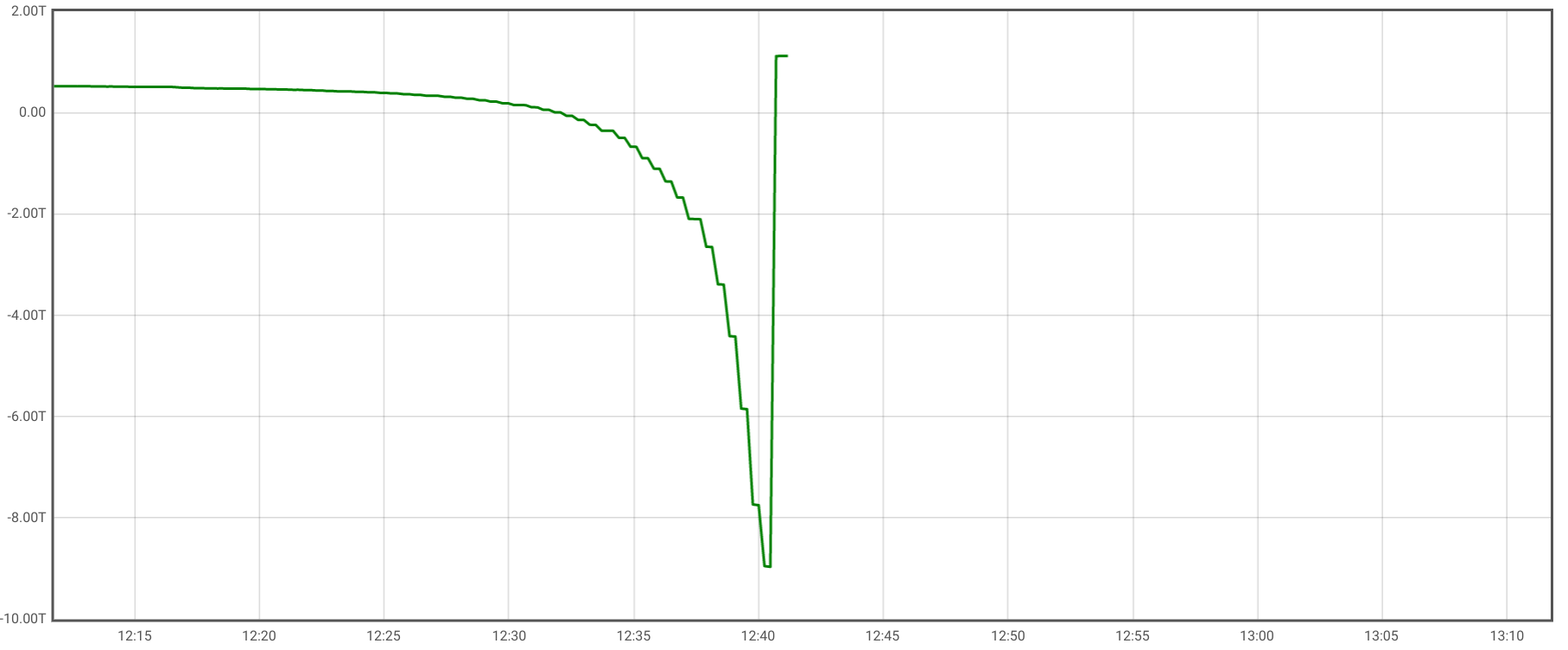
Weirdly, if I extend the range of the range query, the graph moves somewhere else:
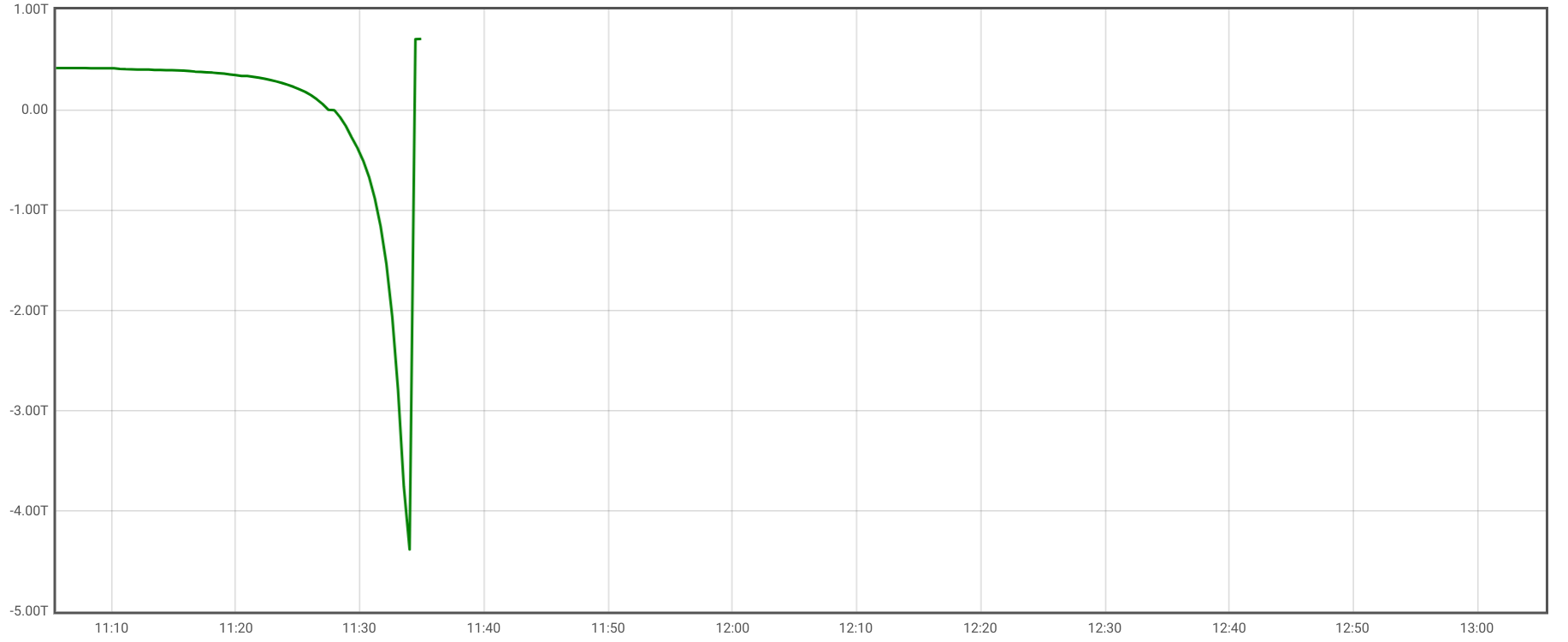
And to add even more weirdness, when I run an instant query, a value is returned for "now", i.e. a time where the graph view showed no value.
So for sure, something is going very wrong here because the range query should yield the same result as the instant query for the evaluation time of the instant query. But I also do not understand the result of the range query. The notion of "now" seems to be broken there.
First, we need to find out what semantics we desire in the first place (see expectations above – I currently believe the second one is the most useful). Then we have to ensure that the implementation follows that expectation.
System information
No response
Prometheus version
v2.40.3
Prometheus configuration file
No response
Alertmanager version
No response
Alertmanager configuration file
No response
Logs
No response

Hi Björn. I saw that you self assigned this issue, but if you haven't already started work on it, I'd be happy to try my hand at a fix this week. Of the three options proposed, I agree that the second one seems the most logical. Do you think this approach of extrapolating using the end slope is still the best way to proceed?

Thanks @justintocco . I have not yet worked on it, and I will happily review your PR. :)
I still believe the 2nd option is the most useful one, and nobody came up with any other opinion so far, so let's go for it.
As said above, deriv seems to work fine with the @ modifier, so the bug must be located in the code calling the deriv codepath.
The above PR is a proposal for a new function that would integrate properly with the "@" operator. It only implements the backend capability for the function.
The main issue with using the "@" operator appears to be that the current timestamp is being used in the calculation of the function, as opposed to functions like deriv() which return a fixed value regardless of which timestamp is being queried. I'm sure the proposal is not fully fleshed out but I hope it is a starting point for a possible function that could integrate better with "@".
Will need to make changes in order to comply with the CI tests. Sorry, this is my first attempt at contributing to this repo.
So I've doe a bit of fmt.Println debugging.
I have run this instant query: predict_linear(up{instance="localhost:9090", job="prometheus"}[2s] @ 1686264200, 10) on a test Prometheus that scrapes itself every 500ms.
Dumping enh.Ts and the samples in the range vector:
enh.Ts: 1686264385192 samples: {__name__="up", instance="localhost:9090", job="prometheus"} =>
1 @[1686264198220]
1 @[1686264198720]
1 @[1686264199220]
1 @[1686264199720]
So this looks as expected: enh.Ts is the actual evaluation timestamp, not modified by @, but the samples in the range vector are selected according to the @ modifier. So linearRegression is doing the right thing, extrapolating to enh.Ts, from where we go another 10s into the future. All good.
If I run the same query as a range query with start=1686264385.192&end=1686264389.192&step=1, the dump looks like this:
enh.Ts: 1686264385192 samples: {__name__="up", instance="localhost:9090", job="prometheus"} =>
1 @[1686264198220]
1 @[1686264198720]
1 @[1686264199220]
1 @[1686264199720]
enh.Ts: 1686264386192 samples: {__name__="up", instance="localhost:9090", job="prometheus"} =>
1 @[1686264199220]
1 @[1686264199720]
For start, all is as before, but for the one 1s later, we see only two samples in the range vector. And the other iterations don's show up at all, presumably having no samples in the range vector. The engine is losing those samples somehow.
To double-check, I ran instant queries with time=time=1686264386.192 and time=1686264387.192. The dump looked like the following:
enh.Ts: 1686264386192 samples: {__name__="up", instance="localhost:9090", job="prometheus"} =>
1 @[1686264198220]
1 @[1686264198720]
1 @[1686264199220]
1 @[1686264199720]
enh.Ts: 1686264387192 samples: {__name__="up", instance="localhost:9090", job="prometheus"} =>
1 @[1686264198220]
1 @[1686264198720]
1 @[1686264199220]
1 @[1686264199720]
So the query works as expected as an instant query.
In other words, when running an instant query, range vectors with an @ modifier can lose data for iterations later than the first. This could affect more than just predict_linear, and I'm now pretty confident that the predict_linear implementation is doing the right thing, but that deeper in the PromQL engine, we are not populating the range vectors properly. I guess I need to ask @codesome what might be the reason.
@codesome has limited availability until further notice, so I guess we have to help ourselves.
Here is my theory:
- For the instant query, and for the first step in a range query, everything works fine.
- For the 2nd step in a range query, the engine increments the evaluation timestamp by the step (obviously).
- It also increments the "view" onto range selectors by the step, which is usually the right thing, but in case of a range selector pinned to a timestamp with
@, it means we get a truncated view.
Therefore, in step 2, we see the two earlier samples in the range selector disappear (because they are in the first second, and the step is one second). No new samples appear because the pinned range selector was never meant to contain any later samples (so that part of the selection works). In step 3, we have completely moved out of the pinned time window and see no samples at all.
If my theory is correct, we "simply" need to avoid that iteration of the "view" for range selectors containing @.
Changed title according to my hypothesis. And also raised to P1 because this seems to affect every range selector with @ if used in a range query.
@beorn7, I think your hypothesis 🔝 makes sense. Please see my PR to make predict_linear evaluate to the same result regardless of the evaluation timestamp...

Thank you very much. I'll put #13504 on my review list and will try to get to it ASAP.