
windows_exporter
 windows_exporter copied to clipboard
 prometheus-community
windows_cs_logical_processors show only physical cores
Hello. Windows_cs_logical_processors return only physical cores but should return logical cores. I have servers with 96 logical cores and windows_cs_logical_processors return me value 48.
# HELP windows_cs_logical_processors ComputerSystem.NumberOfLogicalProcessors
# TYPE windows_cs_logical_processors gauge
windows_cs_logical_processors 48
windows_hyperv_hypervisor_logical_processors work fine and return right value 96
OS: Windows server 2016, 2022 Windows 10 Exporter version: 0.17.1, 0.18.01

Can you please give me the following values in the "Performance > CPU" tab of the Task Manager of the Hyper-V Host please?
- Sockets
- Cores
- Logical processors
- Host logical processors (If availeable)
Should look something like this:
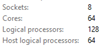

@JDA88 you got a NASA computer? wtf 64 cores anyways https://i.imgur.com/uzFnPLO.png i want to get the 8 not 16 how could i do that

I think your need is different from @AvdeevArtem issue, no?
The current version of the Exporter only expose Logical Processors. It doesn't expose the number of Sockets, the number of core per Processors and the fact that Hyper-Threading is enabled or not
I think of two way to fix this in the exporter:
-
Create a few new metrics:
windows_cs_sockets_count 2windows_cs_cores_per_socket_count 8windows_cs_logical_processors_count 16(renamed fromwindows_cs_logical_processorsas the_countsuffix make sense) The Hyper-Threading can be deducted by query if (windows_cs_sockets_count*windows_cs_cores_per_socket_count!=windows_cs_logical_processors_count)then Hyper-Threading is enabled -
Change the current label
corein the existing metric{core="0,0"}to{socket="0",core="0"}Count bysocketwould give you the physical processors count Count bycorewould give you the physical processors core count Then the same query as above to get the Hyper-Threading status
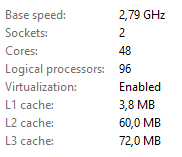
Thanks, @AvdeevArtem
Ok, so your system have:
- 2 Physical CPU
- 48 Core each
- Hyper-Threading is enabled
What does the following PowerShell command return?
Get-WmiObject -class Win32_processor | ft NumberOfCores,NumberOfLogicalProcessors
Bonus question:
How many lines of windows_cpu_processor_performance metric do you have? 48 or 96?
I might have an idea of what's appending but unfortunately I do not currently have a dual (or more) socket Windows with Hyper-Threading enable on hand to reproduce.
Maybe there is a bug in windows_cs_logical_processors logic that return a wrong value on multi socket computers. Can someone else make the test on another computer?
In my case, a Windows Server 2019 with dual Intel(R) Xeon(R) Gold 5218R CPU @ 2.10GHz:
Task Manager:
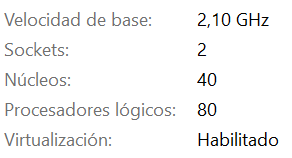
PS C:\> Get-WmiObject -class Win32_processor | ft NumberOfCores,NumberOfLogicalProcessors

NumberOfCores NumberOfLogicalProcessors
------------- -------------------------
           20                        40
           20                        40
The output of the url /integrations/windows_exporter/metrics:
# HELP windows_cs_logical_processors ComputerSystem.NumberOfLogicalProcessors
# TYPE windows_cs_logical_processors gauge
windows_cs_logical_processors 80
I'm not exactly using windows_exporter directly but through grafana-agent. I hope it helps anyway:
C:\Program Files\Grafana Agent>agent-windows-amd64.exe -version
agent, version v0.23.0 (branch: HEAD, revision: 36b8ca75)
  build user:       root@360da2ffbf37
  build date:       2022-02-10T15:31:14Z
  go version:       go1.17.6
  platform:         windows/amd64

@jagbarcelo Thanks for the feedback, on your side everything is working fine. I'm out of ideas :(
PS C:\Windows\system32> Get-WmiObject -class Win32_processor | ft NumberOfCores,NumberOfLogicalProcessors

NumberOfCores NumberOfLogicalProcessors
------------- -------------------------
           24                        48
           24                        48
windows_cpu_processor_performance show me 96 lines
This is strange because on 60 servers with relatively new CPUs(all dual) the metric shows the wrong values, but on servers, with older CPUs like the Dual Xeon e-2690 v4 the metric shows the correct values
This issue has been marked as stale because it has been open for 90 days with no activity. This thread will be automatically closed in 30 days if no further activity occurs.
![github-actions[bot] avatar](https://avatars.githubusercontent.com/in/15368?v=4 "Published by a pub.dev verified publisher")
