
windows_exporter
 windows_exporter copied to clipboard
 prometheus-community
No data collected when CPU is overloaded
Hi team! Can you please give me an advice how to collect metrics when host's CPU is overloaded?
As you can see in the screenshot below, no data has been collected between the red lines.
The query is
100 - (avg by (instance) (irate(windows_cpu_time_total{mode="idle", instance=~"my_host"}[1m])) * 100)
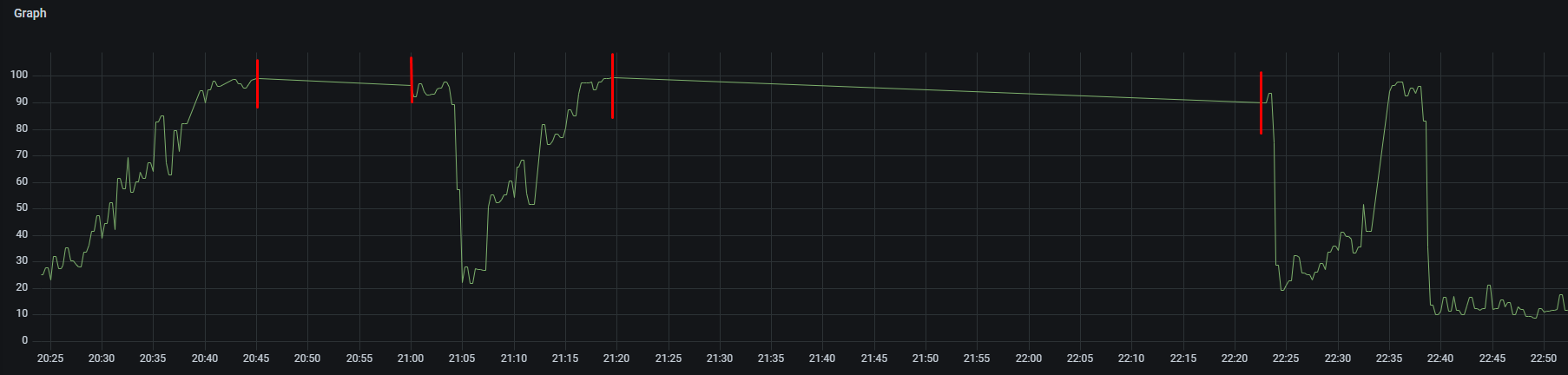
Is this the exporter issue or a problem with my local configuration?
My Prometheus config:
  - job_name: 'windows_exporter'

    scrape_interval: 25s
    scrape_timeout: 20s
And windows_exporter config:
collectors:
  enabled: cpu,cs,logical_disk,net,os,service,system,process,iis
log:
  level: warn
scrape:
  timeout-margin: 0.1
collector:
  service:
    services-where: (NAME = 'windows_exporter') OR (Name = 'W3SVC') OR (Name = 'Redis')
  process:
    whitelist: windows_exporter|w3wp

This is because the process doesn't have any resources to collect the metrics in time. If this is a virtual machine I would advice to use the hypervisor's cpu metrics alongside.

But the Zabbix agent was collecting data at the same time at the same without loss. What is the difference?
to use the hypervisor's cpu metrics
Do you mean I should collect these metrics outside the host? Can I do it with windows_exporter or it should be other exporter?
I'm not sure where Zabbix gets it's metrics from. But I'm referring to running windows_exporter on the hosts (if it's Hyper-V) or Telegraf if it's VMware.
windows_exporter is verysensitive to CPU pressure compare to other monitoring agents i have worked with. Things you might consider to mitigate the issue:
- Use recents version of windows_exporter as the less it depends on WMI the faster it seen to respond
- Minimize the number of collectors as much as possible (filter etc.)
- Try to avoid having VMs with a single CPU as this is where we had the most occurrence of this issues in our environment
- You can try to increase the priority of the windows_exporter process to Above normal if you still have issues but you take a small risk in doing so

I think adding a flag to change the process default priority could be a solution for peoples facing the issue
--process.priority [realtime, high, abovenormal, normal, belownormal, low]
Can we bring that up on the list?
I have a script that force the priority to high without any effect on the past year now
@JDA88, Am I correct in using the following arguments: $arguments = '/i "c:' + $exporter_location + '\prometheus\windows_exporter-' + $msi_version + '-amd64.msi" LISTEN_PORT=9182 EXTRA_FLAGS="--config.file=' + $config_file + ' --web.disable-exporter-metrics --process.priority=high" /qn' Start-Process msiexec.exe -Wait -ArgumentList $arguments

This issue has been marked as stale because it has been open for 90 days with no activity. This thread will be automatically closed in 30 days if no further activity occurs.
![github-actions[bot] avatar](https://avatars.githubusercontent.com/in/15368?v=4 "Published by a pub.dev verified publisher")