

 probil
Error using v-mask in custom vuetify component
V-mask does not work in a vuetify v-text-field component. Apparently it generates some conflict with v-model
By applying in form this. $Refs.form.resetValidation () and this. $refs.form.reset () v-model variable is not reset
Versions: "v-mask": "^2.2.3" "vue": "^2.6.12" "vuetify": "^2.3.10"
<template>
    <v-text-field
        v-model="value"
        v-mask="mask"/>
</template>

<script>
    import createNumberMask from 'text-mask-addons/dist/createNumberMask';

    const number = createNumberMask({
        prefix: '',
        includeThousandsSeparator: true,
        thousandsSeparatorSymbol: '.',
    });

    data: () => ({
           mask = "number"
        }),

</script>

From what I gathered, there is a race condition when the input is updated, depending on which fires first, either it will be reset or it won't.. I have the same issue on blur, basically setting a value on input blur will result 50% of the time on the value you want to set, the rest of the time the input is reupdated right away with the previous value
As you can see input is fired sometimes after a blur and that's when the value stays the same
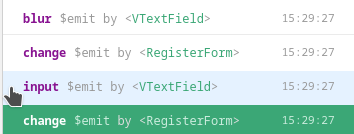
When it doesn't
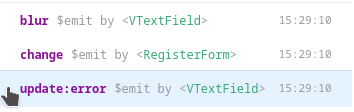
Needs some more digging

Ok so basically the problem is in how the updated event fires in vue even though the value of the underlying element is not yet updated, I think just running the update on next tick should fix the issue
Ok, básicamente, el problema está en cómo se activa el evento actualizado en vue, aunque el valor del elemento subyacente aún no se ha actualizado, creo que solo ejecutar la actualización en el siguiente tick debería solucionar el problema
Hi, thank you for you answer. Could you comment on how to implement the proposed solution?