
slice-machine
 slice-machine copied to clipboard
 prismicio
Slice simulator requires old packages
@prismicio/react used to be called prismic-reactjs. According to your documentation, the latter is now deprecated, and we can replace it with @prismicio/react, which I have done. Unfortunately slice-machine still requires it (and next-slicezone, which is also deprecated I think) as a dependency to run the simulator:

Versions
- slice-machine-ui: ^0.3.3
Reproduction
Run slice-machine locally and try to use the simulator while not using prismic-reactjs.
Steps to reproduce
What is expected?
Simulator should run without error.
What is actually happening?
Simulator won't run.
P.S. I know I can open the URL directly, but I am getting another error which is probably unrelated when using the new packages:
import { SliceSimulator } from "@prismicio/slice-simulator-react";
import { SliceZone } from "@prismicio/react";
import state from "../../.slicemachine/libraries-state.json";
import { components } from "../slices";

const SliceSimulatorPage = () => {
  return (
    <SliceSimulator sliceZone={({ slices }) => <SliceZone slices={slices} components={components} />} state={state} />
  );
};

export default SliceSimulatorPage;
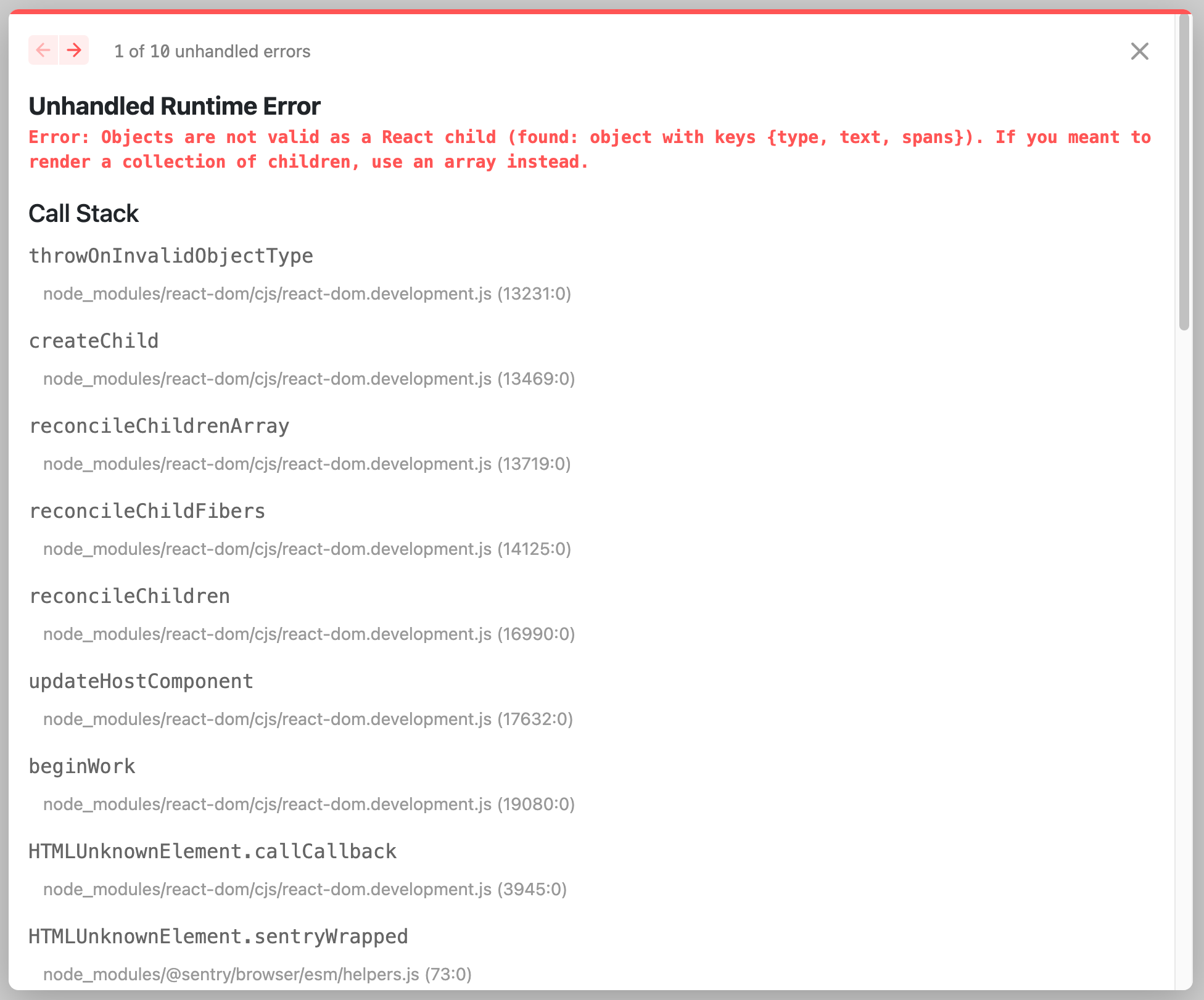
Error: Objects are not valid as a React child (found: object with keys {type, text, spans}). If you meant to render a collection of children, use an array instead.

Hi @amosbastian
What is the framework property in the sm.json file? prevoiseNext or next ?
If it's next the more recent dependancies should be showing up in the setup drawer.
For the simulator issues are you able to provided a stack trace or some more details?

Hi @MarcMcIntosh I must have missed that we need to change the framework property while using the migration guide, sorry!
For the simulator issue. First of all the types don't seem to be correct as I'm getting this:
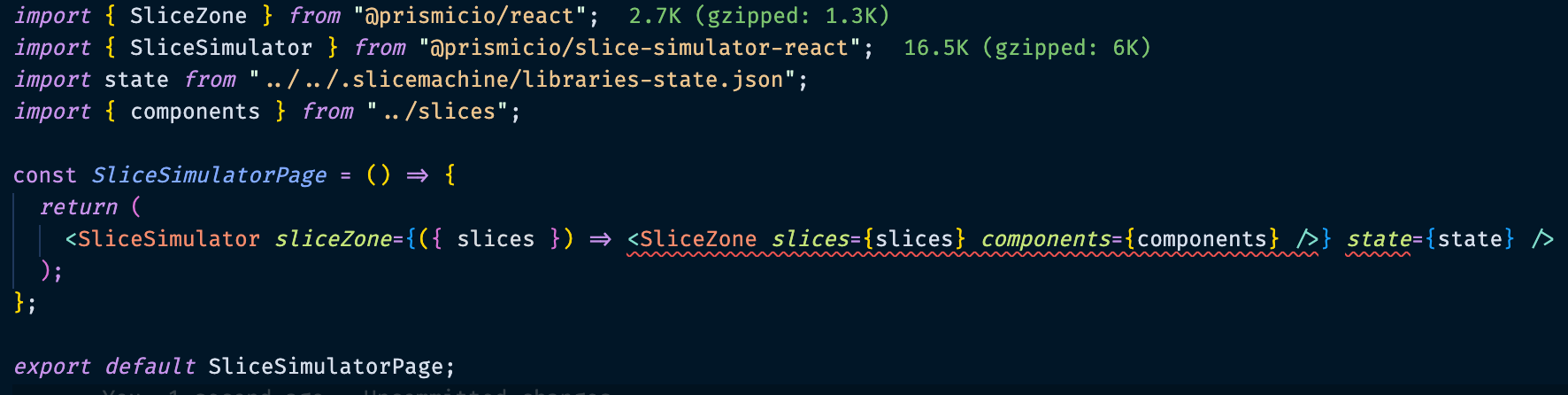
(parameter) slices: [] | [Slice<string, Record<string, AnyRegularField>, Record<string, AnyRegularField>> | SharedSlice<string, SharedSliceVariation<string, Record<...>, Record<...>>>, ...(Slice<...> | SharedSlice<...>)[]]
Type 'Element' is not assignable to type 'ComponentType<{}>'.ts(2322)
[index.d.ts(6, 16): ]()The expected type comes from the return type of this signature.
and
Property '"src/slices"' is incompatible with index signature.
      Type '{ components: { achievements_section: { library: string; id: string; name: string; description: string; model: { id: string; type: string; name: string; description: string; variations: { id: string; name: string; ... 4 more ...; items: { ...; }; }[]; }; mocks: { ...; }; meta: { ...; }; screenshotPaths: { ...; }; };...' is missing the following properties from type '{ name: string | undefined; version: string | undefined; components: { [x: string]: { id: string; library: string; model: { id: string; type: "SharedSlice"; name: string; variations: ({ id: string; name: string; description: string; docURL: string; version: string; } & { ...; })[]; } & { ...; }; mocks: { ...; }; met...': name, versionts(2322)
[index.d.ts(39, 5): ]()The expected type comes from property 'state' which is declared here on type 'IntrinsicAttributes & { className?: string | undefined; sliceZone: (args: { slices: [] | [Slice<string, Record<string, AnyRegularField>, Record<...>> | SharedSlice<...>, ...(Slice<...> | SharedSlice<...>)[]]; }) => ComponentType<...>; } & SliceSimulatorProps'
When visiting the page I get the following:
The other errors are mostly variations of the above, or the following:
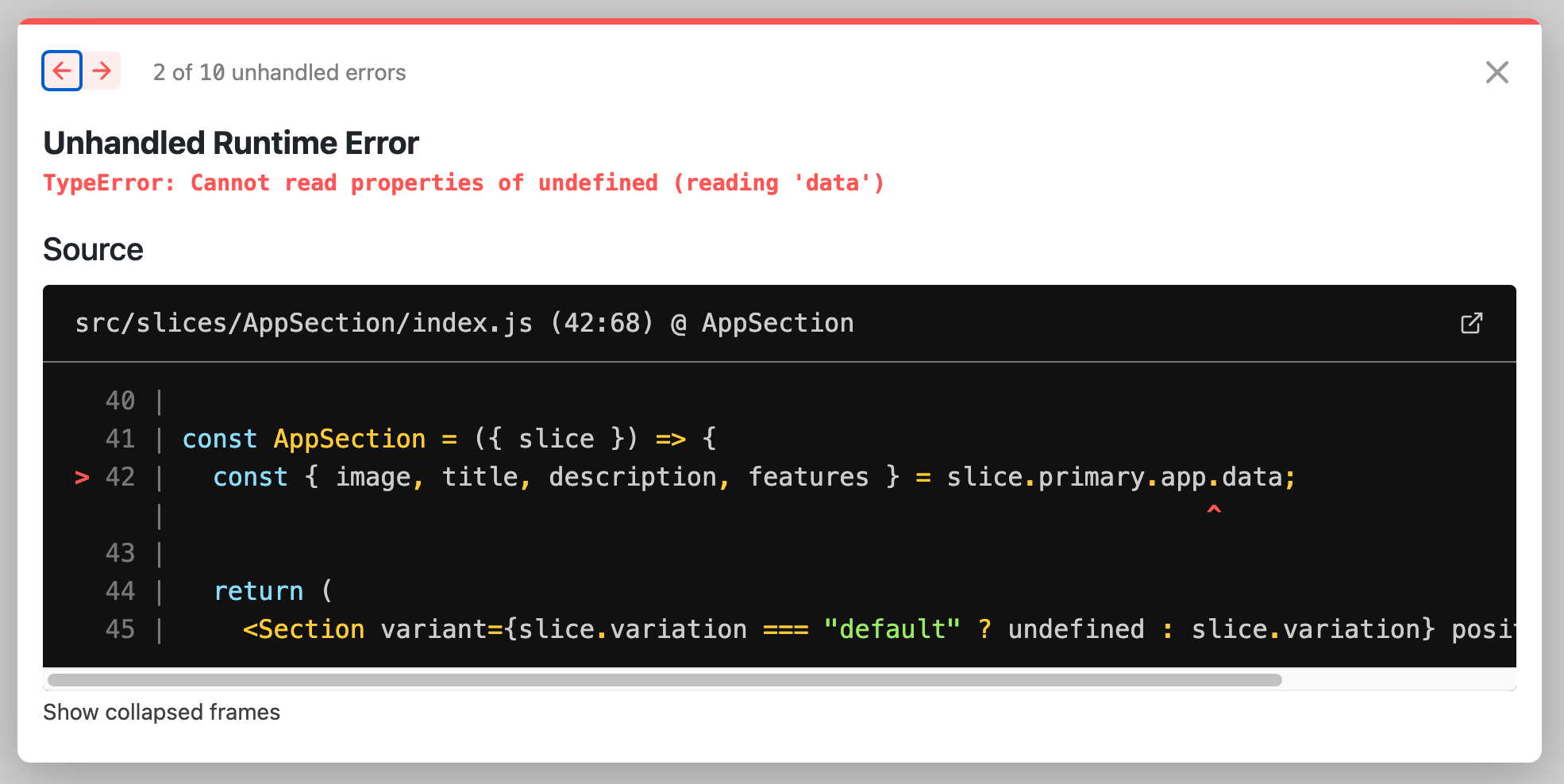
The slices work fine outside of the slice-simulator page, so not sure what is the problem.
Hi @amosbastian
Thanks for the extra info :)
For this error
Property '"src/slices"' is incompatible with index signature.
      Type '{ components: { achievements_section: { library: string; id: string; name: string; description: string; model: { id: string; type: string; name: string; description: string; variations: { id: string; name: string; ... 4 more ...; items: { ...; }; }[]; }; mocks: { ...; }; meta: { ...; }; screenshotPaths: { ...; }; };...' is missing the following properties from type '{ name: string | undefined; version: string | undefined; components: { [x: string]: { id: string; library: string; model: { id: string; type: "SharedSlice"; name: string; variations: ({ id: string; name: string; description: string; docURL: string; version: string; } & { ...; })[]; } & { ...; }; mocks: { ...; }; met...': name, versionts(2322)
[index.d.ts(39, 5): ]()The expected type comes from property 'state' which is declared here on type 'IntrinsicAttributes & { className?: string | undefined; sliceZone: (args: { slices: [] | [Slice<string, Record<string, AnyRegularField>, Record<...>> | SharedSlice<...>, ...(Slice<...> | SharedSlice<...>)[]]; }) => ComponentType<...>; } & SliceSimulatorProps'
Saving a slice should regenerate the slices/index file to the new format.
Saving a slice should regenerate the slices/index file to the new format.
It is doing so as far as I can tell. Like I said I've migrated our entire app to the new version and all the slices on other pages are working using the SliceZone component from @prismic/react
import { PrismicSeo } from "@/components/PrismicSeo";
import { getFAQs } from "@/utils/getFAQs";
import { SliceZone } from "@prismicio/react";
import { FAQPageJsonLd } from "next-seo";
import * as React from "react";
import { components } from "../../slices";

export const PrismicPage = (props: any) => {
  const faqs = getFAQs(props.slices);

  return (
    <>
      {faqs.length > 0 && (
        <FAQPageJsonLd
          mainEntity={faqs.map(({ questionName, acceptedAnswerText }) => {
            return {
              questionName,
              acceptedAnswerText,
            };
          })}
        />
      )}
      <PrismicSeo seo={props.data} />
      <SliceZone {...props} components={components} />
    </>
  );
};
Hey @amosbastian and @MarcMcIntosh,
The <SliceSimulator>/<SliceZone> TypeScript error should be fixed with this PR: https://github.com/prismicio/slice-simulator/pull/8
Basically, the type of the sliceZone prop appears to be incorrect. There shouldn't be any runtime error, however.
The "Objects are not valid as a React child" error is likely coming from one of your Slices. { type, text, spans } indicates that a Rich Text or Title field is being added directly to the React tree, but it needs to be rendered using a component like @prismicio/react's <PrismicRichText> or <PrismicText>.
@amosbastian You could try commenting out all components in slices/index.js and uncommenting them one-by-one until you find the Slice that is causing the error. Then check the Slice's component to ensure you aren't passing a Rich Text or Title field directly into the React tree.
If you need help figuring this out, let me or @MarcMcIntosh know! 🙂

Hey @angeloashmore it seems like certain fields that are key text are seen as rich text in the simulator 🤔 These components also work fine when using them in the app and it's only in the simulator they are giving this error, which is why I think that this is the case.
EDIT:
Here is part of the model of one of our slices where the title is key text, it works fine in the app itself, but the simulator is throwing an error unless slice.primary.title is replaced with prismicH.asText(slice.primary.title)
"primary": {
  "title": {
    "config": {
      "label": "Title",
      "placeholder": "A nice title"
    },
    "type": "Text"
  },
  "description": {
    "config": {
      "label": "Description",
      "placeholder": "A nice description",
      "allowTargetBlank": true,
      "multi": "paragraph,em,strong,hyperlink,list-item,o-list-item"
    },
    "type": "StructuredText"
  }
},
Unfortunately there are also some other slices not working in the simulator (that do work in the Next.js app) because linked documents aren't fetched. On the pages themselves we use getStaticProps to fetch the document like so
const prismicDocument = await client.getByUID("page", uid, { fetchLinks: PAGE_LINKS });
Is there a way to fetch linked documents in the simulator as well?
Thanks for the info @amosbastian, it's very helpful!
The Key Text => Rich Text issue shouldn't be happening. I just tested this with the latest version (v0.3.4) and did not see the issue. My Key Text fields correctly contain a string in all cases.
Could you try the following?
-
Can you upgrade to the latest version,
v0.3.4? Your original issue states you might havev0.3.3installed. I don't believe the latest version contains any changes to the mock data system, but this lets us rule out version differences. -
If that doesn't fix it, could you share the the following with us?
- The React component for the Slice that throws the React error in the simulator.
- The full Slice JSON model for the Slice that throws the React error in the simulator.
You can post it here, or if you'd like to send it privately, you can send me a message on the community forum with this link: Send a message to angeloashmore.
With that info, we might be able to spot an error in the code, or we'll have something to test against if there's a bug in Slice Machine.
Thanks!
Here is one of the components:
import { ContactCard } from "@/components/ContactCard";
import { Section, SectionHeading } from "@/components/Section";
import { Grid } from "@chakra-ui/react";
import * as React from "react";

const ContactsSection = ({ slice }) => (
  <Section variant={slice.variation === "default" ? undefined : slice.variation}>
    <SectionHeading mb={{ base: 16, md: 20 }}>{slice.primary.title}</SectionHeading>
    <Grid
      gridTemplateColumns={{ base: "repeat(1, 1fr)", md: "repeat(2, 1fr)", xl: "repeat(3, 1fr)" }}
      columnGap={4}
      rowGap={16}
    >
      {slice?.items?.map((item, index) => (
        <ContactCard key={index} contact={item} />
      ))}
    </Grid>
  </Section>
);

ContactsSection.displayName = ContactsSection;

export default ContactsSection;
and here is its model:
{
  "id": "contacts_section",
  "type": "SharedSlice",
  "name": "ContactsSection",
  "description": "Contacts Section",
  "variations": [
    {
      "id": "default",
      "name": "Default Slice",
      "docURL": "...",
      "version": "sktwi1xtmkfgx8626",
      "description": "Contacts Section",
      "primary": {
        "title": {
          "config": {
            "label": "Title",
            "placeholder": "A nice title"
          },
          "type": "Text"
        }
      },
      "items": {
        "image": {
          "config": {
            "label": "Image",
            "constraint": {
              "width": 308,
              "height": 308
            },
            "thumbnails": []
          },
          "type": "Image"
        },
        "title": {
          "config": {
            "label": "Title",
            "placeholder": ""
          },
          "type": "Text"
        },
        "name": {
          "config": {
            "label": "Name",
            "placeholder": ""
          },
          "type": "Text"
        },
        "phoneNumber": {
          "config": {
            "label": "Phone Number",
            "placeholder": ""
          },
          "type": "Text"
        },
        "email": {
          "config": {
            "label": "Email",
            "placeholder": ""
          },
          "type": "Text"
        }
      }
    },
    {
      "id": "cream",
      "name": "Cream",
      "docURL": "...",
      "version": "sktwi1xtmkfgx8626",
      "description": "Contacts Section",
      "primary": {
        "title": {
          "config": {
            "label": "Title",
            "placeholder": "A nice title"
          },
          "type": "Text"
        }
      },
      "items": {
        "image": {
          "config": {
            "label": "Image",
            "constraint": {
              "width": 308,
              "height": 308
            },
            "thumbnails": []
          },
          "type": "Image"
        },
        "title": {
          "config": {
            "label": "Title",
            "placeholder": ""
          },
          "type": "Text"
        },
        "name": {
          "config": {
            "label": "Name",
            "placeholder": ""
          },
          "type": "Text"
        },
        "phoneNumber": {
          "config": {
            "label": "Phone Number",
            "placeholder": ""
          },
          "type": "Text"
        },
        "email": {
          "config": {
            "label": "Email",
            "placeholder": ""
          },
          "type": "Text"
        }
      }
    }
  ]
}
It works fine when using the slice on a page, but the simulator throws an error. If I replace slice.primary.title with prismicH.asText(slice.primary.title) then it works in both places.
I generated a new test slice with key text, and that works fine in the simulator, so I'm a bit confused 😕
As I mentioned above, I'm also having another error:
Unfortunately there are also some other slices not working in the simulator (that do work in the Next.js app) because linked documents aren't fetched. On the pages themselves we use
getStaticPropsto fetch the document like soconst prismicDocument = await client.getByUID("page", uid, { fetchLinks: PAGE_LINKS });Is there a way to fetch linked documents in the simulator as well?
@MarcMcIntosh I think the first part was fixed, but I haven't checked if
Unfortunately there are also some other slices not working in the simulator (that do work in the Next.js app) because linked documents aren't fetched. On the pages themselves we use getStaticProps to fetch the document like so
const prismicDocument = await client.getByUID("page", uid, { fetchLinks: PAGE_LINKS });Is there a way to fetch linked documents in the simulator as well?
is still an issue since we stayed on Storybook and I didn't receive an answer
