

 prismicio
Setup on Nuxt fails when adding Storybook. Error in No files matching `..nuxt-storybook/storybook/generated-stories-entry.js`
Versions
- macOS Catalina: 10.15.7
- node: 14.16.1
- npm: 6.14.12
- "slice-machine-ui": "beta"
- "@nuxtjs/prismic": "^1.2.6"
- "@prismicio/vue": "^2.0.11"
- "nuxt-sm": "^0.0.6"
- "vue-essential-slices": "^0.3.0"
- "vue-slicezone": "^0.0.30"
- "@storybook/vue": "6.1.21"
- "vue-loader": "15.9.6"
- "@nuxtjs/storybook": "3.3.1"
Reproduction
Project on Azure DevOps - I can provide a zip privately.
- Open root folder of exisiting Nuxt project
npm i -g prismic-cliprismic loginprismic sm --setupprismic sm --developnpx prismic-cli sm --create-slice(I also tried without this but got additional errors, see below)- http://localhost:9999/ Warnings 'Storybook is not running'
prismic sm --add-storybook- http://localhost:9999/ Warnings none 'Your project is correctly configured. Well done!'
npm run storybook- Terminal webpack error
ERROR in No files matching '(filename clipped)/.nuxt-storybook/storybook/generated-stories-entry.js' were found. - http://localhost:3003/
ERROR in No files matching '(filename clipped)/.nuxt-storybook/storybook/preview.js-generated-config-entry.js' were found.,DevTools failed to load source map: Could not load content for http://localhost:3003/index.js.map: HTTP error: status code 404, net::ERR_HTTP_RESPONSE_CODE_FAILURE,DevTools failed to load source map: Could not load content for http://localhost:3003/react-popper-tooltip.js.map: HTTP error: status code 404, net::ERR_HTTP_RESPONSE_CODE_FAILURE
Additional Details
package.json
"dependencies": {
    "@lihbr/utils-nuxt.smart-link": "^0.2.2",
    "@nuxt/content": "^1.14.0",
    "@nuxtjs/axios": "^5.13.6",
    "@nuxtjs/composition-api": "^0.24.1",
    "@nuxtjs/google-analytics": "^2.4.0",
    "@nuxtjs/gtm": "^2.3.2",
    "@nuxtjs/sitemap": "^2.4.0",
    "@tailwindcss/aspect-ratio": "^0.2.0",
    "@tailwindcss/typography": "^0.4.0",
    "@vueuse/components": "^5.1.3",
    "@vueuse/core": "^5.1.3",
    "@vueuse/integrations": "^5.1.3",
    "core-js": "^3.9.1",
    "lodash.shuffle": "^4.2.0",
    "nuxt": "^2.15.7",
    "nuxt-i18n": "^6.25.0",
    "nuxt-svg-loader": "^1.2.0",
    "vue-observe-visibility": "^1.0.0",
    "@nuxtjs/prismic": "^1.2.6",
    "@prismicio/vue": "^2.0.11",
    "nuxt-sm": "^0.0.6",
    "vue-essential-slices": "^0.3.0",
    "vue-slicezone": "^0.0.30"
  },
  "devDependencies": {
    "@commitlint/cli": "^12.0.1",
    "@commitlint/config-conventional": "^12.0.1",
    "@fortawesome/free-brands-svg-icons": "^5.15.3",
    "@nuxt/image": "^0.4.14",
    "@nuxtjs/eslint-config": "^6.0.0",
    "@nuxtjs/eslint-module": "^3.0.2",
    "@nuxtjs/fontawesome": "^1.1.2",
    "@nuxtjs/pwa": "^3.3.5",
    "@nuxtjs/tailwindcss": "^4.2.0",
    "autoprefixer": "^9.8.6",
    "babel-eslint": "^10.1.0",
    "eslint": "^7.22.0",
    "eslint-config-prettier": "^8.1.0",
    "eslint-plugin-nuxt": "^2.0.0",
    "eslint-plugin-prettier": "^3.3.1",
    "eslint-plugin-vue": "^7.7.0",
    "fibers": "^5.0.0",
    "husky": "^4.3.8",
    "lint-staged": "^10.5.4",
    "node-sass": "^5.0.0",
    "postcss": "^8.3.5",
    "prettier": "^2.2.1",
    "pug": "^3.0.2",
    "pug-plain-loader": "^1.1.0",
    "sass": "^1.35.1",
    "sass-loader": "^10.1.1",
    "stylelint": "^13.12.0",
    "stylelint-config-standard": "^21.0.0",
    "css-loader": "^5.2.6",
    "slice-machine-ui": "beta",
    "@storybook/vue": "6.1.21",
    "vue-loader": "15.9.6",
    "@nuxtjs/storybook": "3.3.1"
  }
nuxt.config.js
// eslint-disable-next-line import/named
import { meta, utils, cookie } from './config/'

const { getStoriesPaths } = require('slice-machine-ui/helpers/storybook')

export default {
  // Watch config subfiles
  watch: ['~/config/*'],

  // Target: https://go.nuxtjs.dev/config-target
  target: 'static',

  // Global page headers: https://go.nuxtjs.dev/config-head
  head: {
    title: meta.name,
    // titleTemplate: meta.titleTemplate,
    script: [
      cookie,
      {
        src:
          'https://cdn.polyfill.io/v2/polyfill.min.js?features=Element.prototype.classList',
      },
      {
        src:
          'https://cdn.jsdelivr.net/npm/[email protected]/dist/focus-visible.min.js',
      },
    ],
    meta: [
      {
        charset: 'utf-8',
      },
      {
        name: 'viewport',
        content: 'width=device-width, initial-scale=1',
      },
      {
        hid: 'description',
        name: 'description',
        content: meta.description,
      },
    ],
    link: [
      {
        rel: 'icon',
        type: 'image/png',
        href: '/icon.png',
      },
    ],
  },

  // Mobile server
  server: {
    host: '0',
  },

  // Global CSS: https://go.nuxtjs.dev/config-css
  css: ['@/assets/css/main.css', 'vue-essential-slices/src/styles/styles.scss'],

  // Plugins to run before rendering page: https://go.nuxtjs.dev/config-plugins
  plugins: [
    // https://utils-nuxt.lihbr.com/components/smart-link
    '~/plugins/smart-link.js',
    // https://github.com/nuxt-community/gtm-module#manual-gtm-initialization
    '~/plugins/gtm.js',
  ],
  // Auto import components: https://go.nuxtjs.dev/config-components
  components: true,
  generate: {
    interval: 2000,
  },
  // Modules for dev and build (recommended): https://go.nuxtjs.dev/config-modules
  buildModules: [
    // https://pwa.nuxtjs.org/setup
    [
      '@nuxtjs/pwa',
      {
        meta: {
          name: meta.name,
          description: meta.description,
          theme_color: meta.themeColor,
          lang: meta.lang,
          // test this later
          ogSiteName: meta.name,
          ogTitle: meta.name,
          ogDescription: meta.description,
          ogHost: meta.ogHost,
          ogImage: meta.ogImage,
          ogUrl: utils.baseURL,
        },
        manifest: {
          name: meta.name,
          // google mandatory
          short_name: meta.shortName,
          // google mandatory
          description: meta.description,
          // google recommended
          display: 'browser',
          // disables "Add to Home Screen" button // google mandatory
          background_color: meta.backgroundColor,
          // google recommended
          theme_color: meta.themeColor,
          // google recommended
          lang: meta.lang,
        },
      },
    ],
    [
      '@nuxtjs/google-analytics',
      {
        id: '**************',
        disabled: () => document.cookie.includes('ga_optout=true'),
        set: [
          {
            field: 'anonymizeIp',
            value: true,
          },
        ],
      },
    ],

    // https://github.com/nuxt-community/gtm-module
    [
      '@nuxtjs/gtm',
      {
        id: '**************',
        scriptURL: 'https://www.googletagmanager.com/gtag/js',
        debug: true,
      },
    ],

    // https://go.nuxtjs.dev/eslint
    '@nuxtjs/eslint-module',

    // https://go.nuxtjs.dev/stylelint
    '@nuxtjs/tailwindcss',
    [
      '@nuxtjs/fontawesome',
      {
        icons: {
          brands: ['faInstagram'],
        },
      },
    ],
    '@nuxtjs/composition-api/module',
    '@nuxt/image',
  ],

  // Modules: https://go.nuxtjs.dev/config-modules
  modules: [
    [
      // CMS: https://content.nuxtjs.org/
      '@nuxt/content',
    ],
    [
      // SVG as components https://github.com/Developmint/nuxt-svg-loader#readme
      'nuxt-svg-loader',
    ],
    [
      'nuxt-i18n',
      {
        locales: [
          {
            code: 'en',
            iso: 'en-GB',
            file: 'en.js',
            name: 'English',
          },
          {
            code: 'de',
            iso: 'de-DE',
            file: 'de.js',
            name: 'Deutsch',
          },
        ],
        lazy: true,
        langDir: 'locales/',
        strategy: 'prefix_except_default',
        defaultLocale: 'en',
        // https://i18n.nuxtjs.org/browser-language-detection/
        detectBrowserLanguage: {
          useCookie: true,
          onlyOnRoot: true, // recommended for better SEO. It allows crawlers to access the requested page withou being redirected on detected locale
        },
        vueI18n: {
          fallbackLocale: 'en',
        },
        baseUrl: utils.baseURL,
      },
    ],
    // Note that if you want to use the $axios instance from the @nuxtjs/axios module within the exported function, the @nuxtjs/axios module must be registered after the nuxt-i18n module.
    ['@nuxtjs/axios'],

    // https://sitemap.nuxtjs.org/guide/setup
    // sitemap must be last in modules
    [
      '@nuxtjs/sitemap',
      {
        path: '/sitemap.xml',
        hostname: utils.baseURL,
        cacheTime: 1000 * 60 * 15,
        gzip: true,
        exclude: ['/static/admin/**'],
        defaults: {
          changefreq: 'daily',
          priority: 1,
          lastmodrealtime: true,
        },
      },
    ],
    [
      '@nuxtjs/prismic',
      {
        endpoint: 'https://mel-hyre.cdn.prismic.io/api/v2',
        apiOptions: {
          routes: [
            {
              type: 'page',
              path: '/:uid',
            },
          ],
        },
      },
    ],
  ],
  // Build Configuration: https://go.nuxtjs.dev/config-build
  build: {
    // fix for https://stackoverflow.com/questions/67350359/nuxt-js-fresh-install-of-nuxt-2-14-6-contains-babel-loose-option-warnings
    babel: {
      plugins: [
        [
          '@babel/plugin-proposal-private-methods',
          {
            loose: true,
          },
        ],
      ],
    },
    transpile: ['vue-slicezone', 'nuxt-sm'],
  },
  router: {
    // deprecated
    // moved to app/router.scrollBehavior.js
  },
  storybook: {
    stories: [
      ...getStoriesPaths(),
      '~/slices/**/*.stories.[tj]s',
      '~/.slicemachine/assets/slices/**/*.stories.[tj]s',
    ],
  },
  ignore: ['**/*.stories.js'],
}
.nuxt-storybook/storybook/main.js
const stories = ['../../components/**/*.stories.@(ts|js)','/Users/meljones/HYRE/website/front/HYREFrontEnd/.slicemachine/assets/**/*.stories.js','../../slices/**/*.stories.[tj]s','../../.slicemachine/assets/slices/**/*.stories.[tj]s']
const addons  = ["@storybook\u002Faddon-essentials"]

function nuxifyStorybook(storybookConfig) {
  return {
    ...storybookConfig,
    webpackFinal(config, options) {
      if (options.nuxtStorybookConfig) {
        config = options.nuxtStorybookConfig.webpackFinal(config, options)
      }
      if (typeof storybookConfig.webpackFinal === 'function') {
        config = storybookConfig.webpackFinal(config, options)
      }
      return config
    },
    stories: [
      ...stories,
      ...storybookConfig.stories
    ],
    addons: [
      ...addons,
      ...storybookConfig.addons
    ],
  }
}

module.exports = {
  webpackFinal(config, options) {
    return options.nuxtStorybookConfig.webpackFinal(config, options)
  },
  stories,
  addons,
  nuxifyStorybook
}
additional error message (when npx prismic-cli sm --create-slice was not used)
ERROR in No files matching '/Users/meljones/HYRE/website/front/HYREFrontEnd/.nuxt-storybook/storybook/generated-stories-entry.js' were found.
What is expected?
- Follow Prismics' docs and set up SliceMachine on an existing Nuxt project.
- I currently use Netlify CMS, our company and marketing team is expanding, I would like to switch SliceMachine
- I have tested it before on a project from scratch, I would like to test it on the current project
- Slice Machine and Storybook setup to compile without errors,
- Next step on docs "Build your Content Model (Slice)" https://prismic.io/docs/technologies/create-model-component-nuxtjs#build-your-content-model-slice
- But I am stuck at setup
What is actually happening?
- Storybook returns an error and I can not build my content model/continue to work with slice machine
- Whendebugging I have created (and deleted) 8 Prisimic repositories 🙈.
- I have tried updating npm packages, uninstalling and reinstalling packages, deleting node_modules and package-lock.json, deleting branches and pulling from the master, then repeating all steps in the docs again. I also tried configuring a slice machine project manually but had no success.
- What else can I try? I'd really like to use your Slice Machine product! I've been watching it (& the Prismic teams) progress for the last year. Well done so far, you are all very awesome! 😁 👐 - Mel

Hey @MoodyBones, thanks for the comprehensive issue and your excitement for Slice Machine!
This looks like an issue at Nuxt Storybook level, we should try to get Storybook up and running first here:
- Can you try updating it to version 4? (apparently it's still running version 3 on your details)
- If still not working can you try removing the stories in your
nuxt.config.jsfile (atstorybook.stories, just give it an empty array) and see if you can at least get an empty Storybook up? - Not thinking about Storybook, can you also confirm the Nuxt dev server (
npm run dev) is working?
Let us know of your progress :)

Heya Lucie, thanks so much for your response and suggestions :) 👏
I had another try today:
- I updated nuxt/storybook.
- Note
prismic sm --add-storybookadds versions3.3.1, it also rolled back my updated version. - I managed to update it again using
npm i @nuxtjs/[email protected]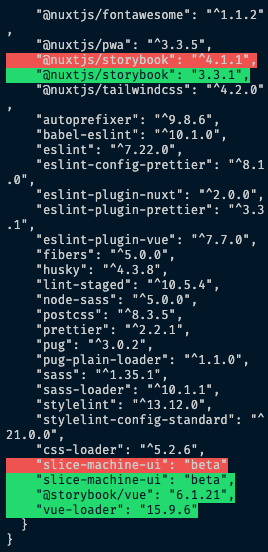
With version 4.1.1 running I tried npm run storybook and it gave me the following errors
 ERROR  Failed to compile with 2 errors

These dependencies were not found:

* @storybook/vue/dist/esm/client/preview/globals in ./.nuxt-storybook/storybook/nuxt-entry.js
* @storybook/vue/dist/esm/client/preview/util in ./.nuxt-storybook/storybook/nuxt-entry.js

To install them, you can run: npm install --save @storybook/vue/dist/esm/client/preview/globals @storybook/vue/dist/esm/client/preview/util
webpack built preview 5559a80b5da130d759f7 in 35518ms
✖ 「wdm」: Hash: 5559a80b5da130d759f7
Version: webpack 4.46.0
Time: 35518ms
Built at: 10/08/2021 16:38:04
ERROR in ./.nuxt-storybook/storybook/nuxt-entry.js
Module not found: Error: Can't resolve '@storybook/vue/dist/esm/client/preview/globals' in '/Users/meljones/HYRE/website/front/HYREFrontEnd/.nuxt-storybook/storybook'
 @ ./.nuxt-storybook/storybook/nuxt-entry.js 69:0-56
 @ ./.nuxt-storybook/storybook/entry.js
 @ ./.nuxt-storybook/storybook/storybook-init-framework-entry.js
 @ multi ./node_modules/@storybook/core-client/dist/esm/globals/polyfills.js ./node_modules/@storybook/core-client/dist/esm/globals/globals.js ./.nuxt-storybook/storybook/storybook-init-framework-entry.js ./node_modules/@storybook/addon-docs/dist/esm/frameworks/common/config.js-generated-other-entry.js ./node_modules/@storybook/addon-docs/dist/esm/frameworks/vue/config.js-generated-other-entry.js ./node_modules/@storybook/addon-actions/dist/esm/preset/addDecorator.js-generated-other-entry.js ./node_modules/@storybook/addon-actions/dist/esm/preset/addArgs.js-generated-other-entry.js ./node_modules/@storybook/addon-backgrounds/dist/esm/preset/addDecorator.js-generated-other-entry.js ./node_modules/@storybook/addon-backgrounds/dist/esm/preset/addParameter.js-generated-other-entry.js ./node_modules/@storybook/addon-measure/dist/esm/preset/preview.js-generated-other-entry.js ./node_modules/storybook-addon-outline/dist/esm/preset/addDecorator.js-generated-other-entry.js ./.nuxt-storybook/storybook/preview.js-generated-config-entry.js ./.nuxt-storybook/storybook/generated-stories-entry.js (webpack)-hot-middleware/client.js?reload=true&quiet=false&noInfo=undefined
ERROR in ./.nuxt-storybook/storybook/nuxt-entry.js
Module not found: Error: Can't resolve '@storybook/vue/dist/esm/client/preview/util' in '/Users/meljones/HYRE/website/front/HYREFrontEnd/.nuxt-storybook/storybook'
 @ ./.nuxt-storybook/storybook/nuxt-entry.js 70:0-75 142:199-211
 @ ./.nuxt-storybook/storybook/entry.js
 @ ./.nuxt-storybook/storybook/storybook-init-framework-entry.js
 @ multi ./node_modules/@storybook/core-client/dist/esm/globals/polyfills.js ./node_modules/@storybook/core-client/dist/esm/globals/globals.js ./.nuxt-storybook/storybook/storybook-init-framework-entry.js ./node_modules/@storybook/addon-docs/dist/esm/frameworks/common/config.js-generated-other-entry.js ./node_modules/@storybook/addon-docs/dist/esm/frameworks/vue/config.js-generated-other-entry.js ./node_modules/@storybook/addon-actions/dist/esm/preset/addDecorator.js-generated-other-entry.js ./node_modules/@storybook/addon-actions/dist/esm/preset/addArgs.js-generated-other-entry.js ./node_modules/@storybook/addon-backgrounds/dist/esm/preset/addDecorator.js-generated-other-entry.js ./node_modules/@storybook/addon-backgrounds/dist/esm/preset/addParameter.js-generated-other-entry.js ./node_modules/@storybook/addon-measure/dist/esm/preset/preview.js-generated-other-entry.js ./node_modules/storybook-addon-outline/dist/esm/preset/addDecorator.js-generated-other-entry.js ./.nuxt-storybook/storybook/preview.js-generated-config-entry.js ./.nuxt-storybook/storybook/generated-stories-entry.js (webpack)-hot-middleware/client.js?reload=true&quiet=false&noInfo=undefined
-
I replaced stories with an empty array, ran
npm run storybookand got the same error as above. I noticed the following message as it was running=> Ignoring cached manager due to change in /Users/meljones/HYRE/website/front/HYREFrontEnd/.nuxt-storybook/storybook/entry.js- could this be a contributor? -
Yes, nuxt dev server
npm run devand alsoprismic sm --developare running ok.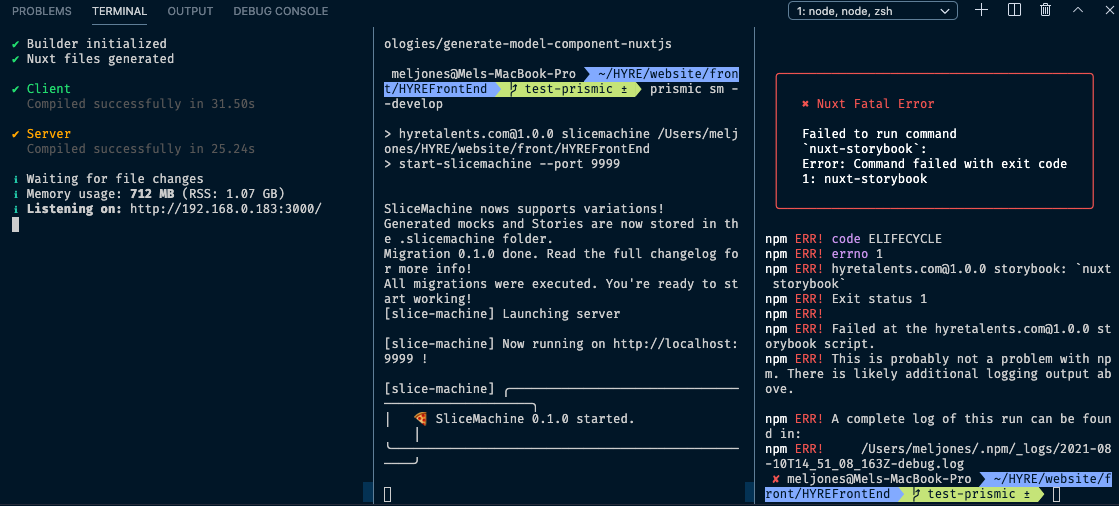
-
Version 4.1.1. is causing a fatal error so I tried rolling back the nuxt/storybook v3.3.1 again and then replacing stories with an empty array. Storybook is running, browser displays:
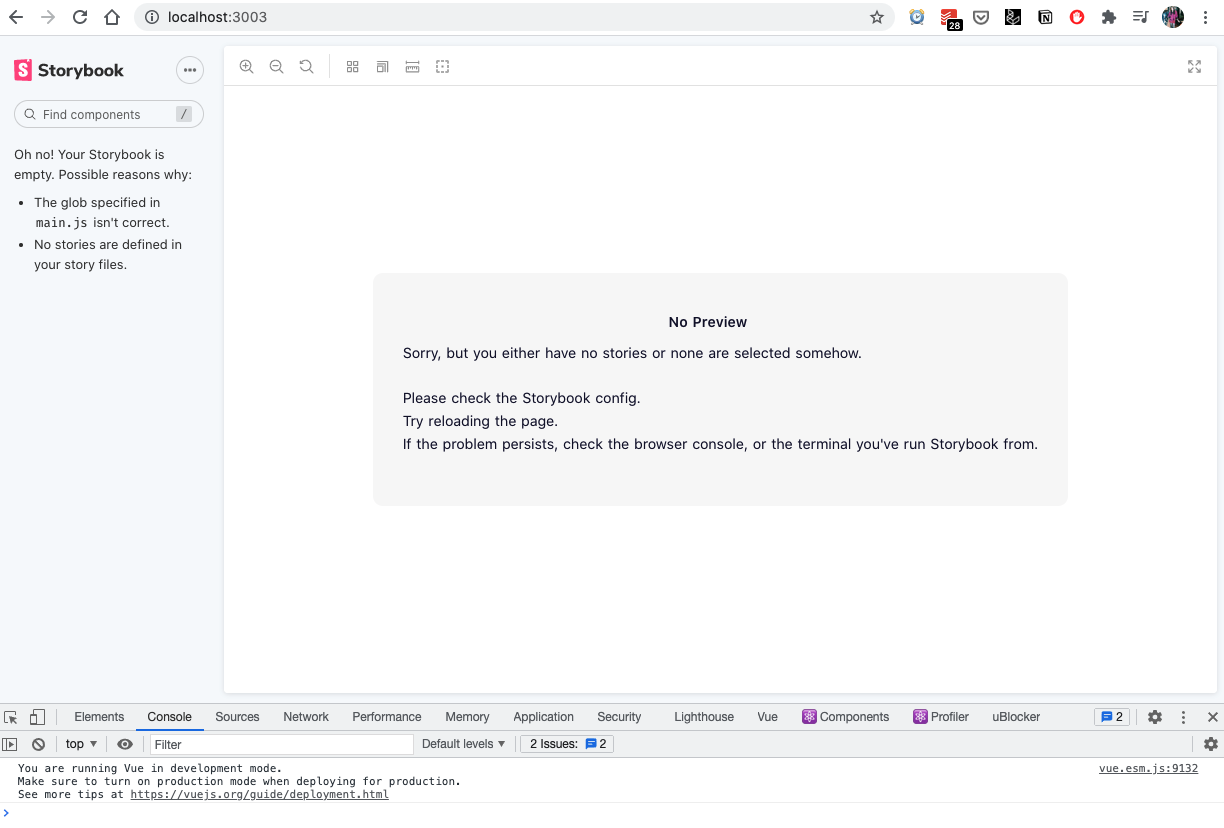
-
I can not create a new slice. On
localhost:9999/slicesthere is no button add slice on the top right. Is there another way? Not sure what I should try next!? I will keep playing :)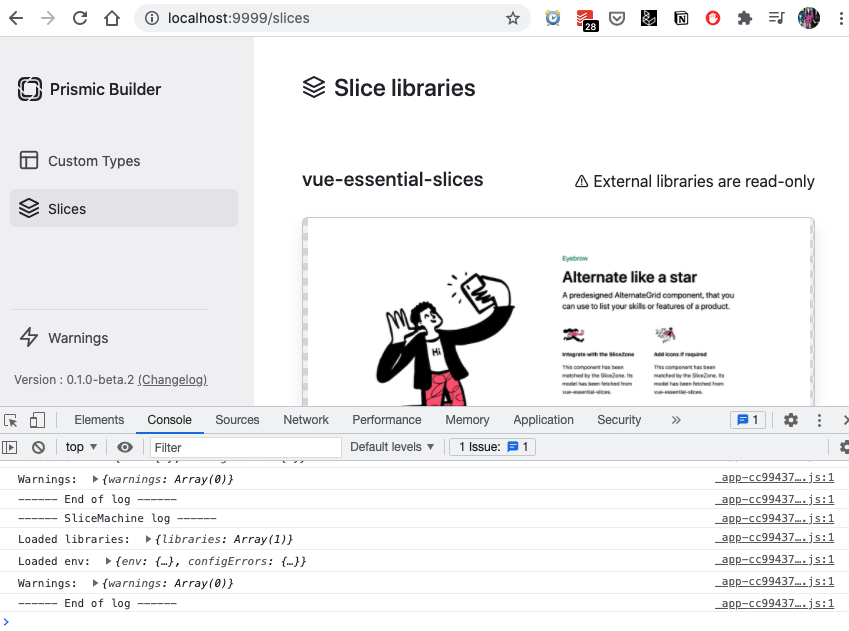
Cheers! ✨
cannot get it working either :/ any updates on this?
edit:
well, I made this step but then prismic sm --add-storybook overwrites it again, looks like that's breaking things
I changed it back to the example code from the link and it worked
but now I have that error as well: https://community.prismic.io/t/slice-machine-in-next-js-example-using-wsl2-windows/5360
and cannot get it away, it breaks when saving a slice

okay, got it running, gonna leave my insights here, probably for my future self 😅
- follow this: https://prismic.io/docs/technologies/setup-a-prismic-project-nuxtjs, it works perfectly fine until step 3
- in step 3, paste the code, except following lines (they are being generated by adding storybook (in a wrong way, but more later))
import { getStoriesPaths } from "slice-machine-ui/helpers/storybook";
...
  storybook: {
    // This is a bug with `getStoriesPaths` and Nuxt that is awaiting to be fixed
    stories: [...getStoriesPaths().map(path => path.replace("../", "~/"))]
  },
  // This is a bug with `getStoriesPaths` and Nuxt that is awaiting to be fixed
  ignore: [...getStoriesPaths().map(path => path.replace("../", "~/"))],
- continue adding storybook as in the docs
- before starting storybook, add/overwrite following now in the nuxt.config.js (the command only adds [...getStoriesPath()])
  storybook: {
    stories: [...getStoriesPaths().map(path => path.replace("../", "~/"))]
  },
- then I had to install [email protected] and because I wanted to use typescript ts-node, so
yarn add -D [email protected] ts-node - finally, when all was running, in the slicemachine command I ran into the following error (using wsl2): https://community.prismic.io/t/slice-machine-in-next-js-example-using-wsl2-windows/5360 https://community.prismic.io/t/slice-machine-error-while-taking-screenshot/6059 and the solution for this was a missing library on my wsl2: https://github.com/actions/virtual-environments/issues/732#issuecomment-614809415
- I needed to save one slice, and only then could (re)start storybook, so it could resolve things correctly and show all the (new) slices in real time
Hey there, I'm really sorry for the lack of support we were able to provide here.
However, I'm glad you got it working @jankohlbach!
In the really near future (like the end of the current sprint), Slice Machine will move away from Storybook for another technology that has proved much simpler to use, setup, and integrate. This will hopefully solve that kind of issue for good while also providing a better developer experience :)
Storybook fan? We are too! And no worries you will still be able to use Storybook alongside Slice Machine, it will just not be part of the core product anymore~
interesting, excited for what you've decided, really like the approach with slice machine

Sure! Slice Machine 0.2.0 was actually released yesterday: https://prismic.io/blog/improve-developer-experience-slice-machine
Let us know how the upgrade goes :relaxed: