

 prisma
Prisma CLI is trying to use cloud authentication for a certain local URL
Describe the bug Prisma CLI is parsing regular local private URLs as cloud workspace URLs with the following error if you are logged in. When you are logged out it is just asking you to login:
-
Logged In
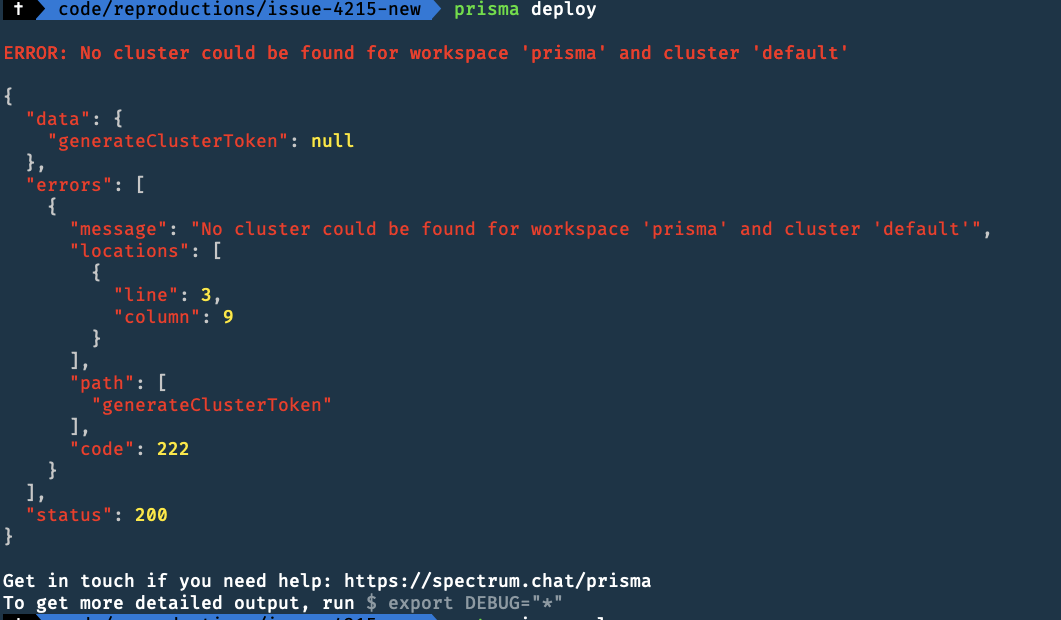
-
Logged Out

To Reproduce Try to deploy the prisma.yml in the following repository: https://github.com/pantharshit00/prisma-issue-4215
Expected behavior It should be parsed as a local URL and should not trigger cloud authentication flow.
Versions (please complete the following information):
- Connector: Postgres
- Prisma Server: 1.32.0
prismaCLI: prisma/1.32.0 (darwin-x64) node-v10.15.1- OS: MacOS 10.14.3 Mojave
cc @kshenes

@pantharshit00 Thanks for the reproduction.
Is this server protected by a management secret? Maybe you can also add your docker-compose to the reproduction. In my understanding:
- This should only be observed for protected servers.
- Adding
PRISMA_MANAGEMENT_API_SECRETon protected servers should also fix this?
Can you please confirm these two points?

The server is not protected by managementApi Secret.
Adding PRISMA_MANAGEMENT_API_SECRET on protected servers should also fix this?
No, it doesn't fix this

@kshenes
We did more digging.
Your server is not protected by a management API secret.
Right now we are somehow trying to fetch it from prisma cloud so that is why it is erroring out as we cannot find this server.
So as a workaround add an environment variable PRISMA_MANAGEMENT_API_SECRET= so that we skip that step.
To confirm, we were not using a management secret when running version 1.27.3 and all was good. When we moved to 1.31 we ran into this issue. Adding a management secret did allow "prisma deploy" to work as it did with versionn 1.27.3

I'm having a similar issue with a fargate + aurora postgres setup (v1.32 cli and server, with a management secret). Prisma deploy doesn't work, but if I connect the server to a prisma cloud it works perfectly. Anything I can do to contribute ?

@Hebilicious
You can provide your prisma endpoint so that we can add it to the unit tests.
@pantharshit00 The url looks like that : http://dev-i-publi-xxxxxxxxxx-xxxxxxxx.eu-west-1.elb.amazonaws.com/XXXXX/xxx
Do you need more information ? I assume it's a CLI parsing issue? https://github.com/prisma/prisma/issues/4215
Yes, it is the parsing issue but it is very limited now(only happening for unprotected servers). That is why I opened a new issue. We don't want to notify around 20~ each time for an issue they are not facing any more
The server is definitely protected by the secret though, here's the prisma.yml
endpoint: http://dev-i-publi-xxxxxxxxxx-000000000.eu-west-1.elb.amazonaws.com/Appname/stage
datamodel: datamodel.prisma
secret: XxxxxXxxxxxxxXxxxxXXxx
generate:
    - generator: typescript-client
      output: ./generated/prisma-client/

seed:
    run: yarn seed
@pantharshit00 I am currently experiencing the same problem as @Hebilicious described. I have deployed a custom server protected by secret. When i try to run prisma deploy against to it, it shows:
 ERROR: Invalid signature

{
  "data": {
    "addProject": null
  },
  "errors": [
    {
      "locations": [
        {
          "line": 2,
          "column": 9
        }
      ],
      "path": [
        "addProject"
      ],
      "code": 3015,
      "message": "Invalid signature",
      "requestId": "local:cjv868laz011q095006rypfau"
    }
  ],
  "status": 200
}
I just created a prisma server on aws with cloudformation, and everything is empty for now. So, the request i sent to my custom server is not associated with any Authorization header. I think the question would be navigated to how to find or generate an Authorization token for the newly created prisma server.
I am using 1.32 prisma server docker image

@Hebilicious
I was not talking about the service secret. I was talking about the management API secret(documented here https://www.prisma.io/docs/faq/service-secret-vs-management-api-secret-fq01/). It can override your service secret and it is the one that is consumed while deploying.
@liyucun I also assume you are using service secret instead of management api secret.
@pantharshit00 I am using PRISMA_MANAGEMENT_API_SECRET=*** prisma deploy to run it with the correct secret. Pretty strange here...any clues that i could try to debug. I even tried to use the graphql ui to access it directly, but still give me the same errors
The error clearly says your secret is wrong, try resetting it by changing managementApiSecret in PRISMA_CONFIG
Running into this issue with both CLI and server @1.33 when protected by a PRISMA_MANAGEMENT_API_SECRET. It happens pretty randomly (sometimes it does, sometimes it doesn't) even when exporting or prepending the PRISMA_MANAGEMENT_API_SECRET variable -it is correct.
Happens with either PRISMA_MANAGEMENT_API_SECRET=*** prisma deploy and:
$ export PRISMA_MANAGEMENT_API_SECRET=***
$ prisma deploy

We also stumbled across the issue of prisma deploy prompting to login to prisma cloud even though service is local and not connected to cloud. For us the reason was simply that the docker images and / or machine was not running. After running docker-machine start default and docker-compose up -d the command prisma deploy again deployed the service to the local server running in the image rather than prompting to login to the cloud.

I am also getting this error now with use of prisma 1.34.0 and prisma deploy from an aws ec2 instance talking to the fargate instance.
ERROR: No cluster could be found for workspace '*' and cluster 'default'

{
  "data": {
    "generateClusterToken": null
  },
  "errors": [
    {
      "message": "No cluster could be found for workspace '*' and cluster 'default'",
      "locations": [
        {
          "line": 3,
          "column": 9
        }
      ],
      "path": [
        "generateClusterToken"
      ],
      "code": 222
    }
  ],
  "status": 200
}
@pantharshit00


For me PRISMA_MANAGEMENT_API_SECRET=*** prisma deploy worked as suggested by @divyenduz and @pantharshit00
