
react
 react copied to clipboard
 primer
Components do not update with programmatic changes in theme
Describe the bug
We use <ActionMenu> in a couple of places on docs.github.com and they get the wrong theme applied to them.
In this screenshot you can see it twice. Once inside the modal (upper right-hand) and behind the modal too, where it has an action menu for "TYPE" and "TOPIC".

On docs.github.com we use auto as the default theme on the server-side generated HTML. Then, after the page has loaded we use useEffect to correct the theme preference based on a cookie (Cookies.get('color_mode')).
To reproduce it I think you need an OS that prefers dark, but override your settings on github.com to light.
Visit: https://docs.github.com/en/issues/guides
Incidentally, when I test in my Firefox (where I currently don't have a cookie that prefers light mode) this rather odd behavior happens (when I refresh and refresh and refresh the page):
https://user-images.githubusercontent.com/26739/184646968-a77715df-d395-491a-8e9e-7857d212f2d7.mov
The two ActionMenu buttons this time starts out in light mode and then later become dark.
To Reproduce Steps to reproduce the behavior:
- Set your OS to prefer dark
- Go to https://github.com/settings/appearance and select that you prefer one of the light themes
- Visit https://docs.github.com/en/issues/guides
- See error
Expected behavior
That the "TYPE" and "TOPIC" buttons appear in light mode. Like they do on the documentation:

Screenshots
See above.
Desktop (please complete the following information):
- OS: macOS
- Browser Chrome
- Version latest stable
Additional context
On docs.github.com we use:
    "@primer/css": "^20.2.4",
    "@primer/octicons": "17.3.0",
    "@primer/octicons-react": "17.3.0",
    "@primer/react": "^35.2.2",
(from our package.json)

Hi!
I was able to reproduce with OS settings say Dark and github settings say Light. Added to primer/react inbox to triage what's causing it

For what it's worth, ActionMenu isn't the only component that is buggy when the theme changes at render-time.
It's also the Flash component.
You can see an example of that here: https://github.com/github/docs-engineering/issues/2110
So now, there are 2 seemingly related bugs that exhibit the same apparent problem. These affect every GitHub Docs user that uses a theme that might conflict with their OS default.
Relevant: https://github.com/github/docs-engineering/issues/2110#issuecomment-1228940095
@siddharthkp Any news on this? We see reports of this trickling in from other people who have a OS theme that doesn't match their GitHub theme.
Hi @peterbe, thanks for your patience. We haven't heard reports of this outside of the docs. Can you give us a sense of how many user reports you've received about this recently?
In the meantime, I'll move this back to our project board's inbox to review/prioritize again with the team.

We reviewed this during our weekly triage and we moved it to unprioritized backlog. It's on our radar, but since it's not breaking the experience, we're going to de-prioritize and pick this up when we have the resourcing.

Is this what is causing unreadable "in this article" sidebar in the github docs?
If I force reload the page, it briefly flashes with dark background, but the goes to light mode.
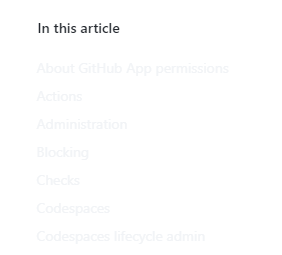

@xPaw Yes. The way we use Primer is that we can't know what cookie the user might have until after they have received the shared HTML + JS + CSS from the CDN. So everyone gets the default theme. Once the client-side rendering kicks in, we can reach the (browser) cookie and change the theme. See https://github.com/github/docs-internal/blob/49671e7d73806cfe1127c53015097e3df1fc9820/components/hooks/useTheme.ts#L101
What what I understand it means that in _app.tsx these lines are execute 3 times:
  const { theme } = useTheme()
  ...
  <ThemeProvider
          colorMode={theme.component.colorMode}
          dayScheme={theme.component.dayScheme}
          nightScheme={theme.component.nightScheme}
          preventSSRMismatch
        >
- First in Node on the SSR render
- Initial hydration in the client
- After the
useEffecthooks have run
It seems only certain components are capable of "changing" their mind between the 2nd and the 3rd render cycle.
Another Hubber report: https://github.com/github/docs-engineering/issues/2745
Another hubber-reported bug report https://github.com/github/docs-engineering/issues/2756
This is still on our radar in the backlog. Thanks for continuing to report examples you find!
This is still on our radar in the backlog. Thanks for continuing to report examples you find!
Thanks for that update. I felt a bit bad about piling on more examples as it might feel annoying. But we're also housekeeping dupes by linking to this on our end :)
We're now using TreeView for the sidebar on docs.github.com (which looks amazing 😍 thanks for the awesome component!), but it means that users whose themes don't match have a very grey page 🙃 Here are some examples in our feedback discussion.
Please let us know if these examples aren't helpful! We totally understand that this work is on your backlog and don't at all intend to just be piling on 💛

This might be related to using the TreeView component. I'm one of the folks with mismatched-themes affected by this and I've recently been really struggling to see the contents of the side bar, the low contrast is causing me to squint!
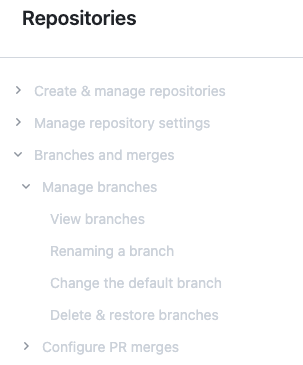
Edit: Has this changed again? The text seems even brighter now:
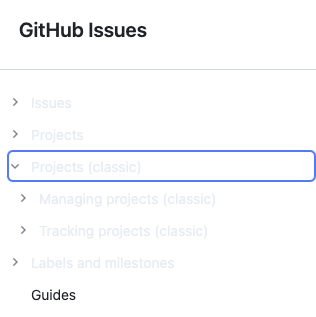

This might be related to using the TreeView component. I'm one of the folks with mismatched-themes affected by this and I've recently been really struggling to see the contents of the side bar, the low contrast is causing me to squint!
Edit: Has this changed again? The text seems even brighter now:
I can confirm that the problem has gotten worse. I encountered it on this page today. https://docs.github.com/en/get-started/quickstart/hello-world
The "in this article" component has the same problem.

Thanks @lesliecdubs - given the impact on the tree view this is definitely becoming a much higher priority issue for us. While it doesn't totally break the experience, it does make docs very hard to use for the small percentage of our user base that has that configuration of themes. Appreciate you bringing it back into the backlog.
