
prettier-vscode
 prettier-vscode copied to clipboard
 prettier
please provide option to remove the status bar item
Is your feature request related to a problem? Please describe.
The Prettier status bar item takes up a lot of space and provides me no utility, since I don't care what the current formatting state is, because I can trivially trigger a reformat using my key binding for editor.action.formatDocument. Instead, because it takes up so much space on the task bar, it means there isn't enough space to put something there which is actually useful to me - a Git Blame item that contains the first 50 characters of the currently-highlighted line's commit. It seems in #438 users are split between those who think this is useful (presumably because they don't have anything else more important that would go in their status line) and those for whom it is blocking their other workflows. I am from the latter group.
Describe the solution you'd like Please provide a simple option to hide the status bar indicator completely.
Describe alternatives you've considered I could maximize my window at all times, but this is inconvenient in certain situations when multiple windows are open. Or I could remove several other extensions that take up a lot of space on the status bar (e.g. AmVim plugin). But things like AmVim plugin and Git Blame are specifically showing information about the current action, so they are always useful at all times. Prettier at most just displays some general information about the open file, and uses up more horizontal space than similarly general status bar items located on the right (spacing, encoding, end of line sequence). Also, annoyingly, it always appears no matter what file you have open - even when it's not JavaScript and thus can never be formatted using Prettier anyway.
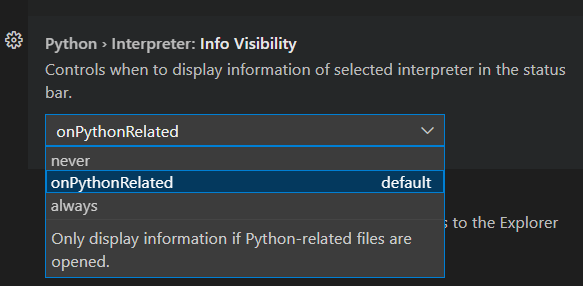
Additional context Please consider looking at how Python extension does this, allowing the user to choose whether the status bar item should never appear, only appear for Python files, or appear for all files.


Thanks for that! I didn't realize you could hide these things manually through the UI. It's a bit annoying it can't seem to be configured in a file anywhere so every computer I work on I need to do it again, but this will solve my problem for now. Feel free to close the ticket if there is no interest in having a dynamic show/hide functionality based on open filetype.
This issue has been automatically locked since there has not been any recent activity after it was closed. Please open a new issue for related bugs.
![github-actions[bot] avatar](https://avatars.githubusercontent.com/in/15368?v=4 "Published by a pub.dev verified publisher")