

 prasmussen
TUTORIAL: How to get rid of 403 Errors
How to get rid of 403 errors
Many people get Errors like
Failed to get file: googleapi: Error 403: Rate Limit Exceeded, rateLimitExceeded
and thanks to LINKIWI https://github.com/prasmussen/gdrive/issues/392#issuecomment-423048518 I found a way to fix it properly.
What causes the problem?
The developer made one API for this program and an Google API can "only" make 10 million requests at a day. That means that too many people use this program and the requests gets full.
How much does an own API cost?
Nothing, Google made them free for everyone.
How do I fix it then?
You have to make an own API, download the programing language go, change the API to your own one and compile it to an .exe. (And btw. binary editing resulted in errors)
And now step by step:
-
Download "go" for your platform from https://golang.org/dl/ and install it following the instructions for your platform here and download Git from https://git-scm.com/downloads and install it with standard settings
-
Download the repository as .zip from GitHub and unzip it in a new folder or simply execute
git clone https://github.com/gdrive-org/gdrive.git
-
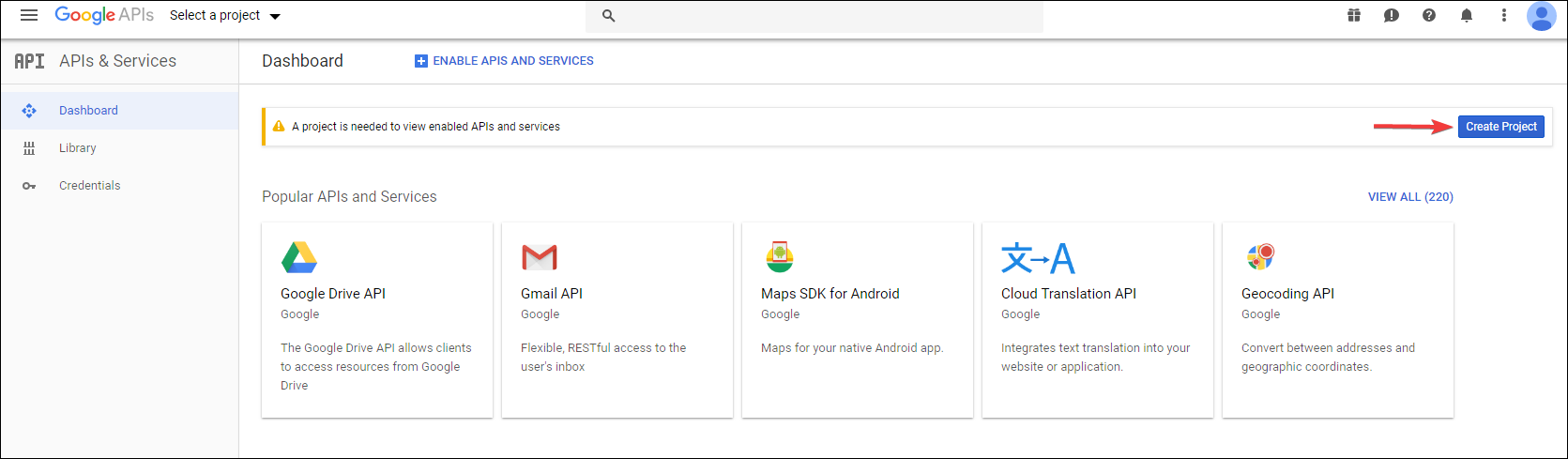
Log into your Google Account (or create one) and go to the Google Developer API Website (and if needed accept the ToS)
-
Click on "Create Project"
-
and then click "CREATE"

-
Give it a name (in my case "Google CLI TA40") and click "Create"

-
Now go to Google Drive API and click "ENABLE"

-
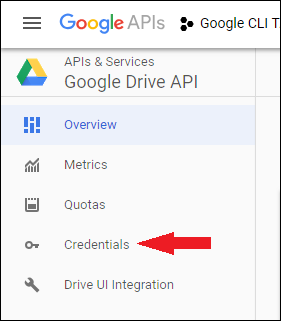
Now on the left side, click "Credentials"
-
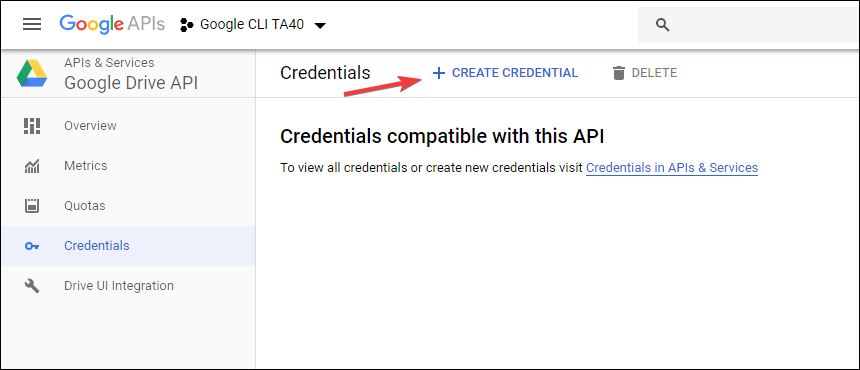
And click "CREATE CREDENTIAL"
-
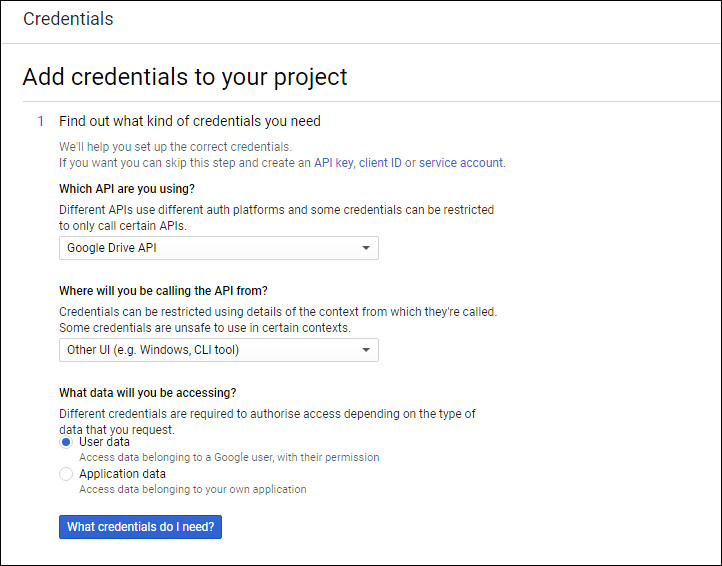
Fill the things like I did and then click on "What credentials do I need?"
-
Give it a name (I took the name of the API)
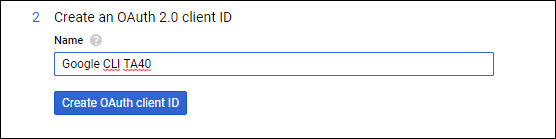
-
Next select your e-mail and then give it a name (I again took the name of the API)

-
Click on "Download" (A .json file will be downloaded)

-
Open the .json file in the editor of your choice.(Notepad++ prefered) You should see :
- "client_id" which looks like this:
81915486XXXX-XXXX22bh62ql2rbnaqtpds82od4ql976.apps.googleusercontent.com - "client_secret" which are random characters like this:
lnA7ZFg5NEGOMpFhd6e4Pqny
-
In the unzipped repository open the file names "handlers_drive.go" (via Notepad++) and change these 2 variables to the ones you got in step 14
 and save it
 -
open CMD/terminal and go to the folder where the "handerls_drive.go" is. First type this:
go get github.com/prasmussen/gdrive(thanks to mbenlioglu https://github.com/prasmussen/gdrive/issues/426#issuecomment-459046466) Now type this:go build -ldflags '-w -s'Now you should have an executable for you platform which you can use normally
You can reset your data by deleting the %appdata%\.gdrive on Windows, $HOME/.gdrive on other platforms
Cross Compiling a Linux/OS X/Windows etc. version of gdrive from your device:
If you want to compile the binary for an OS other than the one you're using you should first set GOOS and GOARCH variables for that system.
Look up your target OS here: https://golang.org/doc/install/source#environment
Now do this in terminal: On Windows:
SET GOOS=your os
SET GOARCH=your arch
On Mac OS/Linux:
export GOOS=your os
export GOARCH=your arch
then do go build -ldflags '-w -s'
Example variables if target platform is a 64 bit Linux machine:
GOOS=linux
GOARCH=amd64
Edit: Updated to cover all platforms

Thanks for the tutorial. Closes #424 and #392. Should be included to the repo imo
Also I think Client ID/Secret should be read from client_id.json directly instead of hard-coding and simply replacing that file would solve it. I might create a pull request but not sure if the repo is still maintained.

Last update was a year ago, so yeah, I don't think so. But this step-by-step tutorial should be fine, if anything's missing, let me know
TA40 isn't it possible to compile a linux amd64 version of this even if your doing it from golang installed on windows. Try to follow your steps and everything good so far, just need figure out the how to compile it and compile it for ubuntu 64bit, so amd64. Trying to do this from windows right now. If know if this possible and how maybe let me know and add to the guide?

I don't know how to compile it for linux etc. I can test it if you give me some type of commands but I don't know how to CrossCompile on a Windows machine
yea been trying too google it myself but yea might be better install unbutu in vmware and go from there. Like never done much compiling etc so dont realy know what im doing. Tryd follow ur steps for windows compile but yes giving me errors like this atm:
C:\Users\zibia\go\gdrive-master>go build handlers_drive.go:12:2: cannot find package "github.com/prasmussen/gdrive/auth" in any of: C:\Go\src\github.com\prasmussen\gdrive\auth (from $GOROOT) C:\Users\zibia\go\src\github.com\prasmussen\gdrive\auth (from $GOPATH) gdrive.go:7:2: cannot find package "github.com/prasmussen/gdrive/cli" in any of: C:\Go\src\github.com\prasmussen\gdrive\cli (from $GOROOT) C:\Users\zibia\go\src\github.com\prasmussen\gdrive\cli (from $GOPATH) compare.go:5:2: cannot find package "github.com/prasmussen/gdrive/drive" in any of: C:\Go\src\github.com\prasmussen\gdrive\drive (from $GOROOT) C:\Users\zibia\go\src\github.com\prasmussen\gdrive\drive (from $GOPATH)
After you've changed the token, running _release/build-all.sh on Linux (or bash on Windows) should build all versions defined in "PLATFORMS" variable.
2 prerequisites:
1. install go first.
2. execute $ go get github.com/prasmussen/gdrive
yea been trying too google it myself but yea might be better install unbutu in vmware and go from there. Like never done much compiling etc so dont realy know what im doing. Tryd follow ur steps for windows compile but yes giving me errors like this atm:
C:\Users\zibia\go\gdrive-master>go build handlers_drive.go:12:2: cannot find package "github.com/prasmussen/gdrive/auth" in any of: C:\Go\src\github.com\prasmussen\gdrive\auth (from $GOROOT) C:\Users\zibia\go\src\github.com\prasmussen\gdrive\auth (from $GOPATH) gdrive.go:7:2: cannot find package "github.com/prasmussen/gdrive/cli" in any of: C:\Go\src\github.com\prasmussen\gdrive\cli (from $GOROOT) C:\Users\zibia\go\src\github.com\prasmussen\gdrive\cli (from $GOPATH) compare.go:5:2: cannot find package "github.com/prasmussen/gdrive/drive" in any of: C:\Go\src\github.com\prasmussen\gdrive\drive (from $GOROOT) C:\Users\zibia\go\src\github.com\prasmussen\gdrive\drive (from $GOPATH)
execute go get github.com/prasmussen/gdrive first you should be able to build then
Okay, I found it out.
On Windows you can do SET GOOS=linux and GOARCH=amd64 and then do go build
This will create a linux executable file
You can look for your OS here: https://golang.org/doc/install/source#environment
execute
go get github.com/prasmussen/gdrivefirst you should be able to build then
will add this one to the guide, thanks
Okay so based on all this info i manged to compile a working version for my Ubuntu server. Have tested it and confirmed its using the new API info i put inn and no more 404 errors. Thanks for putting this together TA40. But yea if someone knows how code this maybe next thing would be to move the google api Credentials to a config file rather than having them hard coded like this. Would be ideal for regular users so they don't have to compile it themselves.
Nice, good to know that it's working. Anything to add to the tutorial where you had problems or so? And well, thanks to LINKIWI for finding this out https://github.com/prasmussen/gdrive/issues/392#issuecomment-423048518
Well nothing big but i installed golang first then git, newly reinstalled windows so didn't have it and you will need to restart your computer for GIT to work in golang so maybe add that. But yea besides that everything was straight forward and painless.
Yea might forgotten to do that after i installed git, know i did it after i installed golang. But yea so lovely to set it upload without any errors. You intrested in maybe working on this some more, like im no code expert but removed the hard coded api bits and get that put into a config file instead.
I myself have no idea how to do this because I don't know how golang works^^
Yea read a little up on it, but yea im in the same boat so would just be trail and error. So yea when have some time to spend i might test some see if can figure something out. Well at least this post is here and hopeful those who need it will find it. And yea by all means if anyone don't know how to get this done id be more than willing to help out and compile for someone.
For the lazy people who don't want to recompile (myself included) - How to change the API credentials in gdrive binary without recompile on Linux
NOTE - This ONLY works if the client_id and client_secret are both the same length as the ones defined originally in the gdrive binary. If they are not these lengths, this method will not work and you will have to recompile from source.
STEP 1 Generate API credentials for Google Drive (see TA40's OP here - follow steps 3-14)
STEP 2
Get the client_id and client_secret from your client_id.json file. The client_id MUST be 72 chars long and the client_secret MUST be 24 chars long. If they are not these lengths, following this method will probably break gdrive, and you will have to recompile gdrive from source instead.
Use your favourite method - I used wc to get the length
echo -n **CLIENT_ID** | wc -c
echo -n **CLIENT_SECRET** | wc -c
STEP 3
Backup your gdrive binary
cp gdrive gdrive.old
STEP 4
Edit binary in-place with sed (Replace **CLIENT_ID** and **CLIENT_SECRET** with your newly generated details from client_id.json).
sed -i -e 's/367116221053-7n0vf5akeru7on6o2fjinrecpdoe99eg.apps.googleusercontent.com/**CLIENT_ID**/g' gdrive
sed -i -e 's/1qsNodXNaWq1mQuBjUjmvhoO/**CLIENT_SECRET**/g' gdrive
STEP 4a Delete the old .gdrive/token_v2.json (Thanks leekung)
cd ~ && rm .gdrive/token_v2.json
STEP 5
Run gdrive list to confirm that it has worked. It will ask you to go through the OAuth login process again to generate a new token, but after you should have a list of files in your Google Drive.
END HOWTO
Also I think Client ID/Secret should be read from client_id.json directly instead of hard-coding and simply replacing that file would solve it. I might create a pull request but not sure if the repo is still maintained.
This would be the best way forward. There is a note in the README about the state of maintenance though:
This tool is not being actively maintained at the moment, ymmv.
Edit 2019-03-25: There are reports that these steps do not work on FreeBSD (see this comment). I only tested this on Linux. If its not working for you - follow other peoples instructions and rebuild from source.

Well if you know how to code and fix it i would be interested in this, if even just make a pull request with changes il be more then happy to compile it for all different OS. Assuming he actual cheeks this he could just put in the new stuff. Maybe have the default config use the hard coded Client ID/Secret as default so it will still work but users can then easily change it as they wish since it would be in a config file.
@mbenlioglu @scrumbee I have submitted a pull request with working external client credential support - https://github.com/prasmussen/gdrive/pull/428
Enjoy
@mbenlioglu @scrumbee I have submitted a pull request with working external client credential support - #428
Enjoy
Thanks for the effort @rohfle. Just checked it out looks nice
Looks very good thanks, just suggestion not sure if its needed or not but add to read me a example of a client_id.json config file. Just to make it clear for everyone how it should look as im sure there gone be some that has questions regarding it.
someone can fork this repo, like i did and start maintaining it, i am willing but i am new to this github.com/tripLr

I only create the CREDENTIAL(not yet build) ,everything already works fine,403 not show up again

Hi! First, It's very useful howto, thanks for your work. I go trough the steps, and everything looks fine no error message or warning. After I tested and got this message:
./gdrive-linux-x64 list Failed to list files: Get https://www.googleapis.com/drive/v3/files?alt=json&fields=nextPageToken%2Cfiles%28id%2Cname%2Cmd5Checksum%2CmimeType%2Csize%2CcreatedTime%2Cparents%29&orderBy=&pageSize=30&q=trashed+%3D+false+and+%27me%27+in+owners: oauth2: cannot fetch token: 401 Unauthorized Response: { "error": "unauthorized_client", "error_description": "Unauthorized" }
i build in windows 10 (in virtualbox) linux x64. What is wrong? Can somebody help?

For the lazy people who don't want to recompile (myself included) - How to change the API credentials in gdrive binary without recompile on Linux
You mighty king. This worked perfectly, and I'm back to my uploads after they failed for a week.

Okay so based on all this info i manged to compile a working version for my Ubuntu server. Have tested it and confirmed its using the new API info i put inn and no more 404 errors. Thanks for putting this together TA40. But yea if someone knows how code this maybe next thing would be to move the google api Credentials to a config file rather than having them hard coded like this. Would be ideal for regular users so they don't have to compile it themselves.
I have a fork, I am maintaining,
For the lazy people who don't want to recompile (myself included) - How to change the API credentials in gdrive binary without recompile on Linux
NOTE - This ONLY works if the client_id and client_secret are both the same length as the ones defined originally in the gdrive binary. If they are not these lengths, this method will not work and you will have to recompile from source.
STEP 1 Generate API credentials for Google Drive (see TA40's OP here - follow steps 3-14)
STEP 2 Get the
client_idandclient_secretfrom your client_id.json file. The client_id MUST be 72 chars long and the client_secret MUST be 24 chars long. If they are not these lengths, following this method will probably break gdrive, and you will have to recompile gdrive from source instead.Use your favourite method - I used
wcto get the lengthecho -n **CLIENT_ID** | wc -c echo -n **CLIENT_SECRET** | wc -cSTEP 3 Backup your gdrive binary
cp gdrive gdrive.oldSTEP 4 Edit binary in-place with
sed(Replace**CLIENT_ID**and**CLIENT_SECRET**with your newly generated details from client_id.json).sed -i -e 's/367116221053-7n0vf5akeru7on6o2fjinrecpdoe99eg.apps.googleusercontent.com/**CLIENT_ID**/g' gdrive sed -i -e 's/1qsNodXNaWq1mQuBjUjmvhoO/**CLIENT_SECRET**/g' gdriveSTEP 5 Run
gdrive listto confirm that it has worked. It will ask you to go through the OAuth login process again to generate a new token, but after you should have a list of files in your Google Drive.END HOWTO
Also I think Client ID/Secret should be read from client_id.json directly instead of hard-coding and simply replacing that file would solve it. I might create a pull request but not sure if the repo is still maintained.
This would be the best way forward. There is a note in the README about the state of maintenance though:
This tool is not being actively maintained at the moment, ymmv.
I have started maintaing my for of this. All code help appreciated
Okay so based on all this info i manged to compile a working version for my Ubuntu server. Have tested it and confirmed its using the new API info i put inn and no more 404 errors. Thanks for putting this together TA40. But yea if someone knows how code this maybe next thing would be to move the google api Credentials to a config file rather than having them hard coded like this. Would be ideal for regular users so they don't have to compile it themselves.
I have a fork, I am maintaining,
Active maintenance of this repo will restart soon
After I tested and got this message:
./gdrive-linux-x64 list Failed to list files: Get https://www.googleapis.com/drive/v3/files?alt=json&fields=nextPageToken%2Cfiles%28id%2Cname%2Cmd5Checksum%2CmimeType%2Csize%2CcreatedTime%2Cparents%29&orderBy=&pageSize=30&q=trashed+%3D+false+and+%27me%27+in+owners: oauth2: cannot fetch token: 401 Unauthorized Response: { "error": "unauthorized_client", "error_description": "Unauthorized" }
You need to delete your old .json from AppData.. The current credentials dont match the new build you have made. Once deleted you will be prompted in the exe.

Having to build the app with the credentials hardcoded presents a serious problem to those who want to use more than one account via gdrive. It is not reasonable to re-build the app each time with new credentials. How can we deal with this situation?
