
vue-float-menu
 vue-float-menu copied to clipboard
 prabhuignoto
Vue warn: Failed to resolve component: Menu
Thank you for this great package. I followed the code according to the example. Here's the package.json snippet
...
 "@intlify/vite-plugin-vue-i18n": "^3.2.1",
    "@mdi/js": "^5.9.55",
    "@vitejs/plugin-vue": "^1.10.1",
    "axios": "^0.21.1",
    "dayjs": "^1.10.7",
    "mdi-vue": "^3.0.7",
    "tailwindcss": "^2.2.8",
    "vite": "^2.6.14",
    "vue": "^3.2.4",
    "vue-float-menu": "^1.9.1",
    "vue-i18n": "^9.1.7",
    "vue-router": "4",
    "vue-tippy": "^6.0.0-alpha.32",
...
The following warning appears every time I click the floating button

 Do I simply ignore it or ?
Since I'm using Vitejs, I followed the guide on the following page to fix it : vueCompilerOptions on Vite 2 #1312
plugins: [
   vue({
      template: {
        compilerOptions: {
          isCustomElement: tag => tag.startsWith('float-') // float-menu
            || tag.startsWith('custom-') // my custom component
            || tag.startsWith('famous-') // my other component
        }
      }
    }),
    vueI18n({
      include: path.resolve(__dirname, './src/locales/**'),
    }),
  ],
And the result, the floating button can't be clicked at all. Any help given will be greatly appreciated. Thanks

@young-altair thanks for reporting the issue. can you please share a link to the repo or a sandbox where i can reproduce this issue

The log points to this line in vue-float-menu.es.js
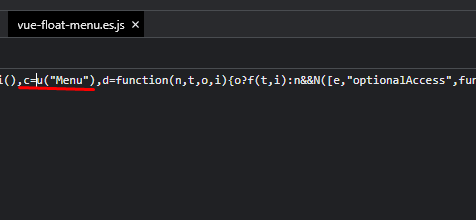 I managed to get rid of the warning message by adding this line to main.js. But I don't think this is right to do.
 The repo code will follow
Let me know if you can't access the following link: https://stackblitz.com/edit/vitejs-vite-mguyro?file=src%2Fcomponents%2FHelloWorld.vue&terminal=dev
Let me know if you can't access the following link: https://stackblitz.com/edit/vitejs-vite-mguyro?file=src%2Fcomponents%2FHelloWorld.vue&terminal=dev
