
osu-stable-issues
 osu-stable-issues copied to clipboard
 ppy
ppy
Cutting edge tournament client stutters heavily with halftime mod
To preface, I want to acknowledge the fact that tournament client performance issues are listed as an example of an invalid report. However, this feels more severe than a performance issue and is likely a bug.
Broadcasting maps played with halftime (HT) using the cutting edge tournament client is very, very stuttery and is borderline unwatchable. Tournament organizers who wish to provide high quality broadcasts while also including non-standard mappools (HT pools) are affected by this issue with the only feasible workaround being to create "rate edits" of maps to mimic HT while the maps are played without any mods. It is my understanding that the stable tournament client is not affected by this problem.
To reproduce, load the cutting edge tournament client and spectate a lobby where a map is played back with HT.
It would be fantastic to find a resolution for this issue without the need for workarounds and I believe it is of great importance to the tournament community.
Here are some videos demonstrating this issue.
French Sightread Tournament HT Map: ~~https://www.twitch.tv/videos/1514821026?t=01h01m36s~~ - VOD is unavailable as of Aug 13 2022.
https://user-images.githubusercontent.com/38370573/177459466-fdf48ac8-5912-4f75-b1e8-377df2abd326.mp4
https://user-images.githubusercontent.com/38370573/177459477-676cd416-ca2f-4583-8999-3755e3077237.mp4
https://user-images.githubusercontent.com/38370573/177459489-d824f506-710a-40e9-9d66-8dd5471eb774.mp4
Changelog:
- Edited paragraph 3 to reflect that the cutting edge client specifically needs to be run in order to reproduce. (15:13UTC July 6 2022)

other notable "workaround" to this problem is spamming the shit out of the sync music button while its playing, somehow that makes it way less stuttery and kinda watchable again. No idea why this works, I just know that for whatever weird reason that seems to work, maybe that might provide a hint as to what the underlying problem could be

This may be too difficult to fix, but let’s try.
I’ve added some logging in the next cutting edge build. I’m seeing some different results locally, so after you repro the issue copy out the tournament.log file from the logs folder and paste it here.

Okay @smoogipoo - just managed to get a test done and the logs seem to be very telling. Here is some context:
- Multiplayer lobby simulating a 3v3 setup for the tourney client (tourney client was configured for a 3v3), with two players. One on each team.
- Red player in slot 1, Blue in slot 4
- The same map as the above videos was played through in full, with the halftime mod.
- Here is a link to the lobby
Logs are attached below. tournament.log
A few changes have arrived into Cutting Edge, please test and see how it behaves, and provide new logs.
In short - I changed the main buffering flow to fix a few edge cases (should be mostly irrelevant but check that the client doesn't randomly break), and changed the seeks most relevant from the log above to only occur every 5 sec.
These changes appear to have greatly improved the halftime performance. I ran the same test again, this time with 6 players. Attached is a full (very compressed) recording of the gameplay and fresh logs. If you would like the source quality for the recording, let me know and I'll provide that. If you would like me to run more tests with other songs, I can do that as well.
One note from the recording, the player putinhagever (slot 1) experienced a weird issue where the failing shader provided a green tint instead of a red one, which is something I've never seen before. The "shaders" option is on. You can see that their tint is different than AlexDaisuke's in the screenshot below. Game playback starts at 1:00 in the recording.
Logs:
Media:
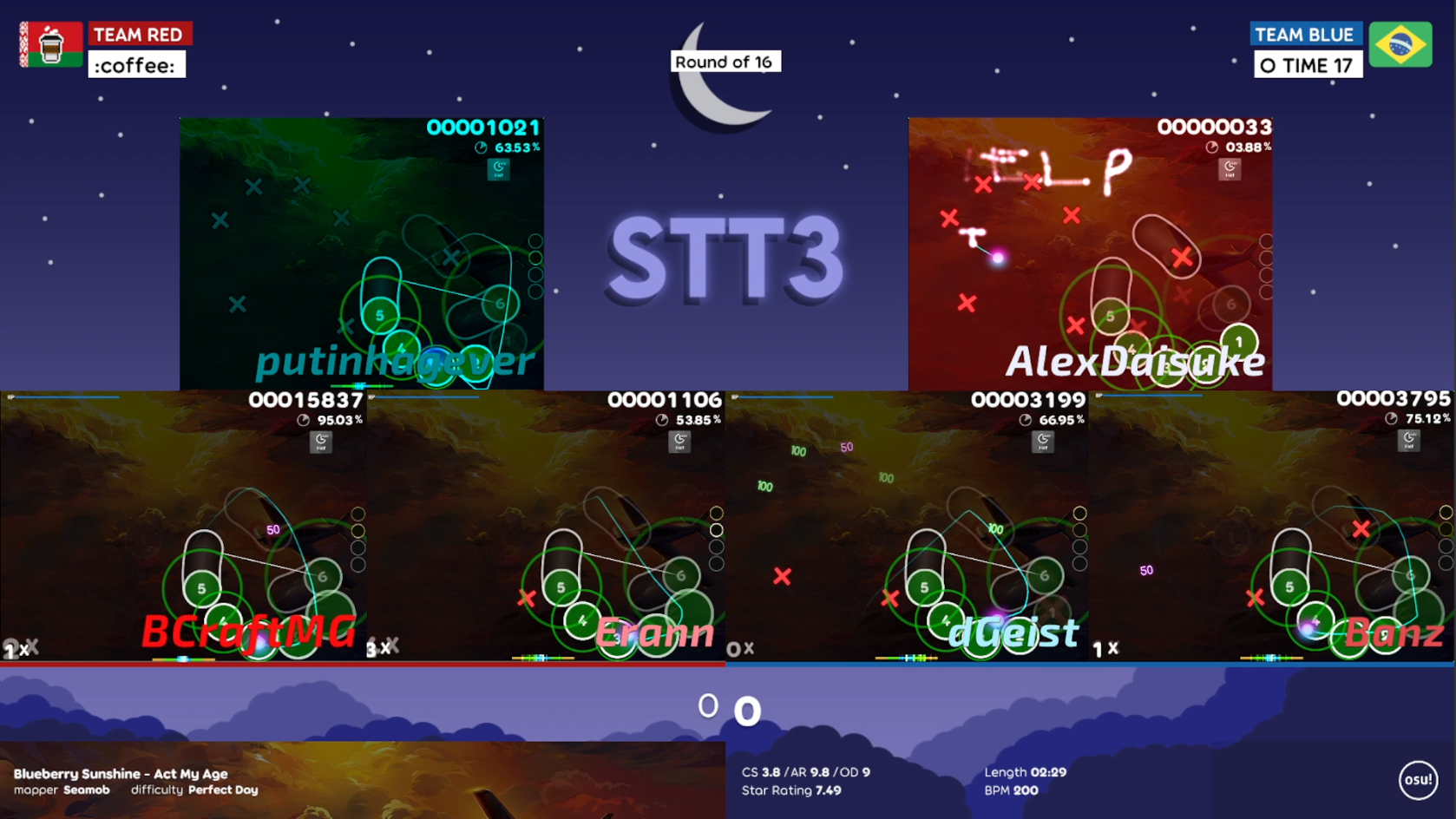
https://user-images.githubusercontent.com/38370573/178727618-a3041607-7c6b-4832-b86e-61395bc27203.mp4
Awesome, thanks for testing. The log still looks very bad to me, but at least it's usable enough?
I'll keep this in the back of my mind and may touch upon it again during the weekend, but I'll deprioritise for the time being.
I'm going to pretend I didn't see that shader issue, it's unrelated to these changes (and any changes in the last 6+ years) and won't investigate :stuck_out_tongue:
Haha all good. Yes it's certainly watchable now. Thank you so much for your work on this - I speak on behalf of the entire tournament community when I say we deeply appreciate endeavors made to resolve these sorts of issues.
My tournament's streaming staff have noticed a few "desync" related issues with the client this weekend after this update. I could best describe this as some noticeable stuttering increases where it seems the tournament client manager is having a harder time syncing all of the clients than normal. Halftime performance appears nominal as expected.
Here is a Twitch highlight made by my staff: https://www.twitch.tv/videos/1533588379?t=00h01m03s | I think the main note is the amount of times the client pauses to resync. I do not think the individual player POVs dropping in / out has much to do with the syncing issue in question.
In any case, I figured I would mention it here in case this is diagnosable. The map in question was played starting at 12:46:04UTC. If my intuition serves me right, this should be line 1318 in the log.
Log:
The changes made to the client have been reverted today, so I'll close this as an issue that can't or won't be resolved for now.
It's fine to keep this open to track the issue. There's no guarantee it will be fixed, but we're fine to keep this open just to track that it hasn't been fixed yet.
