

 powertab
Extend number of built in filters to include all existing instruments in a Tab
Description I would like to be able to visualize only one instrument at a time. For instance, I only want to see the tabs for the lead guitar, but listen to all instruments. I was able to do this by creating a filter. But there should be built in filters for every specific instrument/name.
Additional context
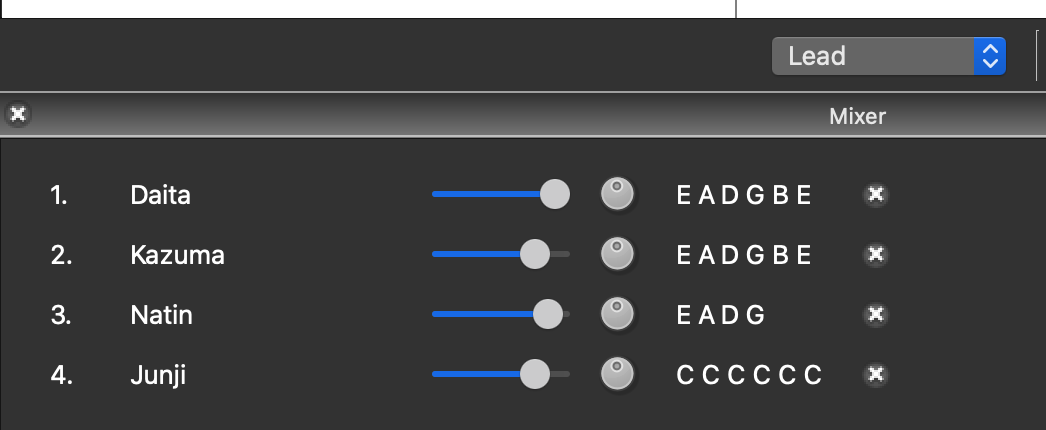
Here I created the filter lead to only show Daita Lead Guitar. This should be a provided filter IMO. There should be a way to hide all tabs except one. I'm trying to learn daita´s lead guitar, so I don't want to see the other guitar tabs. Something like: For instrument in Instruments filter.create(instrument)
PS: The project looks great, If you give me indications maybe I can do it.

Thanks! I think this would be a very good idea
There are a couple approaches we could take here:
- One would be to create an actual filter for each player (set up when importing from another file format or adding a player interactively in the UI), and then keep these up to date as players are renamed or renamed. These filters would be saved in the file etc and could be edited in the view filter dialog
- The other approach would be to have this exist entirely in the UI layer. The menu could present an extra list of the player names, and create a temporary filter that's used just for rendering the score. This avoids some of the extra bookkeeping for updating the filters when changes to the players occur, but it might be unexpected that those filters can't show up in the edit view filters dialog etc?

Hi benjamimo1, could you please describe how you added the filter to see just the lead guitar tabs? I would need the exact same. Cheers!

If you go to the menu item Player -> Edit View Filters, press the + button to create a new filter. The new filter should be populated with a single filter rule of Player Name matches (empty), so just fill in the name of the player (e.g. Lead Guitar 1). The name can also be a regex pattern like Lead.* if you need to do something more complex
After finishing the dialog, change to the new filter using the menu below the score, which probably is set to All Instruments by default
I just started using Power Tab Editor and one of the first things I tried to do was to change the view to only show a single instrument. I eventually figured out how to do it by adding filters for the corresponding instruments myself, but it would make sense if the app could support it out-of-the-box.
The other approach would be to have this exist entirely in the UI layer. The menu could present an extra list of the player names, and create a temporary filter that's used just for rendering the score.
This sounds like a sensible approach IMO.
This avoids some of the extra bookkeeping for updating the filters when changes to the players occur, but it might be unexpected that those filters can't show up in the edit view filters dialog etc?
Perhaps a good way around this is to create sections in the view filter dropdown? Something like this:
--- Instruments ---
Instrument 1
Instrument 2
etc
--- Filters ---
All instruments
Guitars
Basses
To me that would clearly indicate which views are filters that can be edited, and which views are not.
