

 potree
How to use poteree in Vue


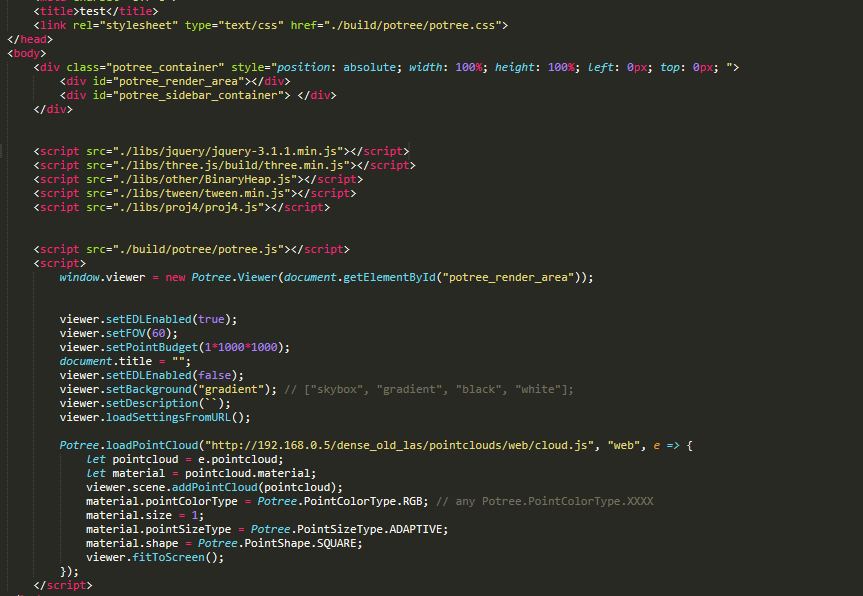
@wh123660 Do you mean you want to use the module system in Vue to import Potree?
I am not sure Potree supports ES6 module import in the current version. You can just use in the vanilla JS way which is same as what you are showing above. But you might not able to use bundling features like tree-shaking, uglify, etc
Try this project which is wrapping Potree core in Typescript https://github.com/pnext/three-loader


没有,直接换路线了,换成用threejs加载pcd了。。好集成。。
------------------ 原始邮件 ------------------ 发件人: "notifications"<[email protected]>; 发送时间: 2020年6月9日(星期二) 下午4:23 收件人: "potree/potree"<[email protected]>; 抄送: "胡大本事@"<[email protected]>; "Comment"<[email protected]>; 主题: Re: [potree/potree] How to use poteree in Vue (#746)
你好,现在可以在vue中使用了么?
— You are receiving this because you commented. Reply to this email directly, view it on GitHub, or unsubscribe.
没有,直接换路线了,换成用threejs加载pcd了。。好集成。。 … ------------------ 原始邮件 ------------------ 发件人: "notifications"<[email protected]>; 发送时间: 2020年6月9日(星期二) 下午4:23 收件人: "potree/potree"<[email protected]>; 抄送: "胡大本事@"<[email protected]>; "Comment"<[email protected]>; 主题: Re: [potree/potree] How to use poteree in Vue (#746) 你好,现在可以在vue中使用了么? — You are receiving this because you commented. Reply to this email directly, view it on GitHub, or unsubscribe.
好的 谢谢

yes, I can use potree to load pointcloud data at vue. But before reading the pointcloud data the Potree.Viewer must be loaded once, otherwise only a part of pointcloud data can be read. And the URL problem, I want to load local pointcloud data but I can't get local HTTP URL by vuetify.
loadPointCloud() { const url = '../dst/ept.json'
if (window.Potree) { console.log('Potree is available, trying to load point cloud')
try {
  window.Potree.loadPointCloud(url, 'dst', e => {
    const pointCloud = e.pointcloud
    console.log('pointCloud Babylon1', pointCloud)
    const viewer = new window.Potree.Viewer(document.getElementById('babylon-container')) // open viewer

    // document.getElementById('babylon-container').style.position = 'absolute'
    // document.getElementById('babylon-container').style.top = '-10000px'

    viewer.scene.addPointCloud(pointCloud)
    viewer.fitToScreen()

    setTimeout(() => {
      console.log('visibleNodes', pointCloud.visibleNodes)
      this.addToBabylonScene(pointCloud)


      document.getElementById('babylon-container').style.display = 'none'  // close viewer
    }, 2000)
  }, error => {
    console.error('Error loading point cloud:', error)
  }, {
    type: 'laszip'
  })
} catch (error) {
  console.error('Failed to initialize Potree Viewer or load point cloud:', error)
}
} else { console.error('Potree is not available') } },

yes, I can use potree to load pointcloud data at vue. But before reading the pointcloud data the Potree.Viewer must be loaded once, otherwise only a part of pointcloud data can be read. And the URL problem, I want to load local pointcloud data but I can't get local HTTP URL by vuetify.
loadPointCloud() { const url = '../dst/ept.json'
if (window.Potree) { console.log('Potree is available, trying to load point cloud')
try {
  window.Potree.loadPointCloud(url, 'dst', e => {
    const pointCloud = e.pointcloud
    console.log('pointCloud Babylon1', pointCloud)
    const viewer = new window.Potree.Viewer(document.getElementById('babylon-container')) // open viewer

    // document.getElementById('babylon-container').style.position = 'absolute'
    // document.getElementById('babylon-container').style.top = '-10000px'

    viewer.scene.addPointCloud(pointCloud)
    viewer.fitToScreen()

    setTimeout(() => {
      console.log('visibleNodes', pointCloud.visibleNodes)
      this.addToBabylonScene(pointCloud)


      document.getElementById('babylon-container').style.display = 'none'  // close viewer
    }, 2000)
  }, error => {
    console.error('Error loading point cloud:', error)
  }, {
    type: 'laszip'
  })
} catch (error) {
  console.error('Failed to initialize Potree Viewer or load point cloud:', error)
}
} else { console.error('Potree is not available') } },
I don't understand what you mean by your first question, your code seems to have no problems. On the second question,try to put local files in the public directory
yes, I can use potree to load pointcloud data at vue. But before reading the pointcloud data the Potree.Viewer must be loaded once, otherwise only a part of pointcloud data can be read. And the URL problem, I want to load local pointcloud data but I can't get local HTTP URL by vuetify. loadPointCloud() { const url = '../dst/ept.json' if (window.Potree) { console.log('Potree is available, trying to load point cloud')
try {
  window.Potree.loadPointCloud(url, 'dst', e => {
    const pointCloud = e.pointcloud
    console.log('pointCloud Babylon1', pointCloud)
    const viewer = new window.Potree.Viewer(document.getElementById('babylon-container')) // open viewer

    // document.getElementById('babylon-container').style.position = 'absolute'
    // document.getElementById('babylon-container').style.top = '-10000px'

    viewer.scene.addPointCloud(pointCloud)
    viewer.fitToScreen()

    setTimeout(() => {
      console.log('visibleNodes', pointCloud.visibleNodes)
      this.addToBabylonScene(pointCloud)


      document.getElementById('babylon-container').style.display = 'none'  // close viewer
    }, 2000)
  }, error => {
    console.error('Error loading point cloud:', error)
  }, {
    type: 'laszip'
  })
} catch (error) {
  console.error('Failed to initialize Potree Viewer or load point cloud:', error)
}
} else { console.error('Potree is not available') } },
I don't understand what you mean by your first question, your code seems to have no problems. On the second question,try to put local files in the public directory
On the first question, I want to get the pointcloud data from [const pointCloud = e.pointcloud], at this moment, pointCloud output only around 6000 point, no matter how long did i delay. only after opening potree viewer, I can get the whole point(around 600000).
Second question, I want to load pointcloud data from local file on Browser. How can I get HTTP URL.
yes, I can use potree to load pointcloud data at vue. But before reading the pointcloud data the Potree.Viewer must be loaded once, otherwise only a part of pointcloud data can be read. And the URL problem, I want to load local pointcloud data but I can't get local HTTP URL by vuetify. loadPointCloud() { const url = '../dst/ept.json' if (window.Potree) { console.log('Potree is available, trying to load point cloud')
try {
  window.Potree.loadPointCloud(url, 'dst', e => {
    const pointCloud = e.pointcloud
    console.log('pointCloud Babylon1', pointCloud)
    const viewer = new window.Potree.Viewer(document.getElementById('babylon-container')) // open viewer

    // document.getElementById('babylon-container').style.position = 'absolute'
    // document.getElementById('babylon-container').style.top = '-10000px'

    viewer.scene.addPointCloud(pointCloud)
    viewer.fitToScreen()

    setTimeout(() => {
      console.log('visibleNodes', pointCloud.visibleNodes)
      this.addToBabylonScene(pointCloud)


      document.getElementById('babylon-container').style.display = 'none'  // close viewer
    }, 2000)
  }, error => {
    console.error('Error loading point cloud:', error)
  }, {
    type: 'laszip'
  })
} catch (error) {
  console.error('Failed to initialize Potree Viewer or load point cloud:', error)
}
} else { console.error('Potree is not available') } },
I don't understand what you mean by your first question, your code seems to have no problems. On the second question,try to put local files in the public directory
On the first question, I want to get the pointcloud data from [const pointCloud = e.pointcloud], at this moment, pointCloud output only around 6000 point, no matter how long did i delay. only after opening potree viewer, I can get the whole point(around 600000).
Second question, I want to load pointcloud data from local file on Browser. How can I get HTTP URL.
Could you share the specific code for introducing dependencies? I have already imported them from index.html, but I always get an error and cannot find the DOM in the sidebar
