

 potree
latest potree doesn't work at all on mobile
I can't get any of the examples on the potree home page to work on any mobile device I've tried, including an iPad and several Android phones and tablets, using Chrome, Safari and Firefox. Older examples still indexed by Google work without issue, so for example:
http://potree.org/demo/potree_1.3/showcase/chiller.html works,
http://www.potree.org/potree/examples/showcase/chiller.html doesn't.


Works on my mobile device: Android 7.0, Chrome 69.
What are the versions of your devices and browsers?

And which device?
Could you also post the list of supported extensions from http://webglreport.com/ ?

For example Nexus 5: WebGL Report.pdf
Anyway, potree works on my own data on the same browser and device.
Nexus 7 2013
ANGLE_instanced_arrays EXT_blend_minmax EXT_color_buffer_half_float EXT_texture_filter_anisotropic WEBKIT_EXT_texture_filter_anisotropic EXT_sRGB OES_element_index_uint OES_standard_derivatives OES_texture_float OES_texture_half_float OES_texture_half_float_linear OES_vertex_array_object WEBGL_color_buffer_float WEBGL_compressed_texture_etc1 WEBGL_debug_renderer_info WEBGL_debug_shaders WEBGL_lose_context WEBKIT_WEBGL_lose_context
I encounter similar problems on Chrome 70 iphone x, safari 13.01 iphone x and ipad. Potree worked fine previously. Clicking on the wegGL report confirms that these browsers support WebGL 1, however not webgl 2. Can anything be done to render potree on Apple platforms?
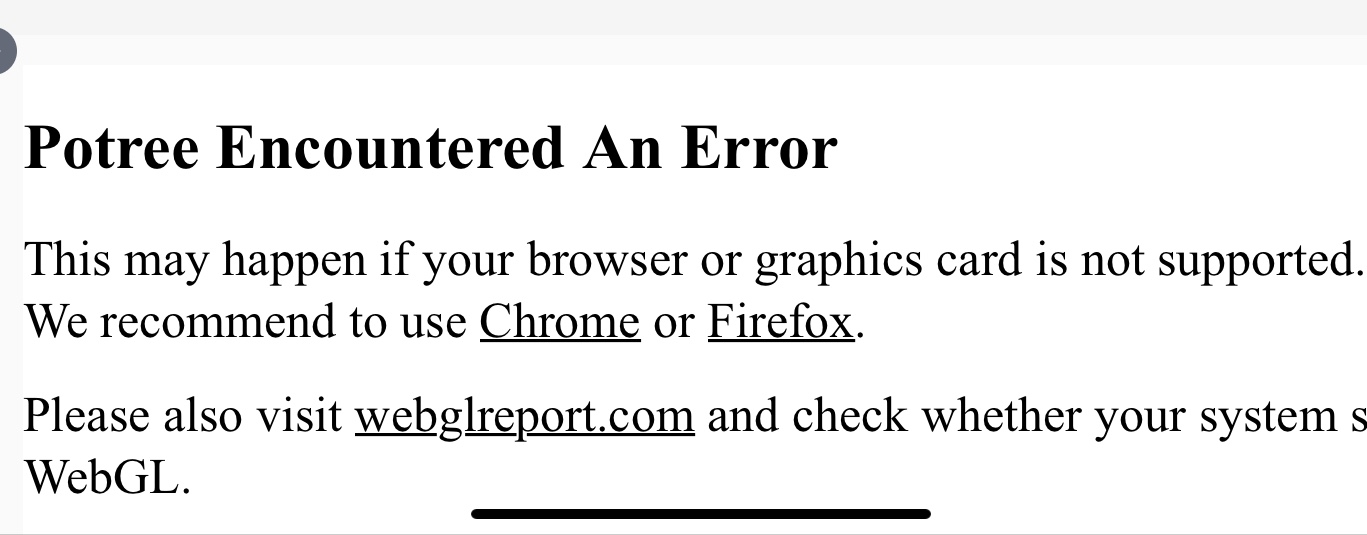

Apple platforms are not actively supported because 1: I don't have any apple devices to test on and 2: Apple essentially abondoned WebGL so not much use in developing WebGL Apps on Apple devices. Apple might make a return with WebGPU, but that will probably take another year.
Just tested on Safari Desktop on MAC OS Catalina. I did have to manually turn on WebGL support, but it did work.

So, I did a little investigation into running it on Ipad. I had to manually turn it on in the settings, webgl2 is currently supported experimentally. unfortunately, only the interface comes up, no points, similar to how Android is currently broken, the First link in the first comment above works fine though, the newer versions do not, again the same as current android viewing.
A little more testing, potree interface works in CHROME, FIREFOX and SAFARI on IPAD, but the newer versions won't display the point, the old link from the first comment here, works fine in allthe browsers listed. Hmm, three finger panning, that's a new thing . . .
This is a webgl2 issue. I'm wondering if the code could be adapted to default to webgl1 if webgl2 isn't present.
What exactly is dependent on webgl2?

What exactly is dependent on webgl2?
Nothing actually, there was a brief attempt at switching to WebGL2 which I abondoned because it's poorly supported. Maybe something wasn't rolled back properly.
I've been testing on various mobile browsers/devices and am coming up with less browsers that support webgl2 than do.
I would like to pursue using potree on Mobile but this webgl 2 aspect is stopping me.
Any idea on how much effort to roll back to webgl 1 reauirements? Is funding needed?
bobb
On Thu, Jan 16, 2020, 6:43 AM Markus Schütz [email protected] wrote:
What exactly is dependent on webgl2?
Nothing actually, there was a brief attempt at switching to WebGL2 which I abondoned because it's poorly supported. Maybe something wasn't rolled back properly.
— You are receiving this because you commented. Reply to this email directly, view it on GitHub https://github.com/potree/potree/issues/576?email_source=notifications&email_token=ABIFFP33GETJC7OH5WEJNL3Q6BI5JA5CNFSM4GGC2HQ2YY3PNVWWK3TUL52HS4DFVREXG43VMVBW63LNMVXHJKTDN5WW2ZLOORPWSZGOEJD5XKQ#issuecomment-575134634, or unsubscribe https://github.com/notifications/unsubscribe-auth/ABIFFP3LHKHIGYTM5I4WDO3Q6BI5JANCNFSM4GGC2HQQ .
Hello and thanks for your work on the potree viewer! I don't know if it may help, but I had a look at the safari console on an iPad and this was reported:
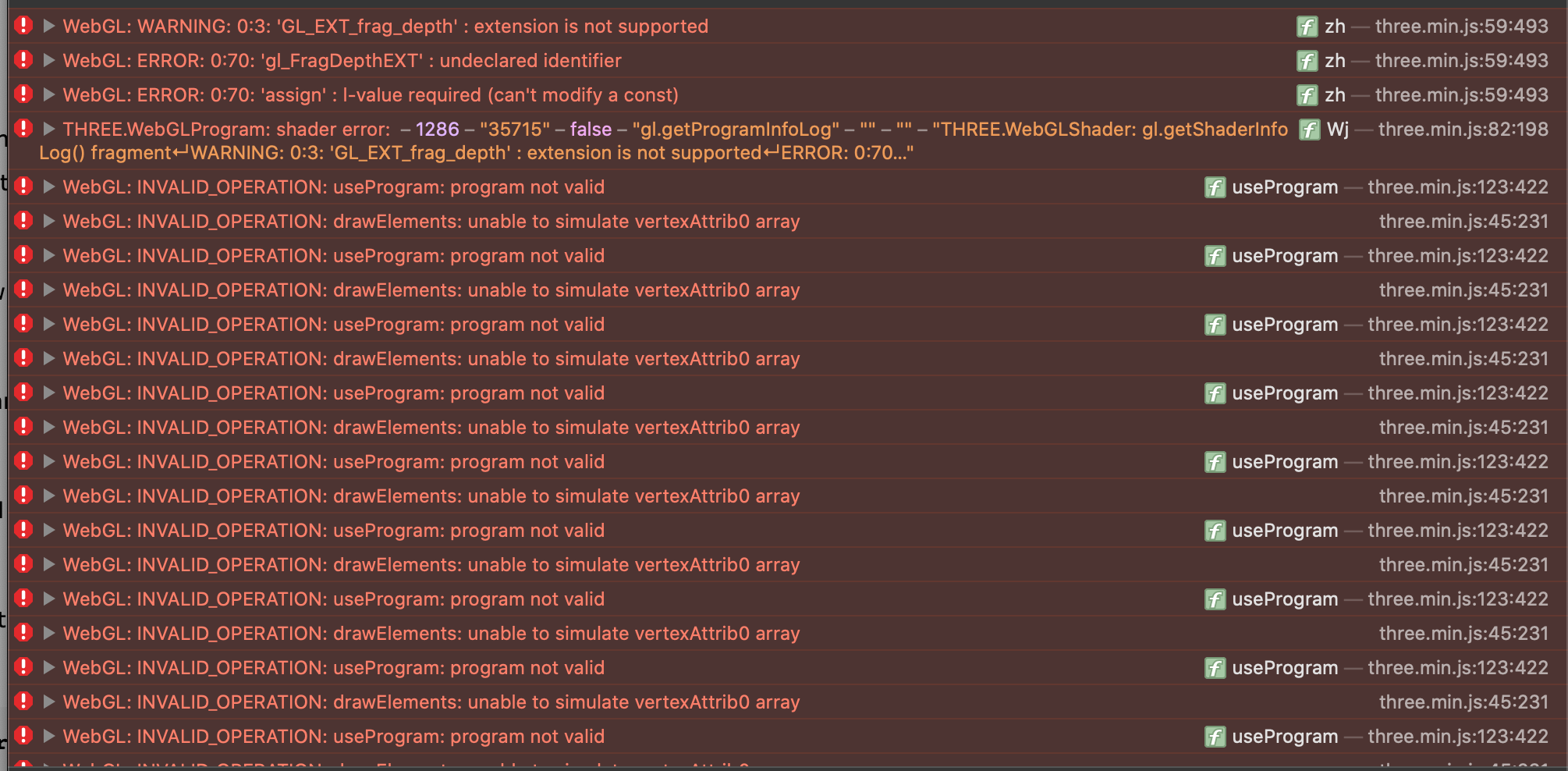
I also attach the logs here for further analysis purposes!
It would be great to make this work again on mobile devices, it opens so many new possibilities!
Thanks for having a look at it!

Potree on Mobile Browsers
To get Potree to work on mobile devices one must enable WebGL 2.0. WebGL is a JavaScript API for rendering interactive 2D and 3D graphics, and version 2.0 is not always enabled or available on mobile device browsers.
Enabling WebGL 2.0 for Safari: IOS 13.6 Iphone/Ipad
Navigate to the settings app Find the ‘Safari’ tab and click on it Scroll all the way down and click on advanced Click on experimental features Scroll down and enable WebGL2.0
Chrome 84 mobile does not support WebGL2.0 on IOS
Chrome on Android- Untested: https://www.laptopmag.com/articles/how-to-enable-webgl-support-on-chrome-for-android
Changing Potree Settings
After enabling WebGL2.0 in order to use Potree on mobile devices the Potree settings must also be changed. This can be done through the UI of the site or on the backend of the site. So for example if you visit the https://github.com/potree/potree/ examples then on the right menu the settings can be adjusted. Disable ‘Eye-Dome-Lighting’ Set Splat Quality to Standard

Thanks @Z01iC. That helped me.
Disable ‘Eye-Dome-Lighting’ Set Splat Quality to Standard
at least on Android with Chrome 89.4389 and Firefox 87
On FF zooming is a bit troublesome though. But no need to manually enable webgl (2.0).

I can get some of the older examples to work under iPadOS 14.4.2 on an iPad Pro. But none of the newer examples or ones that I've generated to work. I have enable WebGL 2.0. Anyone have success with this?
https://www.aeccommunications.com/coch1/coch1.html

@sdoughtie Works just fine on Galaxy Tab S7 with Firefox (also worked on old Android phone). Android and iPad aren't great analogs to each other, but they (often) suffer from the same problem of OpenGL ES / WebGL not using the depth buffer extension. EDL and HQ splats use the depth buffer when calculating color. This is a problem for mobile devices (though EDL no longer creates issues since the feature check was added). I don't suspect that's the problem here, but for others on older potree versions, this is relevant.
The depth buffer is not an extension of WebGL 2 but part of the spec itself, any device that is fully WebGL 2 capable can technically run potree*****. Big asterisk there because you'd have to rewrite the shaders to use GLSL 3 and change potree's rendering context to WebGL 2. EDL and splatting should not cause problems after all of that, but it's so much easier to just disable these rendering options on mobile platforms.
That said, I would recommend you try Chrome or Firefox. Safari never had WebGL 2 fully implemented. Even though that isn't being used here, I would not trust Safari to be the most compatible. I don't own an iPad, but I imagine it allows other browsers to be installed.
If you cannot get another browser or if they fail too, you'll need to find a way to check the console for errors. In Chrome/FF, you must enable remote debugging and connect the device to a computer with the same browser version installed. You'll need to find your way to the remote debugger and enable / connect it. This is a pain in the neck the first time, but it's the only way I know of to get the contents of the native browser console without overriding the built-in console methods.

Thanks for checking. I should say that it works perfectly under my Android 10 Tablet using Chrome 90.0.
Great news, I just installed iPadOS 15 and Potree now works in Safari. The features that seems to work are Eye Dome Lighting, High Quality, and changing the Point Budget. Unfortunately, Orthographic does not seem to work or the features that require a selection click such as Clipping and Measurements.
But I am extremely happy to be able to view models on my iPad!
Edit: Potree now works on Safari 15.0, some of the same issues as the mobile version.
