
hass-atv-beta
 hass-atv-beta copied to clipboard
 postlund
HASS Plugin Power management support
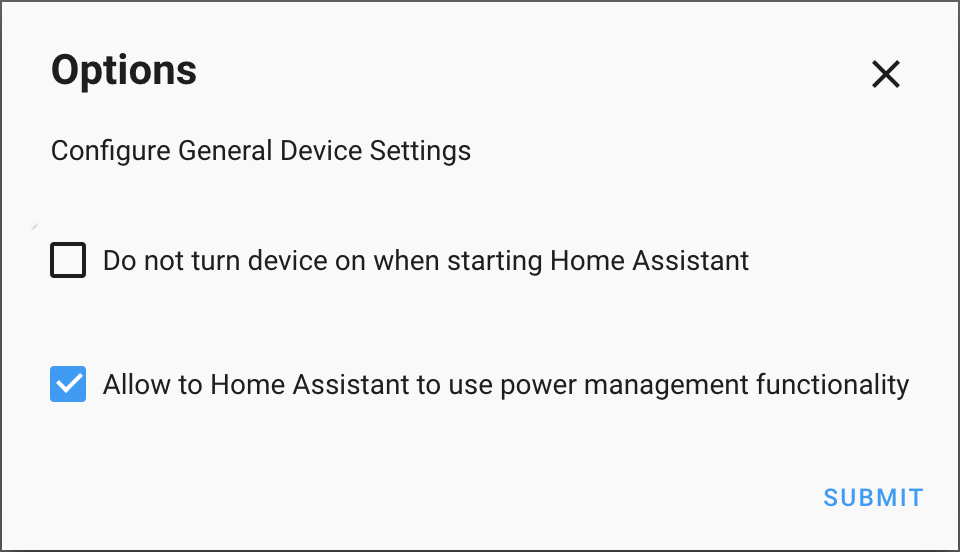
Power management is disabled by default. To enable power management you should check the "Allow to Home Assistant to use power management functionality" checkbox in the Integration Options.
Re-submitting PR to clean up a mess of previous PR#2
@postlund please review and let me know if you see something strange in the code. :) I will try to work on tests during the weekend.

This is much easier to review, I will have look again. Would be great if you could get a beta tester or two to verify that it works out in the wild as well.

Hi @stickpin,
Thanks so much for this contribution! I'm testing this functionality on an Apple TV 4K running tvOS 13.4.5 build 17L562, and found the Power Off working; but, not the Power On. Once the device is powered on using the native Apple TV remote, all other functions of the integration work as designed.
Below are the debug logs for your review. Happy to help troubleshoot this, and will step through the code as well.
2020-05-30 15:33:34 DEBUG (MainThread) [custom_components.apple_tv] Updating state: connected=True, disconnected=False
2020-05-30 15:33:34 DEBUG (MainThread) [custom_components.apple_tv] Turning the device on
2020-05-30 15:33:34 DEBUG (MainThread) [pyatv.mrp.connection] <HA_IP>:39788<-><ATV_IP>:49152 >> Send (Data=<REDACTED_DATA>)
2020-05-30 15:33:34 DEBUG (MainThread) [pyatv.mrp.connection] <HA_IP>:39788<-><ATV_IP>:49152 >> Send (Encrypted=<REDACTED_ENCRYPTED>)
2020-05-30 15:33:34 DEBUG (MainThread) [pyatv.mrp.connection] <HA_IP>:39788<-><ATV_IP>:49152 >> Send: Protobuf: type: WAKE_DEVICE_MESSAGE
identifier: "25f8595a-8522-4b98-8987-68d691f9e366"
errorCode: NoError
2020-05-30 15:33:39 ERROR (MainThread) [homeassistant.components.websocket_api.http.connection.140430356889040]
Traceback (most recent call last):
  File "/usr/src/homeassistant/homeassistant/components/websocket_api/commands.py", line 130, in handle_call_service
    connection.context(msg),
  File "/usr/src/homeassistant/homeassistant/core.py", line 1253, in async_call
    task.result()
  File "/usr/src/homeassistant/homeassistant/core.py", line 1288, in _execute_service
    await handler.func(service_call)
  File "/usr/src/homeassistant/homeassistant/helpers/entity_component.py", line 213, in handle_service
    self._platforms.values(), func, call, required_features
  File "/usr/src/homeassistant/homeassistant/helpers/service.py", line 454, in entity_service_call
    future.result()  # pop exception if have
  File "/usr/src/homeassistant/homeassistant/helpers/entity.py", line 597, in async_request_call
    await coro
  File "/usr/src/homeassistant/homeassistant/helpers/service.py", line 485, in _handle_entity_call
    await result
  File "/config/custom_components/apple_tv/media_player.py", line 258, in async_turn_on
    await self._manager.connect()
  File "/config/custom_components/apple_tv/__init__.py", line 188, in connect
    await self.atv.power.turn_on()
  File "/usr/local/lib/python3.7/site-packages/pyatv/mrp/__init__.py", line 502, in turn_on
    await self.protocol.send_and_receive(messages.wake_device())
  File "/usr/local/lib/python3.7/site-packages/pyatv/mrp/protocol.py", line 138, in send_and_receive
    return await self._receive(identifier, timeout)
  File "/usr/local/lib/python3.7/site-packages/pyatv/mrp/protocol.py", line 146, in _receive
    await asyncio.wait_for(semaphore.acquire(), timeout)
  File "/usr/local/lib/python3.7/asyncio/tasks.py", line 449, in wait_for
    raise futures.TimeoutError()
concurrent.futures._base.TimeoutError

@d0nni3q84 thanks for your help. I have a question:
- You Apple TV connected over Wifi or Ethernet?
It seems that your Apple TV goes to some kind of deep sleep or something. At least based on the log it seems that pyatv itself not able to reach Apple TV, interesting...
No problem, happy to help!
My Apple TV is connected via Ethernet. Doing some additional testing, I was able to get the Apple TV to turn off and then on again, if toggled before the white power light on the Apple TV goes off. However, once the Apple TV is back on again, no other functions of the integration work (all faced with the same TimeoutError).
Doing some additional testing, I was able to identify that while the Apple TV is in its sleep routine, it appears not to respond at all to ICMP, AirPlay (TCP 7000), or Media Remote Protocol (TCP 49152). However, it periodically starts responding again and I am able to power on the Apple TV after restarting the integration.
That said, I'm seeing some really odd ARP and Echo Reply activity in this VLAN, which might mean I have a duplicate IP or ARP entry somewhere. I'm going to take a closer look at that a bit later and will report back what I find.
You probably have a sleep proxy on your network, so it goes to sleep. See https://github.com/postlund/pyatv/issues/595 sh or details. Scanning and making pyatv connect again is probably the only solution.
Maybe this is the reason why the integration breaks for some people and doesn't come back up again until a power on+off is done in Home Assistant... Very unclean of Apple to not close or re-use the socket if that's the case.
That could be a possibility, but I'm just building out my media network and it's fairly small:
pfSense (Default Gateway)
Home Assistant (Ubuntu)
Sony Bravia TV (Android-ish)
Apple TV 4K
I'm going to run some packet captures to see if I see any sleep proxy activity and remove the Sony Bravia TV from the mix. In the meantime, I've also found something peculiar with the integration regarding the TCP session, which is where I think the root cause is. I'm finding that despite the Apple TV being completely powered off (unplugged form commercial power), the TCP sessiondoes not close:
root@iot-hub:/home/sysadmin# netstat -an | grep <ATV_IP>
tcp        0    428 <HA_IP>:40120        <ATV_IP>:49153       ESTABLISHED

root@iot-hub:/home/sysadmin# arp -an | grep <ATV_IP>
? (<ATV_IP>) at <incomplete> on ens192

root@iot-hub:/home/sysadmin# ping <ATV_IP>
PING <ATV_IP> (<ATV_IP>) 56(84) bytes of data.
From <HA_IP> icmp_seq=1 Destination Host Unreachable
From <HA_IP> icmp_seq=2 Destination Host Unreachable
From <HA_IP> icmp_seq=3 Destination Host Unreachable
As a result, I can see how it would not be until Home Assistant and the integration are restarted, that the Apple TV functions again. I noticed that these functions are used in the code for managing what I believe is the WebSocket connection.
Could there be a defect there where things are not closing properly?
-  manager.disconnect()
+  manager.close_connection()
Yeah, the part of not closing the socket (which is what I meant in the last sentence I wrote in my previous post) is not very sane. One problem with the entire situation is how to synchronize state i HA with device state in a proper (and fast) way. How it works now, at least in theory:
- Device is put to sleep
- Connection is lost to device in HA
- The re-connect logic kicks in and tries to reconnect
- The connection will wake up the device (via sleep proxy)
- Assume this to be repeated every time device is put to sleep or goes to auto-sleep
Conclusion: the device can never really sleep as it will always be woken up. It's a tricky nut to solve. From what I understand, connecting to it again doesn't seem to trigger CEC anymore? So it is at least only a problem from an energy savings perspective.
The websocket connection (between backend and frontend/Lovelace) is managed outside of the component. What you are looking at is the manager that establish a connection to the device (with pyatv) and handles reconnects, manual turn on/off, etc. There is no websocket involved in the communication with the Apple TV.
Thanks, @postlund for the detailed information! Wouldn't the fix be here to have the manager (pyatv) tear down the TCP session once the power off is received? Thereafter, go back into the discovery routine looking for the Apple TV to come back online.
One other thing that I noticed in the code is that state is set on an anticipatory basis. That is, state is changed, then the action takes place to change the state, without reverting if the state change fails. Shouldn't we execute state change actions with a promise type then if it comes back successful, update HA?
That all said, are we thinking this is a helpless Apple does weird things situation or can it be addressed? Happy to help test and contribute!
The problem is that the connection is not terminated, so pyatv is never notified of what is happening. Since I can't reproduce this myself, it's very hard to debug. But it would be very interesting to dig deeper into the network traffic and try to see if it is closed or not and if it is, figure out why it's not dispatched to pyatv. I'm all up for ideas to troubleshoot this in creative ways!
I will have to take a look at the code again to see if there are any pitfalls. Previously I have set intermediate "status" states, just to indicate what is happening.
I really do hope that it's possible to solve. One more thing... After powering off the device and you hit power on again, if you wait a while (like 15s) and hit power on again, is it the same problem?
Hey @postlund, very sorry for the delay in reply to you. Just wanted to quickly say "yes", after following that procedure the same problem exists. I've freed up sometime this week/weekend, so I will be able to do additional deep dives on this issue and should be able to provide some packet captures as well. Talk soon, thank you for the awesome plugin and hope we can confirm adding this feature sooner than later.
Okay, so it looks like this is just an issue with the Apple TV 4K. I have added two Apple TV HDs to the integration and the power management feature introduced in this PR works as designed. Now it's down to understanding the difference, especially since the tvOS is the same on all the devices (13.4.6).
Looking at the packet capture, the HA server is sending ARP requests for the Apple TV 4K, but never gets a reply back. The UniFi Switch 8 also puts the Apple TV 4K into STP Blocking for a period of time, then comes back. Lastly, I noticed that when the Apple TV 4K is in sleep mode, the interface speed drops from 1Gbps to 100Mbps. On the other hand, the Apple TV HDs are always at 100Mbps, HA server has a steady established connection to the device, and ARP requests are replied to in a timely manner.
That said, it appears the network adapter on the Apple TV 4K is behaving differently than that of the Apple TV HDs, causing unexpected issues resuming the device from sleep mode.
Do we see any other oddness like this that is isolated to the 4Ks and not on the HDs?
During additional testing, once the Apple TV 4K goes into sleep mode and the interface shifts from 1Gbps to 100Mbps, HA and the integration no longer function. However, if I restart the HA and integration, the discovery process begins and wakes up the Apple TV 4K; during that moment I can press the Power On button from HA and the Apple TV 4K comes one successfully.
So, while I think it is super hacky-ish, we may need to put in a special condition for the Apple TV 4Ks. That is, when HA powers it off, HA will close all TCP sessions cleanly. Then, before we send the power on, we do the discovery routine which brings the Apple TV 4K back on the network at 1Gbps and operates normally. Again, the Apple TV HDs don't experience this situation since they are always online at 100Mbps.
@postlund - I've been following this thread with interest as I am only able to wake up my old LG TV by turning on my Apple TV (not 4K) with your integration and giving it a kick via the CIC/HDMI input.
I've no idea if this helps you with the wider commentary on this topic, but have decided to share how the ATV Power on/off it seems to be working for me.
- The media turn_off for ATV works as expected.
When my Apple TV is sleeping (no white LED);
- Calling media turn_on on does nothing to the device (White LED stays off) but it does show the ATV as online within Home Assistant
- After calling media turn_on if I then call the media play service it seems to "wake up the device" and the White LED comes on and the ATV powers up.
Therefore, to automate the turning on of my crappy old LG TV, I've written a short nodered flow to turn_on the ATV, wait 1s, call media Play, wait another 1s and then call media Pause. It is a bit clunky but it does indeed power on both my ATV and LG...
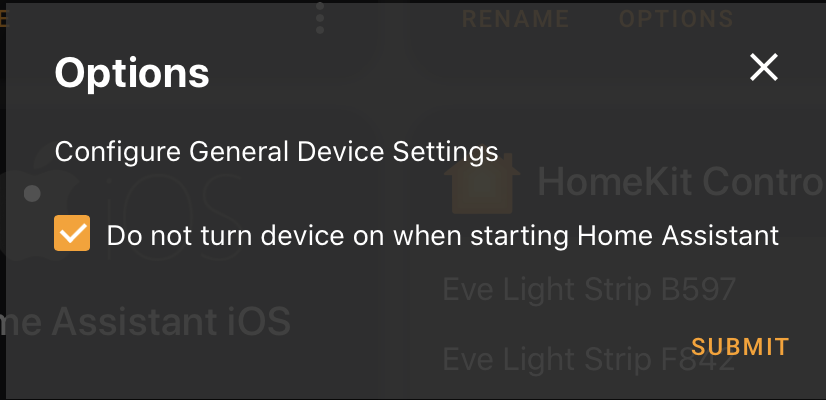
Also, when I look at the Integration in HA, I don't get the option to Allow Home Assistant to use Power Management Functionality.

@d0nni3q84 I have both AppleTV 4K and AppleTV Gen 4 both connected to 1GB Ethernet Ports and I don't have any of the issues that you are referring to, so it seems more environment-related.
@Sooty70 If you want to install the plugin with power options please follow the instructions in this post: https://github.com/postlund/pyatv/issues/672
@stickpin while both may be connected to a 1Gbps port, only the 4K actually operates at 1Gbps and moves to 100Mbps when sleeping. It could be an issue with the switching gear, I’m using Ubiquiti, how about you?
Can you provide a debug log and packet capture on the 4K powering off via HA, waiting 5 min or so, then powering on via HA? I’d like to see if there’s a key difference at the network layer.
@stickpin while both may be connected to a 1Gbps port, only the 4K actually operates at 1Gbps and moves to 100Mbps when sleeping. It could be an issue with the switching gear, I’m using Ubiquiti, how about you?
@d0nni3q84, I use a couple of Netgear GS108Ev3 (https://www.netgear.de/support/product/GS108Ev3.aspx) they are reasonably cheap and doing the job.
Can you provide a debug log and packet capture on the 4K powering off via HA, waiting 5 min or so, then powering on via HA? I’d like to see if there’s a key difference at the network layer.
Sorry, I don't know when I will have time to play with it. Both of my ATVs are in the Prod network, so I am avoiding messing around with it. :)
I believe this will "sort of" solve itself with the next release of pyatv, since I've added TCP keep-alive now. Keep-alive messages are sent (on TCP level) and the connection will timeout after 20s if a certain amount of responses are not received, yielding a connection_lost (I assume). Might be worth testing, even though finding the root cause would be the best solution of course.
Thanks @postlund! What would be the best way to get this PR and the updated pyatv together for testing? I’d like to help see this PR committed by doing testing.
Create a new venv and manually install both Home Assistant and pyatv (from master) there. Then run Home Assistant to create a new config, copy the custom component to the new config directory and test from there. Since Home Assistant require releases from pypi, I think this is more or less the only way.
I also have issues with an ATV 4K. After a while pyatv seems to lose the connection but does not detect it. So I stop getting status events about playing media until I manually turn off / on the hass component which causes pyatv to reconnect. This does not seem to happen on a none 4K ATV. I'm now trying the tcp keepalive patch which will hopefully solve this issue. Thanks!

There are a few issues open regarding the hanging connection. I hope keep-alive at least should serve as a temporary work-around for that.
I'm gonna try to finish off https://github.com/postlund/pyatv/issues/724 within the next couple of days or so, after that I can make a pre-release to pypi. This makes it easy to test as you only have to bump version in the manifest.


Not yet. Thee will be a lot of changes to the component once I finish the review comments I got. I'm doing a lot of things in ways I shouldn't, so we need to adjust to that.
Is there anything we can do to help? Would love to see this sorted out.

Hi @postlund and @DiederikvandenB The mentioned PR doesn't actually work for me :( I'm not getting notified about power state off my Apple TV, and I'm not able to control it, with this PR I even have no option in configuration to enable it. However I'm big fan of all pyatv (kudos @postlund really great work), this integration, and this PR. If there is something I can help I'm all in. As this is not working for me I thought about writing own mqtt AppleTV bridge, using pyatv, and use it as universal media player in HA (loosing some functionalities), but I definitely like the native support.

Also tested this and does not seem to work.
Running Apple TV 4K running TVos 14 (connected via WiFi) and HA 0.118.3.
I get the below message in the corner: Failed to call service media_player/turn_off. with the following added to the logs:
  File "/usr/src/homeassistant/homeassistant/components/websocket_api/commands.py", line 135, in handle_call_service
    await hass.services.async_call(
  File "/usr/src/homeassistant/homeassistant/core.py", line 1451, in async_call
    task.result()
  File "/usr/src/homeassistant/homeassistant/core.py", line 1486, in _execute_service
    await handler.job.target(service_call)
  File "/usr/src/homeassistant/homeassistant/helpers/entity_component.py", line 204, in handle_service
    await self.hass.helpers.service.entity_service_call(
  File "/usr/src/homeassistant/homeassistant/helpers/service.py", line 499, in entity_service_call
    future.result()  # pop exception if have
  File "/usr/src/homeassistant/homeassistant/helpers/entity.py", line 664, in async_request_call
    await coro
  File "/usr/src/homeassistant/homeassistant/helpers/service.py", line 536, in _handle_entity_call
    await result
  File "/config/custom_components/apple_tv/media_player.py", line 263, in async_turn_off
    await self._manager.disconnect()
  File "/config/custom_components/apple_tv/__init__.py", line 197, in disconnect
    await self.atv.power.turn_off()
  File "/usr/local/lib/python3.8/site-packages/pyatv/mrp/__init__.py", line 506, in turn_off
    await self.remote.home_hold()
  File "/usr/local/lib/python3.8/site-packages/pyatv/mrp/__init__.py", line 236, in home_hold
    await self._press_key("home", hold=True)
  File "/usr/local/lib/python3.8/site-packages/pyatv/mrp/__init__.py", line 140, in _press_key
    await self.protocol.send_and_receive(
  File "/usr/local/lib/python3.8/site-packages/pyatv/mrp/protocol.py", line 138, in send_and_receive
    return await self._receive(identifier, timeout)
  File "/usr/local/lib/python3.8/site-packages/pyatv/mrp/protocol.py", line 146, in _receive
    await asyncio.wait_for(semaphore.acquire(), timeout)
  File "/usr/local/lib/python3.8/asyncio/tasks.py", line 498, in wait_for
    raise exceptions.TimeoutError()
asyncio.exceptions.TimeoutError```

Does anyone have a little hacked together service that just sends the commands instead of also monitoring state?
