
signal-portable
 signal-portable copied to clipboard
 portapps
Signal has expired - (portable version)
Behaviour
I'm using the latest portable version 5.38.0-7 and starting from 10.May.2022 the following issue occurs and the app cannot be used to write any message.
Issue: after the app is started the following error message appears and the app doesn't allow to write any message.
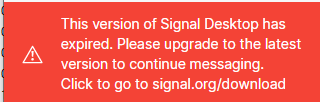
Error message: This version of Signal Desktop has expired. Please upgrade to the latest version to continue messaging.
Additional note:
@crazy-max : It looks like we need your help to release a new release asap thanks How the portable app version could prevent the 'expiration' issue in the future? I have provided all required details and I'm available if you require any further information or clarifications thanks
Steps to reproduce this issue
Steps:
Open Signal
Get message "This version of Signal Desktop has expired. Please upgrade to the latest version to continue messaging."
Can't write messages
Actual Result: messages cannot be typed
Expected Result: message can be written
Expected behaviour
message can be written
Actual behaviour
messages cannot be sent
Configuration
App release / arch (ex. 1.0.0-2 win64) : 5.38.0-7 win64
Operating system (ex. Windows 10 Pro 64 bits) : Win10 Enterprise 20H2 64bit (OS Build 19042.1645)
Winver screenshot : Win10 Enterprise 20H2 64bit (OS Build 19042.1645)
Screenshots
Logs

I have exactly the same problem since Tuesday, I can no longer use the desktop version at work. An update is missing. I have always used the portable version HERE because we use roaming profiles here and the "original" installed version has problems with %Appdata%" roaming. At home I use the installed version and it works.


How could we get a feedback on how we could contact the author to have it fixed? The author seems not answering or we have a wrong user. Is there any other way to get signal Portable working?
Andrea Comba
On 13. Jul 2022, at 17:52, tianxuanliu @.***> wrote:
Same issue here.
— Reply to this email directly, view it on GitHub, or unsubscribe. You are receiving this because you authored the thread.
Updating yourself is relatively straight forward:
- Download the signal installer from signal.org
- Don't run the installer, use something like 7zip to extract the contents.
- Locate the file "app-64.7z" in $PLUGINSDIR
- Extract the contents of this folder into the sub-folder "app" in your signal portable folder.

@lucasnz Thanks for the workaround. But, I tried the Winrar and it does not worked. So, peazip or 7zip apps is fine
I wish there were a way to reach everyone still using Portable Signal, but this will have to do. The two latest versions use a new encrypted key which depends on the logged in user, which means Signal Portable no longer functions (portably). As far as I can tell, there is no way around it currently.
Worse, if you try to use it on a different computer, in my experience it will break and you lose everything, even if you put it back on the original computer after that.

The workaround above still works for me. I last updated last week when my installation expired.

Oh yes, the workaround still works on a single computer, but in my experience if you use it on more than one computer, it will fail to open, and then not be openable on the first computer either. Is your experience different?
Some background information: https://www.bleepingcomputer.com/news/security/signal-downplays-encryption-key-flaw-fixes-it-after-x-drama/
So does it mean the portable version will stop working?
Meanwhile they still dont have a way to password protect the desktop app...
I'm sorry I said it wouldn't work, I just meant that it would no longer be portable (i.e., movable from one machine or user to another).
The desktop app's storage is now protected by an encrypted key instead of a plain text key. Up till now, anyone who could read your files could use free tools to read all your Signal messages. Now they could only open the Signal database if they are logged into your Windows as your user account.
The encryption Signal adopted is locked to the current user of the current Windows installation. If you change your user or reinstall Windows (two things that are constantly suggested as fixes online, and done by repair shops), you will probably lose all access to your Signal data, since the encrypted key is connected to your current situation. I believe if you upgrade to a new version of Windows in the future, and certainly if you move your files to a new computer someday, this would also lock you out.
For sure, the way it is now, if you try opening your Signal Portable on another computer, it won't work. And in my experience it will lose the original key, and no longer open at all on any computer.
But! If you stay on the current user on the current machine, it should work fine as always. :)
Signal stores the encrypted key in "config.json" so I believe if you have Signal Portable working fine on your current computer, keep a backup of your working "config.json" file (it's in the data folder) and should it break in the future, you should be able to recover, as long as you are on the same user on the same Windows. I don't know how you could ever recover the history if you don't have the same user account on the same Windows, though.
Edit to add: Someone has already set up an app that can extract the new style key, though I think it still requires that you are logged in as before. But, it's something. https://github.com/bepaald/signalbackup-tools?tab=readme-ov-file#desktop_functions