

 pop-os
Keybindings not working
I hope this is the right place to report this.
Since I've started using Pop! (~ months ago) the Ctrl + Num keybinding on items listed in the launcher do not work. Using the view captured below as an example, Ctrl + 1 will not call Krita on my machine (Pop!_OS 22.04, default settings, default extensions). 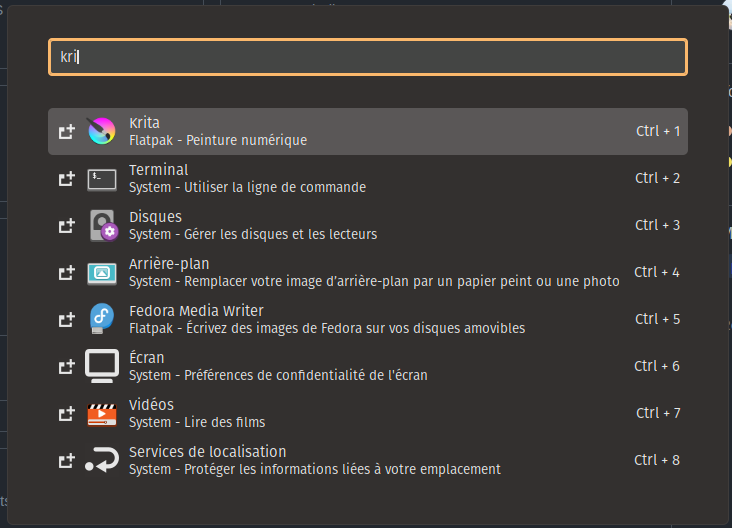 .
.
I wish I could attach log reports but journalctl --follow does not log anything.


Any chance it's based on the keyboard layout?
Nope. The very same bindings work in other contexts.
@why-not-try-calmer Which layouts do you currently have added, and what order are they in? It sounds like it could be the same bug as https://github.com/pop-os/launcher/issues/121

@why-not-try-calmer Which layouts do you currently have added, and what order are they in? It sounds like it could be the same bug as https://github.com/pop-os/launcher/issues/121
Using the Swiss german layout, de-CH.
It's an interesting hypothesis. Willl test and get back to you.
@leviport Okay So I have in this order (Settings > Keyboard):
- French(Swiss) -- which I assume to be
de-CH - English(US) -- which I assume to be
en-US.
Ctr+ <num> from the Launcher works in neither.
Are you using the tenkey, or the top row of numbers on your keyboard? If the latter, is the French(Swiss) layout also one where you need to hold the Shift key to get to the actual numbers?
If you move En_US into the top slot, I imagine it'll start working then. That's the behavior I was seeing in https://github.com/pop-os/launcher/issues/121.
Using the top of numbers on my keyboard.
I did put en_US first. No change (Launcher does not register anything if holding Ctrl + [num]). Same with de_CH using the helper Shift key.
Happy to test more things I you give me the instructions.
Okay I reinstalled a on a friend's machine and it works flawlessly. I reset my GNOME dconf settings and it works just fine. Sorry for the false alarm.
Ah I am sorry to re-open but this bug has come to haunt me again. I don't want to have to switch to a different keyboard layout to work around it (also: switching to en_US does not solve it on my machine).
Any idea how to troubleshoot deeper or to at least give you details for reproduction purposes?
I'm a bit unclear -- is this a duplicate of https://github.com/pop-os/launcher/issues/121 then?
I'm a bit unclear -- is this a duplicate of pop-os/launcher#121 then?
Sorry I should have clarified:
- this bug occurs no matter the order between layouts under Settings > Keyboard, and whether or not the set of layouts includes en_US.
No matter the layouts, as far as I've experienced, the shortcuts do not work.
So if this qualification also applies to the bug in pop-os/launcher#121, yes that's the same bug. Feel free to close if so, I'll follow up there.