
desktop
 desktop copied to clipboard
 pop-os
KDE
THIS IS A WORK IN PROGRESS AND WILL LIKELY CAUSE ISSUES, NOR DOES THIS IMPLY THE INTENT OF SYSTEM76 TO PROPERLY SUPPORT KDE. THIS IS AN INVESTIGATION INTO HELPING BUILD A COMMUNITY MAINTAINED KDE "SPIN" ON POP!_OS
But if you would like to try here are the steps to install:
- Back up your data, and frequently. This may break your system, and is likely to change many times
- This is currently not reversible. Switching back will require a clean install.
sudo apt-manage add popdev:KDEsudo apt update && sudo apt upgrade -ysudo apt install pop-desktop-kde- During the install you will get a message to choose
gdmorsddm, choosesddm - IMPORTANT: your system will go blank as the new display manager is installed. But the install will continue in the background. LEAVE YOUR COMPUTER INSTALLING FOR ~10 minutes.
- After waiting ~10 minutes with the blank screen, manually shutdown your computer. Probably by holding the power button.
- After starting back up you will be at the plymouth drive decryption screen. Enter your decryption password to decrypt your drive
- Then login again as sddm
sudo dpkg --configure -asudo apt autoremove- Now you will be in KDE on POP!_OS

I would also recommend after rebooting to run these two command to be safe:
sudo dpkg --configure -a
sudo apt autoremove

@DaisyLee2010 Thanks, I added that to the list until I improve the install process
Do I need to make any changes to use the most recent commits on a VM built following the earlier version of this PR?

Trying a fresh install works perfectly, aside from the keyboard bug. I may also be making some progress on that front.
Upgrading from the previous version of the PR has some strange behavior with apt. Although the desktop itself seems seems to behave fine, there seems to be some sort of conflict between the graphical update manager and the dpkg + autoremove step.
If I understood what happened correctly, this is what happened on my side:
dpkg --configure -a&apt autoremoveremoved a bunch of packages (1+ gig worth, a bunch of Python / etc)- KDE's graphical update manager claimed there were a bunch of further updates in the form of missing packages
- A further run of --configure + autoremove smoothed things out after saying yes to the package removal below:
pop@pop-os:~$ sudo dpkg --configure -a
pop@pop-os:~$ sudo apt autoremove
Reading package lists... Done
Building dependency tree... Done
Reading state information... Done
The following packages will be REMOVED:
  gir1.2-peas-1.0 gir1.2-totem-1.0 gir1.2-totemplparser-1.0
  gstreamer1.0-pulseaudio libpeas-1.0-0 libpeas-common libtotem0 totem-common
0 upgraded, 0 newly installed, 8 to remove and 0 not upgraded.
After this operation, 2,696 kB disk space will be freed.
Do you want to continue? [Y/n]
Ah those may be further gnome packages that the kde metapackage will have to conflict with
tl;dr the sddm config file isn't being created for some reason
The quickest fix for the virtual keyboard is to put the following into /etc/sddm.conf:
[General]
InputMethod=
However, I'm not sure if this is the best way to address the issue. It may break tablet-based systems.
We may be omitting a package somewhere, as the default locations for config aren't present when following these directions.
I tried adding the kde-config-sddm package. Does that seem to be an improvement?
tl;dr
- Adding that package doesn't help
- Installing & choosing a new sddm theme does
- Are we missing a trigger for config generation?
Adding the package mentioned doesn't work
Adding kde-config-sddm doesn't seem to help, neither when upgrading nor when applying a fresh install over base Pop. In both cases, no config appears inside /etc/sddm.conf.d/ or any other expected location, nor does the folder get created.
I think the earlier config may also have pulled kde-config-sddm in as a dependency.
Either way, It's definitely installed now:
pop@pop-os:~$ dpkg -l | grep kde-config-
ii  kde-config-gtk-style:amd64                    4:5.24.4-0ubuntu1                                               amd64        KDE configuration module for GTK+ 2.x and GTK+ 3.x styles selection
ii  kde-config-screenlocker                       5.24.4-0ubuntu1                                                 amd64        KCM Module for kscreenlocker
ii  kde-config-sddm                               4:5.24.6-0ubuntu0.1                                             amd64        KCM module for SDDM
ii  kde-config-systemd                            1.2.1-3.2                                                       amd64        KDE control center module for Systemd
ii  kde-config-updates                            5.24.7-0ubuntu0.1                                               amd64        Unattended updates configuration
Installing a new theme generates the files
I tried looking around in KDE's settings gui, and found there are theme options. Installing a theme (Sugar Candy) appears to generate the /etc/sddm.conf.d/ directory, containing a kde_settings.conf file:
[Autologin]
Relogin=false
Session=
User=

[General]
HaltCommand=
RebootCommand=

[Theme]
Current=sugar-candy

[Users]
MaximumUid=60000
MinimumUid=1000
My guess is that we may be failing to set off a config generation trigger as either part of the build or install process. I don't yet understand how other distros / spins handle this.
Steps taken:
- Open the system menu by going to the bottom left of the screen & clicking
- Mouse over Settings in the left-hand favorites menu
- Choose System Settings on the right
- A settings window should have popped up
- In the lefthand column of the new window, choose Startup and Shutdown
- Choose 'Login Screen (SDDM)'
- Under the panel on the right, there should be a row of buttons. Choose Get New SDDM Themes. If this button is not visible, choose the vertical '...' furthest on the right, them choose the option from the dropdown.
- To the left of the search box, choose Show Highest Rated First
- Mouse over Sugar Candy for SDDM until an 'Install' button appears
- Click the 'Install' button
- Click close on the theme store window
- In the right-hand panel of the window titled 'Login Screen (SDDM) - System Settings', click to select the new Sugar Candy theme. Its name should now be bold.
- Click Apply
- Restart
No keyboard should pop up automatically anymore.
Is it ok to break with stock Pop's accessibility options?
If yes, we might be able to generate an SDDM config & be done with it for now. If not, we may need to explore LightDM since the on-screen keyboard seems to be all-or-nothing under SDDM. I've seen some mentions of being able to bind the on-screen kb to a button with the lightdm-gtk-greeter package.
I wonder if switching to kde-full from kde-plasma-desktop would help us get that config generated? I'm guessing the minimal nature of the plasma-desktop package is leaving something out.
I tried adding the
kde-config-sddmpackage. Does that seem to be an improvement?
pretty sure that just adds the module into KDE System Settings to configure sddm
It seems like installing kde-full does not have different behavior from our draft package.
pretty sure that just adds the module into KDE System Settings to configure sddm
Yes, that appears to be the case.
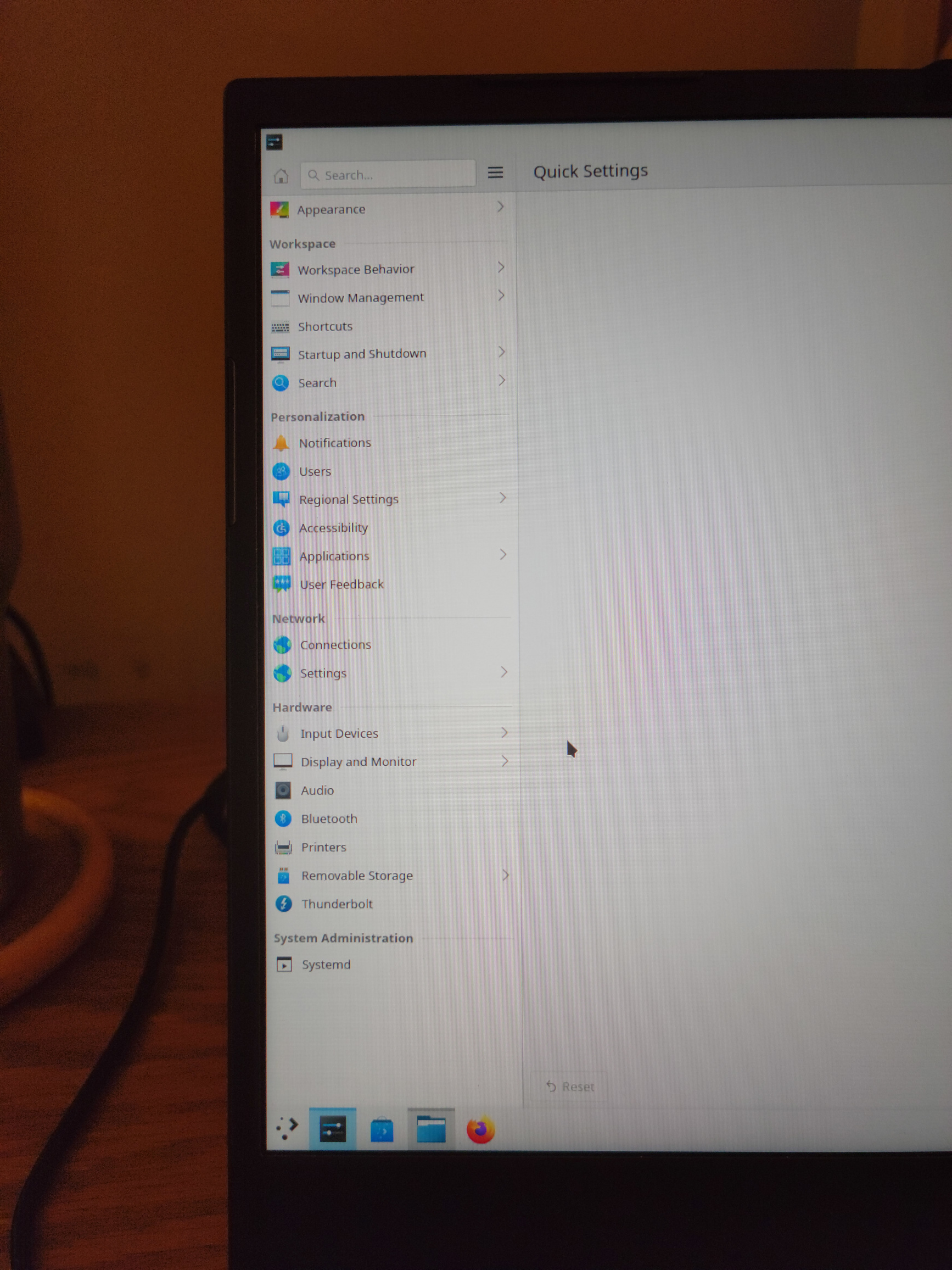
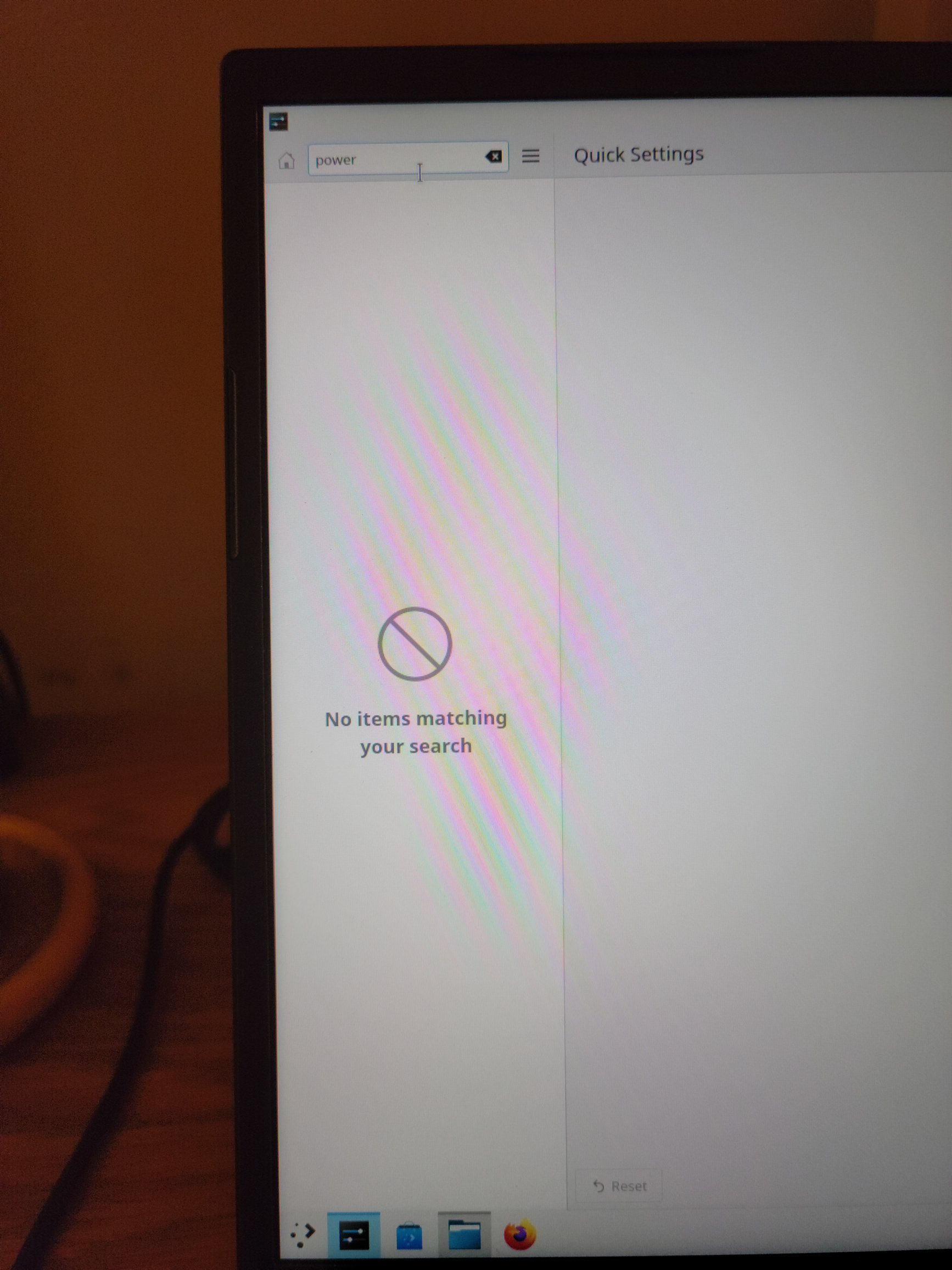
note following issues:
- on System76 Lemur Pro 10, following these procedures produces a lack of a battery icon in the KDE taskbar's "system tray";
- also missing any context options for "Power" in the KDE System Settings menu, see attached screenshots.
For due diligence, have also attached a list of packages removed when running sudo apt autoremove
EDIT - have been unable to reproduce the above noted issues on a ThinkPad X13 Gen2, running the same generation of Intel processor (11th-gen Tiger Lake); however, did encounter an issue running the prescribed sudo dpkg --configure -a, with the faulting package being qtvirtualkeyboard-plugin (go figure); was able to bypass this problem by issuing sudo apt install --reinstall qtvirtualkeyboard-plugin, at which point I was able to continue with the sudo apt autoremove in step 12.


To bring this much more into the open I want to start a dialog on any "default" apps we should install. I like the pop-gnome-cosmic approach which has the basics for the everyday user covered, but I don't want bloat to become a problem. What is everyone's thoughts on the matter?
Also, I know I left pop shop in, because I thought we needed it for system76-firmware but now I know there is a separate firmware utility we can use instead. Along with fwupd backend for discover.
Should we remove the pop shop? or should we keep it and maintain parity, while setting it as the default software center instead of discover?
ive been using this and it works fine for an outdated version of KDE plasma. Certainly prefer it over Gnome any day. Thanks!
