

 pop-os
Missing dock icon in 21.10 if a program closes its original window and opens a new one (observed with Zim)
Distribution (run cat /etc/os-release):
NAME="Pop!_OS"
VERSION="21.10"
ID=pop
ID_LIKE="ubuntu debian"
PRETTY_NAME="Pop!_OS 21.10"
VERSION_ID="21.10"
HOME_URL="https://pop.system76.com"
SUPPORT_URL="https://support.system76.com"
BUG_REPORT_URL="https://github.com/pop-os/pop/issues"
PRIVACY_POLICY_URL="https://system76.com/privacy"
VERSION_CODENAME=impish
UBUNTU_CODENAME=impish
LOGO=distributor-logo-pop-os
(running with system default GNOME Cosmic as the desktop environment without any manually installed GNOME extensions affecting the dock)
Related Application and/or Package Version (run apt policy $PACKAGE NAME):
zim:
Installed: 0.73.5-1
Candidate: 0.73.5-1
Version table:
*** 0.73.5-1 500
500 http://us.archive.ubuntu.com/ubuntu impish/universe amd64 Packages
500 http://us.archive.ubuntu.com/ubuntu impish/universe i386 Packages
100 /var/lib/dpkg/status
Issue/Bug Description: Zim (https://zim-wiki.org/, and present in the Pop!_Shop) opens in two phases - first, a window opens with the selection of available notebooks, then upon choosing one, the original window is closed and a new one opens for that specific notebook.
After I installed all available regular updates through the Pop!_Shop, and then updated from 21.04 to 21.10 today, I observed an issue between this window-replacing behavior and the dock icons for launched programs: the icon for it on the dock vanishes when the program replaces its window, leaving the separator between favorite and launched programs present (screenshots in steps to reproduce).
I can't say for sure whether this is specific to just Zim, or happens for other programs that do this, as I don't think I have any other example that behaves in a similar way (checked also LibreOffice as the closest I could think of to that behavior, by opening it as just LibreOffice and not Writer/Calc/etc, and launching a file from there - did not observe the issue), but the issue only started after the upgrade to 21.10.
Steps to reproduce (if you know):
-
Open the program that handles windows that way (here: Zim). So far, the dock shows the icon for the launched program as expected.
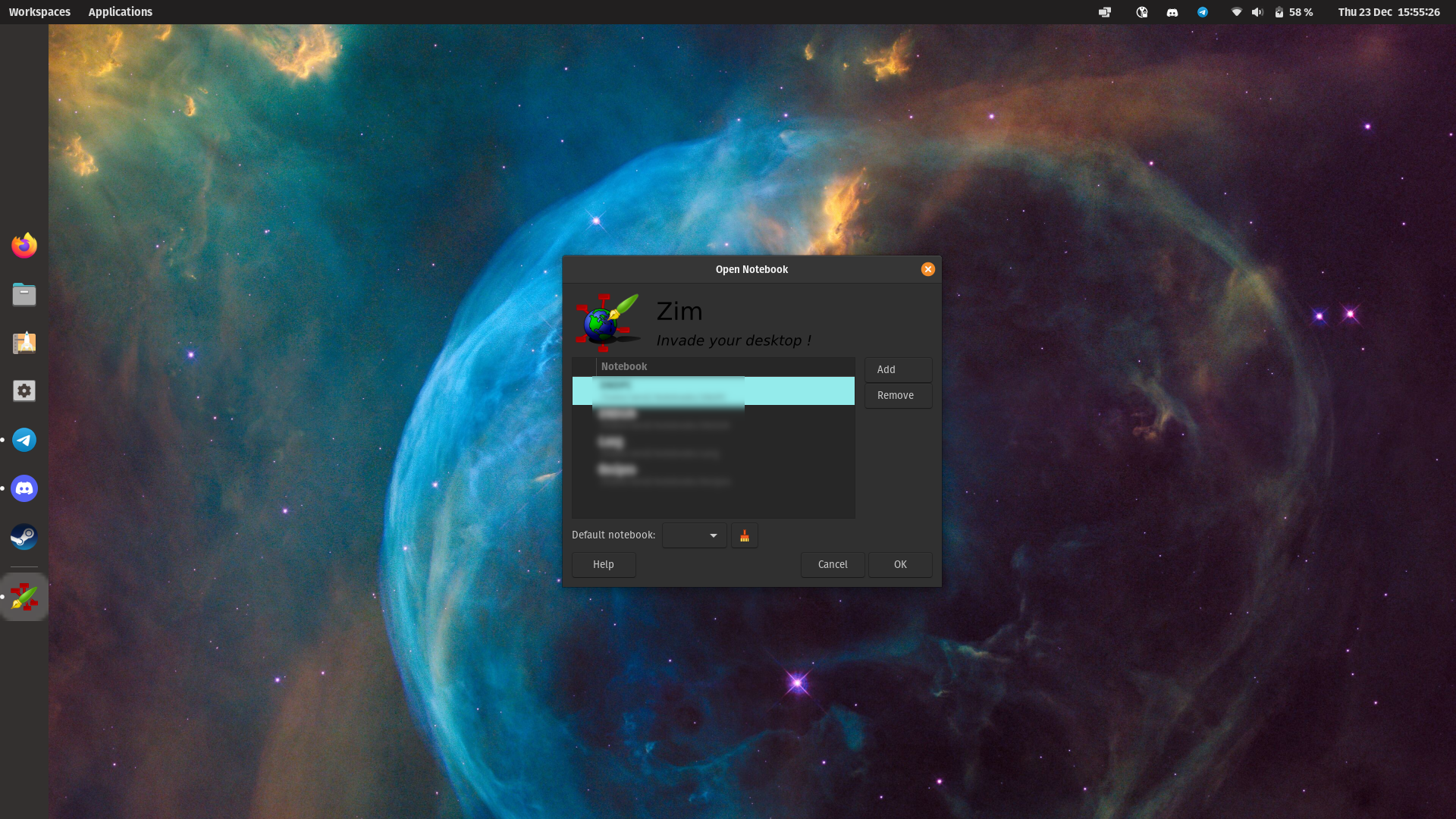
-
Do whatever the program does that closes its original window and launches a new one within the same program (here: launching a notebook from Zim). The program's icon is gone from the dock, even though a window of it is open. The separator between favorites and non-favorited launched programs is still there, and the other icons are moved down a bit so they're centered as if the vanished icon wasn't there (but the presence of the separator is NOT ignored for the purpose of centering the icons).
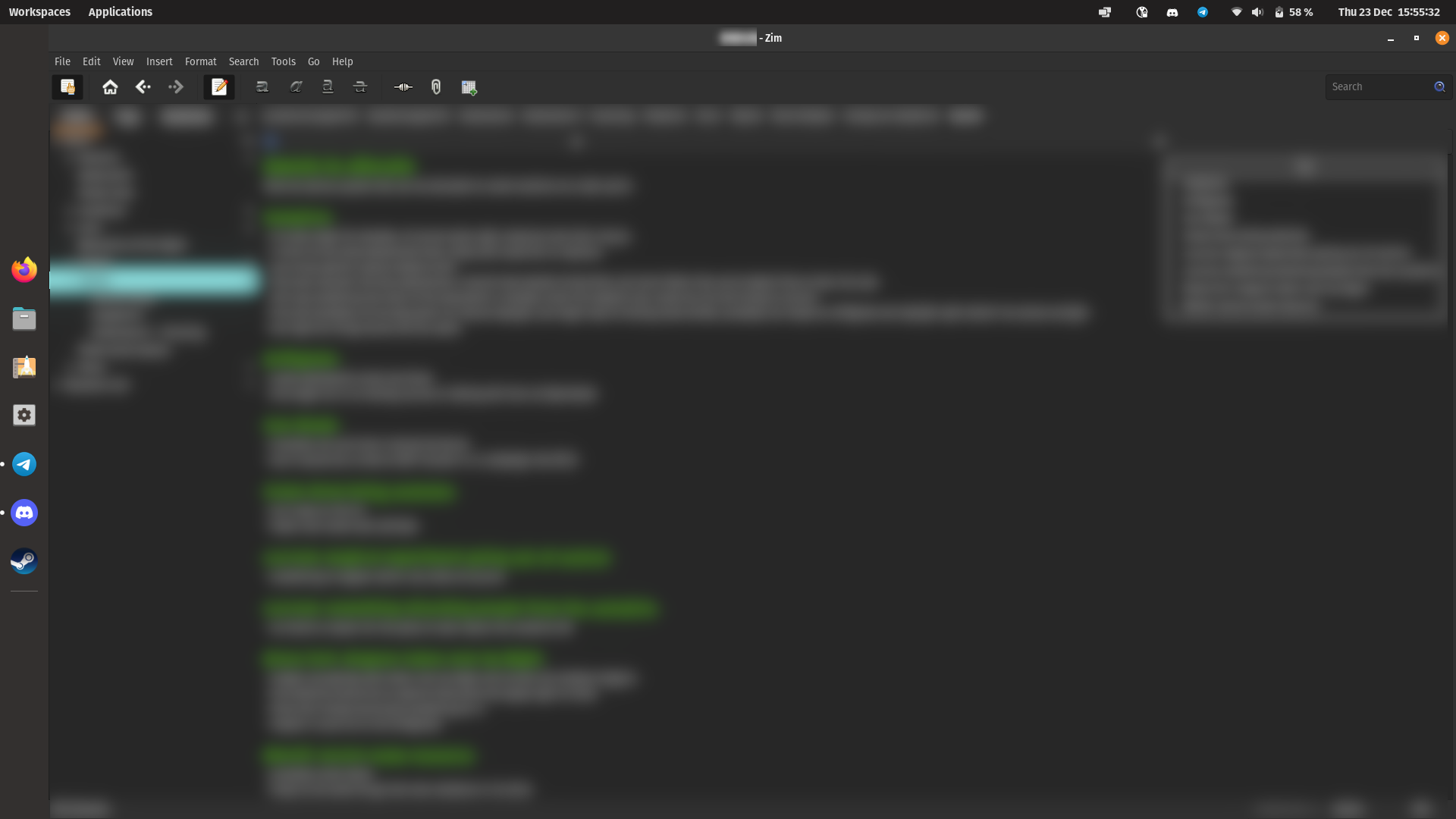
-
The icon can be brought back if any other program (that shows up on the dock as a running program) is opened or closed. It can be both a favorited and a non-favorited program. It must be a program that was not launched before that is being opened (e.g. opening one terminal window works if there was none before, but having one prior and opening a second (or third etc) does not), or all of the open program's windows must be closed (e.g. when having 3 terminal windows open, the affected icon only returns after all three are closed. Here: launched (favorited) Settings, when it was not running before, the Zim icon comes back)
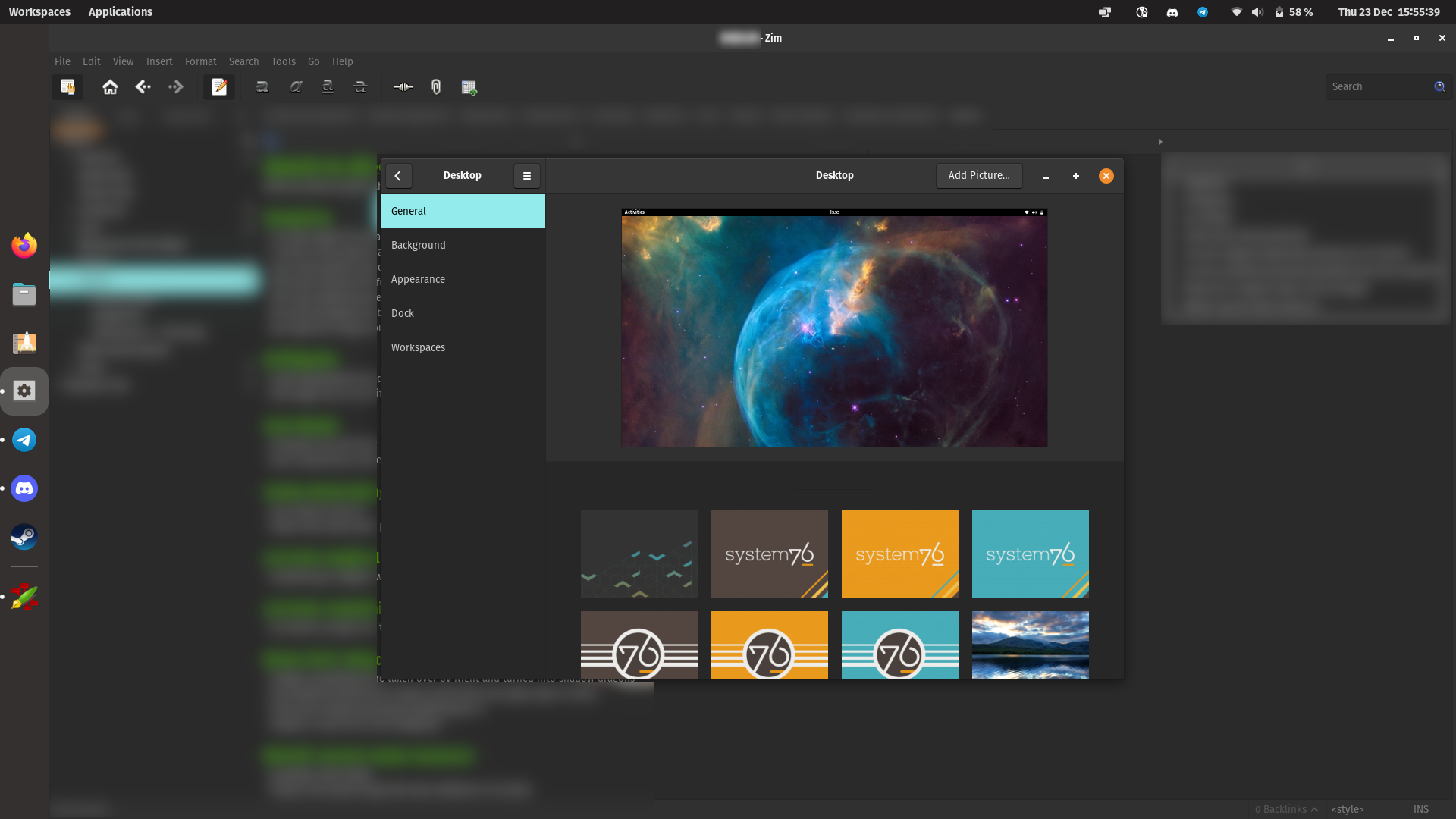
Expected behavior: The program's new window is automatically detected for displaying on the dock without needing to manually force an update on it.
Other Notes:
- Whether the dock is horizontal or vertical does not affect the issue (just replace "moved down" in my description with "moved right").
- Whether the dock is always visible or hidden does not affect the issue.
- Whether the other program whose opening/closing triggers the dock update (point 3 of bug reproduction) is opened/closed on the same workspace or a different one does not affect the issue.
- At one point, after suspending and reopening the machine, the issue did not appear for a moment, but started appearing again after another suspend and resume, and persisted after a reboot afterwards - it doesn't seem to be reliable between suspends/resumes, but the lack of the issue appears to be exceptional at present.
- Opening another window of the affected program (here: Zim), regardless of whether it's opened through the program's own features, or launched via launcher or Applications menu, does not make its icon return as per reproduction point 3 - it has to be a different one.
- There was no change in running processes of the program between the starting and new window, no child processes being created or replacing the previous ones.
- The issue does not occur if the affected program is favorited and always present on the dock - the white dots indicating the number of open windows change correctly.

Open the extensions app and disable cosmic-dock, then reboot. The dock will be gone, and now a panel in the workspaces view (Super + d). Does the same behavior show there?

That behavior does not currently repeat on the panel in workspaces with cosmic-dock disabled and after reboot.
However, as I mentioned by the end of the initial report, there are times when the issue just doesn't happen, and after I re-enabled cosmic-dock now to compare the results (both before and after another reboot), I didn't observe the issue on the dock either.
I don't have a good guess for when the issue would occur vs not, so I'll give it a few more tries in the next few days to see if I'll get a definite clear answer (both affected / dock consistently affected but workspaces not).
Can confirm now: the weird behavior does not happen in the workspaces view:
- observed the issue
- switched off cosmic-dock, rebooted
- tested it in the workspaces view with the dock switched off: icon shows up correctly
- enabled cosmic-dock in extensions right afterwards, it came back right away, did not reboot at that point
- tested it again without rebooting after switching cosmic-dock back on - the icon was missing again
I think I've observed this with LibreOffice when opening a CSV (where the import window appears and then a new window for Calc opens):
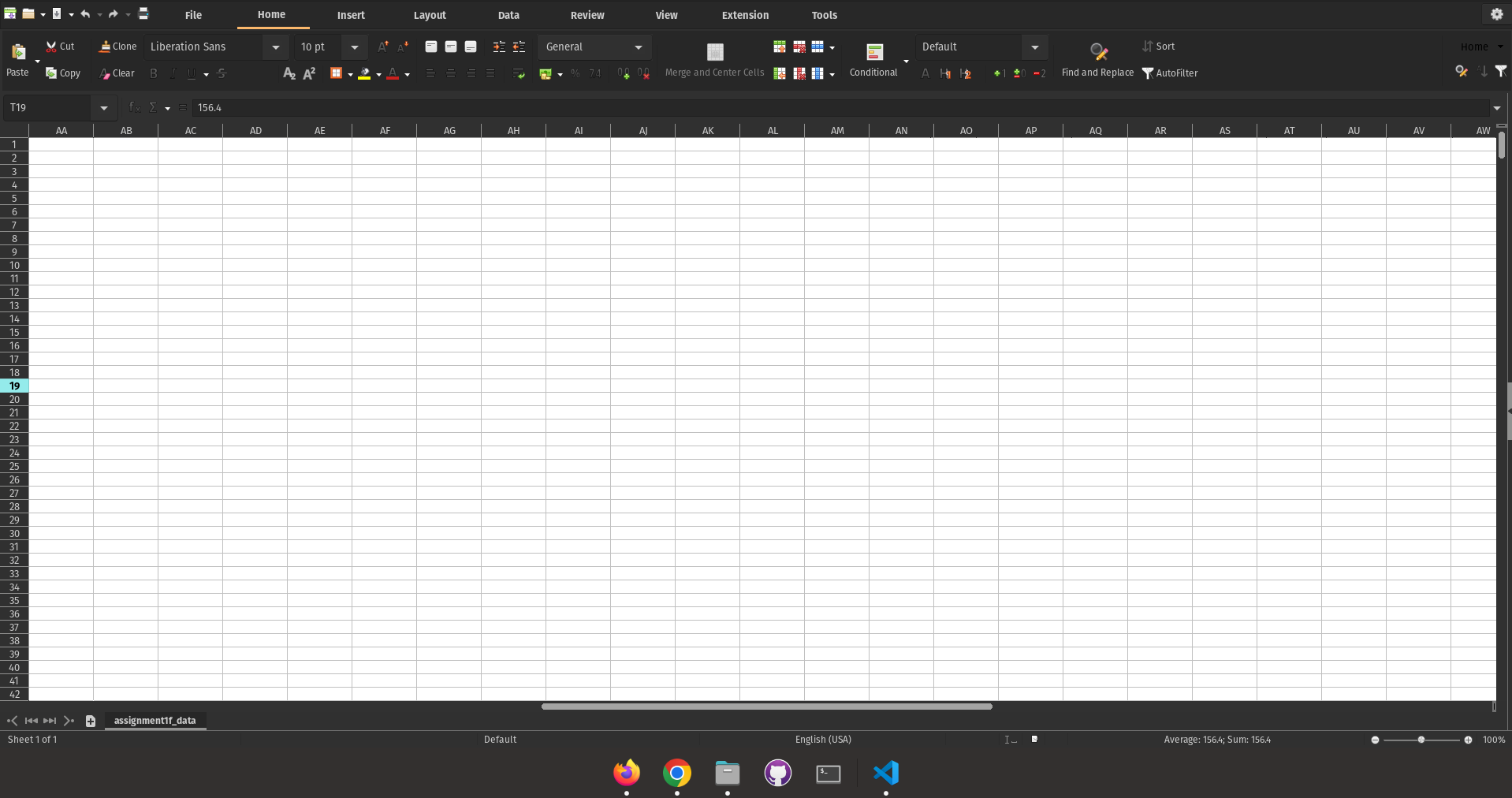
App is still available in Super+Tab. Oddly, opening a terminal window caused the icon to appear (I doubt this is specific to terminal but I haven't tried on other apps):
System details:
$ cat /etc/os-release
NAME="Pop!_OS"
VERSION="22.04 LTS"
ID=pop
ID_LIKE="ubuntu debian"
PRETTY_NAME="Pop!_OS 22.04 LTS"
VERSION_ID="22.04"
HOME_URL="https://pop.system76.com"
SUPPORT_URL="https://support.system76.com"
BUG_REPORT_URL="https://github.com/pop-os/pop/issues"
PRIVACY_POLICY_URL="https://system76.com/privacy"
VERSION_CODENAME=jammy
UBUNTU_CODENAME=jammy
LOGO=distributor-logo-pop-os

$ apt policy libreoffice
libreoffice:
  Installed: (none)
  Candidate: 1:7.3.5-0ubuntu0.22.04.1
  Version table:
     1:7.3.5-0ubuntu0.22.04.1 500
        500 http://apt.pop-os.org/ubuntu jammy-updates/universe amd64 Packages
     1:7.3.2-0ubuntu2 500
        500 http://apt.pop-os.org/ubuntu jammy/universe amd64 Packages

@ct-martin Can confirm, I'm experiencing the exact same issue on Pop!_OS 22.04 LTS x86_64. Specifically when I open LibreOffice, either Calc or another, the import dialog shows in the COSMIC DOCK and when I click "ok", the .csv document launches but the app icon disappears from the COSMIC DOCK.
And yes, whenever you launch another app, the Libre Calc appears in the dock alongside the other app you just launched.
Did you find a fix for this?
Any input will be highly appreciated.

I seem to have fixed this issue with LibreOffice myself. It looks like it had little to do with the Cosmic Dock itself.
Before commenting here, I tried uninstalling and reinstalling the libreoffice suite via the popshop but that didn't fix it.
However, later I used the synaptic manager and searched for all packages containing "libreoffice", and then completely removed all of them. Later I reinstalled the LibreOffice Suite via the PopShop and now this issue seems to have disappeared. I'll report back if it happens again.