
globalSpeed
 globalSpeed copied to clipboard
 polywock
Only set speed on page load
Hi, not super skilled at understanding the way that extensions work, I like everything to run at 2x speed, but sometimes if I miss something I slow it down to 1x and rewatch it, however this extension, while great for setting it to 2x, continues to try and set it back to 2x, meaning I have to temporarily disable the extension. Is there a way to make the speed change only take effect each time a new page loads and/or make internal page speed changes cancel out the extension (i.e. YouTube's built in speed modifier).
I tried using the URL rules as they seemed to have something along those lines, but I just couldn't seem to get it to do anything :/

at the moment I'm trying to use shortcuts to try and work around it but again I had problems as I didn't understand what each of the boxes did except for the shortcut input box. Was trying to make 1 shortcut the doubles speed and one that halves it but other than the hotkey I wanted to use the rest of it confused me.
Hello. The UX is something I'll try to improve in the next major update.
continues to try and set it back to 2x, meaning I have to temporarily disable the extension.
Not sure why that might happen. If you change the speed to 1x, it should stay at 1x. Could you screen record this?
The speed shortcut has 3 modes. (no mode to double or halve the speed).
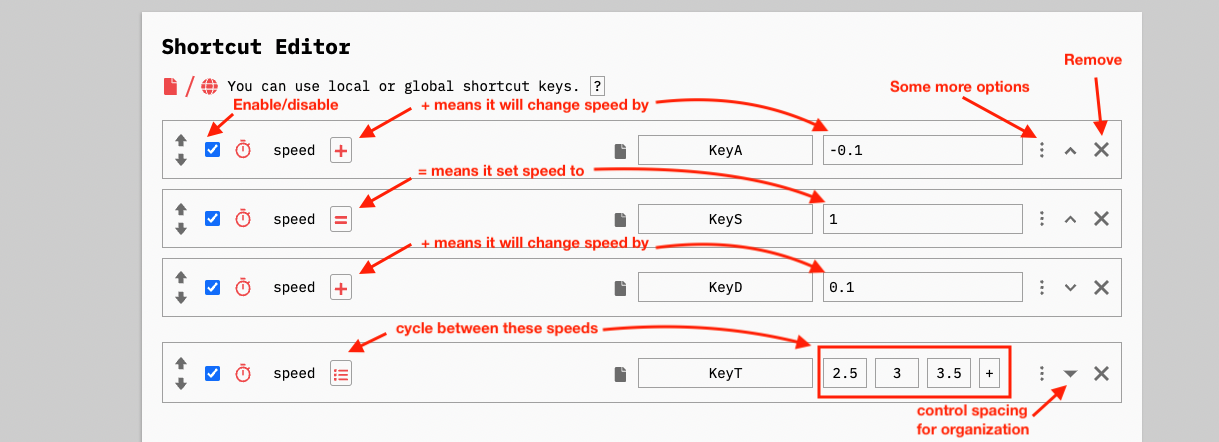
= mode, means it will set the speed to X. + mode, means it will change the speed by X. (if X is negative, it will decrease speed. If X is positive, it will increase speed). The other mode (list icon), means it will cycle between the provided values.

Hi, I recorded the interaction between your program and YouTube's integrated speed modifier and another YouTube based speed modifier. It's a minor grip however it does reduce functionality. Also thanks for the assistance with the shortcuts it was helpful :)
https://user-images.githubusercontent.com/69162335/170692358-45265ffa-de1d-4ac5-8471-e86385846946.mp4
Edit: sorry about the watermark I think I set it to 4k resolution and I wasn't supposed to, It should still make sense though
No issue with the watermark. I was actually learning Davinci Resolve last week, but the Fusion section kept crashing on my Mac.
It's hard to tell without sound, when you change speed using Youtube's controls it changes to speed for a second before reverting? If that's the case, that's the intended behavior. Global Speed is a top-down speed controller, which means it tries to force the desired speed and ignore the website's own controls.