

 pollev
Not working as expected on MacOS (Bash)
I thought perhaps it was my implementation that was incorrect but it seems something it clearly not playing nicely with macos.
I took your script and put it all in one shell script file for testing.
I had to remove the head -c lines for the fake output but besides that, the code is unaltered. (removed comments for brevity)

#!/bin/bash

# Constants
CODE_SAVE_CURSOR="\033[s"
CODE_RESTORE_CURSOR="\033[u"
CODE_CURSOR_IN_SCROLL_AREA="\033[1A"
COLOR_FG="\e[30m"
COLOR_BG="\e[42m"
COLOR_BG_BLOCKED="\e[43m"
RESTORE_FG="\e[39m"
RESTORE_BG="\e[49m"

# Variables
PROGRESS_BLOCKED="false"
TRAPPING_ENABLED="false"
TRAP_SET="false"

CURRENT_NR_LINES=0

setup_scroll_area() {
    # If trapping is enabled, we will want to activate it whenever we setup the scroll area and remove it when we break the scroll area
    if [ "$TRAPPING_ENABLED" = "true" ]; then
        trap_on_interrupt
    fi

    lines=$(tput lines)
    CURRENT_NR_LINES=$lines
    let lines=$lines-1
    # Scroll down a bit to avoid visual glitch when the screen area shrinks by one row
    echo -en "\n"

    # Save cursor
    echo -en "$CODE_SAVE_CURSOR"
    # Set scroll region (this will place the cursor in the top left)
    echo -en "\033[0;${lines}r"

    # Restore cursor but ensure its inside the scrolling area
    echo -en "$CODE_RESTORE_CURSOR"
    echo -en "$CODE_CURSOR_IN_SCROLL_AREA"

    # Start empty progress bar
    draw_progress_bar 0
}

destroy_scroll_area() {
    lines=$(tput lines)
    # Save cursor
    echo -en "$CODE_SAVE_CURSOR"
    # Set scroll region (this will place the cursor in the top left)
    echo -en "\033[0;${lines}r"

    # Restore cursor but ensure its inside the scrolling area
    echo -en "$CODE_RESTORE_CURSOR"
    echo -en "$CODE_CURSOR_IN_SCROLL_AREA"

    # We are done so clear the scroll bar
    clear_progress_bar

    # Scroll down a bit to avoid visual glitch when the screen area grows by one row
    echo -en "\n\n"

    # Once the scroll area is cleared, we want to remove any trap previously set. Otherwise, ctrl+c will exit our shell
    if [ "$TRAP_SET" = "true" ]; then
        trap - INT
    fi
}

draw_progress_bar() {
    percentage=$1
    lines=$(tput lines)
    let lines=$lines

    # Check if the window has been resized. If so, reset the scroll area
    if [ "$lines" -ne "$CURRENT_NR_LINES" ]; then
        setup_scroll_area
    fi

    # Save cursor
    echo -en "$CODE_SAVE_CURSOR"

    # Move cursor position to last row
    echo -en "\033[${lines};0f"

    # Clear progress bar
    tput el

    # Draw progress bar
    PROGRESS_BLOCKED="false"
    print_bar_text $percentage

    # Restore cursor position
    echo -en "$CODE_RESTORE_CURSOR"
}

block_progress_bar() {
    percentage=$1
    lines=$(tput lines)
    let lines=$lines
    # Save cursor
    echo -en "$CODE_SAVE_CURSOR"

    # Move cursor position to last row
    echo -en "\033[${lines};0f"

    # Clear progress bar
    tput el

    # Draw progress bar
    PROGRESS_BLOCKED="true"
    print_bar_text $percentage

    # Restore cursor position
    echo -en "$CODE_RESTORE_CURSOR"
}

clear_progress_bar() {
    lines=$(tput lines)
    let lines=$lines
    # Save cursor
    echo -en "$CODE_SAVE_CURSOR"

    # Move cursor position to last row
    echo -en "\033[${lines};0f"

    # clear progress bar
    tput el

    # Restore cursor position
    echo -en "$CODE_RESTORE_CURSOR"
}

print_bar_text() {
    local percentage=$1
    local cols=$(tput cols)
    let bar_size=$cols-17

    local color="${COLOR_FG}${COLOR_BG}"
    if [ "$PROGRESS_BLOCKED" = "true" ]; then
        color="${COLOR_FG}${COLOR_BG_BLOCKED}"
    fi

    # Prepare progress bar
    let complete_size=($bar_size*$percentage)/100
    let remainder_size=$bar_size-$complete_size
    progress_bar=$(echo -ne "["; echo -en "${color}"; printf_new "#" $complete_size; echo -en "${RESTORE_FG}${RESTORE_BG}"; printf_new "." $remainder_size; echo -ne "]");

    # Print progress bar
    echo -ne " Progress ${percentage}% ${progress_bar}"
}

enable_trapping() {
    TRAPPING_ENABLED="true"
}

trap_on_interrupt() {
    # If this function is called, we setup an interrupt handler to cleanup the progress bar
    TRAP_SET="true"
    trap cleanup_on_interrupt INT
}

cleanup_on_interrupt() {
    destroy_scroll_area
    exit
}

printf_new() {
    str=$1
    num=$2
    v=$(printf "%-${num}s" "$str")
    echo -ne "${v// /$str}"
}

generate_some_output_and_sleep() {
    echo "Here is some output"
    echo "Here is some output"
    echo "Here is some output"
    echo "Here is some output"
    echo "Here is some output"
    echo -e "\n\n------------------------------------------------------------------"
    echo -e "\n\n Now sleeping briefly \n\n"
    sleep 0.3
}


main() {
    # Make sure that the progress bar is cleaned up when user presses ctrl+c
    enable_trapping
    # Create progress bar
    setup_scroll_area
    for i in {1..99}
    do
        if [ $i = 50 ]; then
            echo "waiting for user input"
            block_progress_bar $i
            read -p "User input: "
        else
            generate_some_output_and_sleep
            draw_progress_bar $i
        fi
    done
    destroy_scroll_area
}

main

I checked the manual for echo and it doesn't mention anything about at -e option. However -n should work as expected.
echo -en "\033[0;80r"
Where 80 is ${lines} it seems to work as expected
Don't know why some -en are outputting as text in the terminal
@jwmann,
You need to use the GNU version of echo. The version that macOS ships is an old BSD variant.
gecho is the GNU variant. Notice the macOS default is 20 years old.
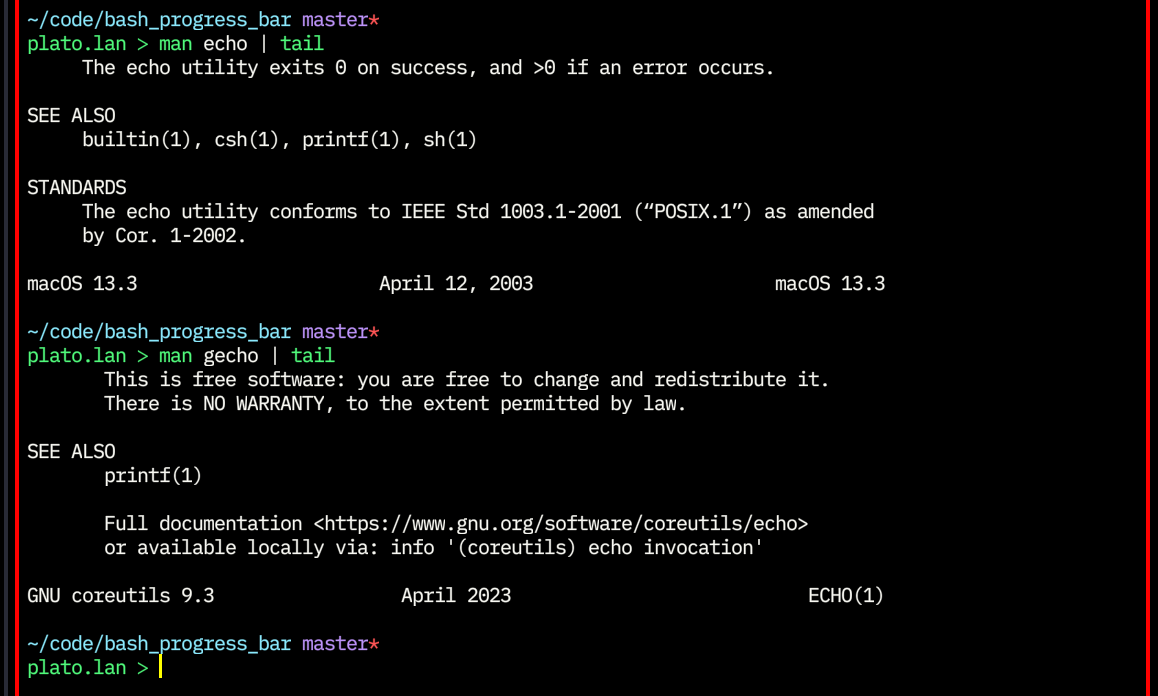
Install coreutils via Homebrew.
plato.lan ᐳ which -s gecho
/opt/homebrew/bin/gecho -> /opt/homebrew/Cellar/coreutils/9.3/bin/gecho
Thank you for your feedback. I'm not a MAC user so I had no way to debug. I'll close this topic now since it seems that the question is properly answered.
