
vectorbt
 vectorbt copied to clipboard
 polakowo
What is the c parameter and what are its methods and attributes?
Please forgive my misunderstanding but in the examples you pass a parameter c to almost all the functions and I can't find what's attributes/methods are?
@njit
def order_func_nb(c, size, price, commperc):
    """Place an order (= element within group and row)."""

    # Get column index within group (if group starts at column 58 and current column is 59,
    # the column within group is 1, which can be used to get size)
    group_col = c.col - c.from_col
    return portfolio_nb.create_order_nb(
        size=size[group_col],
        size_type=SizeType.TargetPercent,
        price=price[c.i, c.col],
        fees=commperc,
    )
or like in this example:
>>> import numpy as np

>>> @njit
... def group_prep_func_nb(c):
...     last_pos_state = np.array([-1])
...     return (last_pos_state,)

>>> @njit
... def order_func_nb(c, last_pos_state):
...     if c.shares_now > 0:
...         size = -c.shares_now  # close long
...     elif c.shares_now < 0:
...         size = -c.shares_now  # close short
...     else:
...         if last_pos_state[0] == 1:
...             size = -np.inf  # open short
...             last_pos_state[0] = -1
...         else:
...             size = np.inf  # open long
...             last_pos_state[0] = 1
...
...     return create_order_nb(size=size, price=c.close[c.i, c.col])

@BlackArbsCEO c is a context that is passed to every function in Portfolio.from_order_func. Different contexts are passed to different functions. For example, SegmentContext is passed to the segment_prep_func_nb. All contexts are listed here. I will provide a better documentation in the next release.

stumbled upon this while trying to build a custom order func. was quite lost what's inside c even I looked into vectorbt.portfolio.enums. do we have a mapping between contexts and those functions?

@Oriono https://polakowo.io/vectorbt/docs/portfolio/nb.html#vectorbt.portfolio.nb.simulate_nb
@Oriono https://polakowo.io/vectorbt/docs/portfolio/nb.html#vectorbt.portfolio.nb.simulate_nb
@polakowo Thanks! This helped a lot clarifying the sequence and structure of simulation design.
A quick question, in the stops/exits example here, since it only has one asset, I could in theory replace group_prep_func_nb by prep_func_nb to initialize stop ? But for best practice, it's better done in group_prep in case of multi assets. Am understanding this correctly?
@Oriono you're right, this stop array can (and should actually) be initialized in the prep_func_nb because it maps to all columns (target_shape[1]) rather than to the columns in the group (group_len). I will fix that.
Generally, it's just a matter of preference where you initialize the arrays. You can initialize smaller arrays (that match the number of columns in the group) in the group_prep_func_nb, or you can initialize bigger arrays (that match the total number of columns) in the prep_func_nb. I personally prefer to initialize everything in group_prep_func_nb because this way my data is hidden from other groups (since the array is re-initialized every time a new group is selected) and it's much more convenient to access this data.
Edit: and it doesn't matter if you have one column or multiple columns in vectorbt. One column is just an array with one element. You should always design your simulation to be fit for multiple columns. The number of columns shouldn't affect the way you initialize your arrays, only grouping (using group_by argument) may require some changes.
@polakowo I got the hidden from other group part, could you elaborate on the "much more convenient to access this data" part by using group_prep? I thought prep_func_nb would create "global" access within the whole simulation, wouldn't this be more convenient to access?
@Oriono you don't always need "global" access. Most of the time, it creates more problems than solutions, because now you have to carefully access data for the current column/group. For example, you have 100 columns, and in each of these columns and at each time step, you want to calculate a metric per column and store it in an array. If you defined this array globally, you would need to store group values using my_array[:, c.from_col:c.to_col] = .... If you defined this array in group_prep_func_nb, you could simply do my_array[:] = ..., without any need for picking the right columns. You would also avoid (accidentally) accessing elements for other columns and groups, and this is perfect because columns are processed one by one and so elements for columns that are not processed yet are empty and filled with random data by NumPy. If you accessed this data, you wouldn't get any errors, but this would have devastating effects on your strategy.
@polakowo now i see it more clearly! I was thinking using the array declared in prep to feed data, wasn't thinking too much on receiving/updating based on each element in all columns/time step.
also a dumb question, I was playing the following example from yours, in Visual Studio Code, seems like i need to run from numda import njit with all the njit functions together in one block, or it won't work correctly, see error screenshot below. so ideally, I should put this custom order function to a separate file and call that file?
from numba import njit
import numpy as np
import pandas as pd
from vectorbt.base.reshape_fns import flex_select_auto_nb, to_2d
from vectorbt.portfolio.enums import NoOrder, OrderStatus, OrderSide, Direction
from vectorbt.portfolio.nb import create_order_nb
import vectorbt as vbt


@njit
def group_prep_func_nb(c):
    # We need to define stop price per column, thus we do it in group_prep_func_nb
    stop_price = np.full(c.target_shape[1], np.nan, dtype=np.float_)
    return (stop_price,)

@njit
def order_func_nb(c, stop_price, entries, exits, size, flex_2d):
    # Select info related to this order
    # flex_select_auto_nb allows us to pass size as single number, 1-dim or 2-dim array
    # If flex_2d is True, 1-dim array will be per column, otherwise per row
    size_now = flex_select_auto_nb(c.i, c.col, np.asarray(size), flex_2d)
    # close is always 2-dim array
    price_now = c.close[c.i, c.col]
    stop_price_now = stop_price[c.col]
    # Our logic
    if entries[c.i, c.col]:
        if c.shares_now == 0:
            return create_order_nb(
                size=size_now,
                price=price_now,
                direction=Direction.LongOnly)
    elif exits[c.i, c.col] or price_now >= stop_price_now:
        if c.shares_now > 0:
            return create_order_nb(
                size=-size_now,
                price=price_now,
                direction=Direction.LongOnly)
    return NoOrder

@njit
def after_order_func_nb(c, order_result, stop_price, stop, flex_2d):
    # Same broadcasting as for size
    stop_now = flex_select_auto_nb(c.i, c.col, np.asarray(stop), flex_2d)
    if order_result.status == OrderStatus.Filled:
        if order_result.side == OrderSide.Buy:
            # Position entered: Set stop condition
            stop_price[c.col] = (1 + stop_now) * order_result.price
        else:
            # Position exited: Remove stop condition
            stop_price[c.col] = np.nan

def simulate(close, entries, exits, threshold):
    return vbt.Portfolio.from_order_func(
        close,
        order_func_nb,
        to_2d(entries, raw=True),  # 2-dim array
        to_2d(exits, raw=True),  # 2-dim array
        np.inf, # will broadcast
        True,
        group_prep_func_nb=group_prep_func_nb,
        after_order_func_nb=after_order_func_nb,
        after_order_args=(
            threshold,  # will broadcast
            True
        )
    )

close = pd.Series([10, 11, 12, 13, 14])
entries = pd.Series([True, True, False, False, False])
exits = pd.Series([False, False, False, True, True])
simulate(close, entries, exits, 0.1).share_flow()
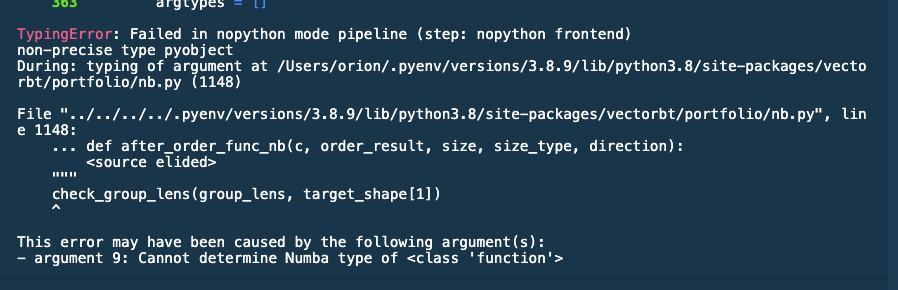
@Oriono any function decorated with njit requires it in imports. The error shows you that some of the functions weren't decorated.