

 pocoproject
Build with VS 2017: Unknown Switch : p:Platform=Win32
Expected behavior
build a solution file and project files without error.
Actual behavior
Invalid Command Line. Unknown Switch : p:Platform=Win32 It still proceeded to create Crypto_vs150.sln. How can I get rid of this "Invalid"? Is it safe to ignore? thanks
Steps to reproduce the problem
(please make this a SSCCE, if applicable and reasonable)
- download zip from git
- open Developer Command Prompt for VS 2017
- run build_vs150.cmd from .\poco-develop
POCO version
2.0.0
Compiler and version
Visual Studio 2017 VCToolsVersion=14.15.26726 VisualStudioVersion=15.0
Operating system and version
Windows 7
Other relevant information

When I open C:\dev\poco\poco-develop\Foundation\Foundation_vs150.sln and build solution, I get the fatal link error below. Any ideas?
1>Generating Code... 1> Creating library ..\lib\PocoFoundationd.lib and object ..\lib\PocoFoundationd.exp 1>Foundation_vs150.vcxproj -> C:\dev\poco\poco-develop\Foundation..\bin\PocoFoundationd.dll 1>Done building project "Foundation_vs150.vcxproj". 2>------ Build started: Project: TestSuite, Configuration: debug_shared Win32 ------ 3>------ Build started: Project: TestLibrary, Configuration: debug_shared Win32 ------ 2>LINK : fatal error LNK1104: cannot open file 'PocoCppUnitd.lib' 2>Done building project "TestSuite_vs150.vcxproj" -- FAILED. 3> Creating library bin\TestLibraryd.lib and object bin\TestLibraryd.exp 3>TestLibrary_vs150.vcxproj -> C:\dev\poco\poco-develop\Foundation\testsuite\bin\TestLibraryd.dll ========== Build: 2 succeeded, 1 failed, 1 up-to-date, 0 skipped ==========
Taking a step back, I want to state our objective. We are currently using POCO version 1.7.8.3 built with VS 2013 to get the following libraries .\POCO.FOUNDATION.V120.1.7.8.3\LIB\POCOFOUNDATIONMDD.LIB .\POCO.CRYPTO.V120.1.7.8.3\LIB\POCOCRYPTOMDD.LIB . I am looking to generate the equivalent using version 2.0.0 and build with VS 2017. What is the easiest way to achieve this? thanks
@shamusn Hold on some times. " cannot open file 'PocoCppUnitd.lib'" is an issue being fixed soon.

After looking closer at the intent of buildwin.cmd, I manually typed the devenv command arguments: devenv Foundation_vs150.sln /build "debug_static_md|Win32" /useenv /Project Foundation_vs150.vcxproj
This produced the desired lib file.

Getting there.
When building Crypto_vs150.sln, it gives an error about missing openssl files (see later on in the comment). I can see that folder C:\dev\poco\poco-develop\openssl is empty. Was this supposed to be filled in as part of the github zip download? Or did I miss a step? thanks
C:\dev\poco\poco-develop\Crypto>devenv Crypto_vs150.sln /build "debug_static_md|Win32" /useenv /Project Crypto_vs150.vcxproj
Microsoft Visual Studio 2017 Version 15.0.28010.2019. Copyright (C) Microsoft Corp. All rights reserved. 1>------ Build started: Project: Crypto, Configuration: debug_static_md Win32 ------ 1>File not found - *.dll 1>File not found - *.lib 1>File not found - *.pdb 1>X509Certificate.cpp 1>c:\dev\poco\poco-develop\crypto\include\poco\crypto\crypto.h(24): fatal error C1083: Cannot open include file: 'openssl/opensslv.h': No such file or directory
I tried https://github.com/pocoproject/openssl but some of the sites are blocked on my side. Going to try and download zip from https://github.com/openssl/openssl. Signing off for the day.
You should update the git submodule used by Poco with the command below:
git submodule udpate --init --recursive --remote openssl
thanks... I have to switch to something else for a few days. I will try this next week and let you know how we get on.
thanks for the help. can you please explain where I am supposed to run the git submodule command from. I tried running from git bash /c/dev/git/poco and /c/dev/git/poco/openssl and I get a usage dialog box.
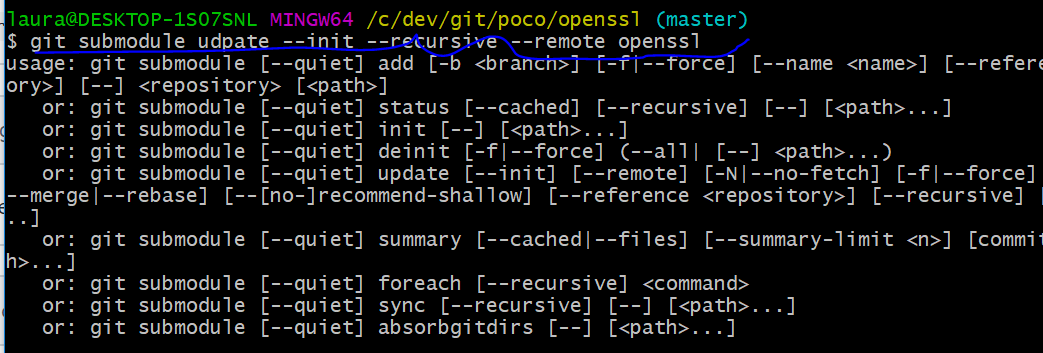

Looking at gettingStarted page openSSL section, I am running the following: $ cd %POCO_BASE% $ rmdir /s /q openssl $ git clone https://github.com/pocoproject/openssl PS C:\dev\git\poco\openssl> Set-ExecutionPolicy -ExecutionPolicy RemoteSigned -Scope CurrentUser .\build.ps1 -openssl_release 1.1.0 -vs_version 150 -config release -platform Win32 -library static
packages are downloading and extracting. will continue another time.

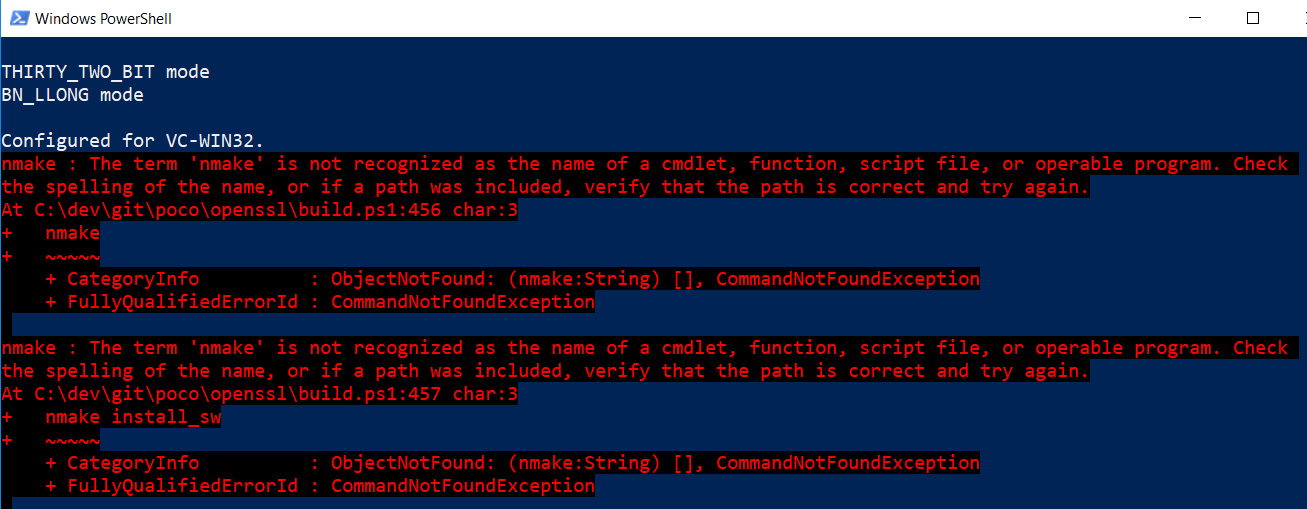
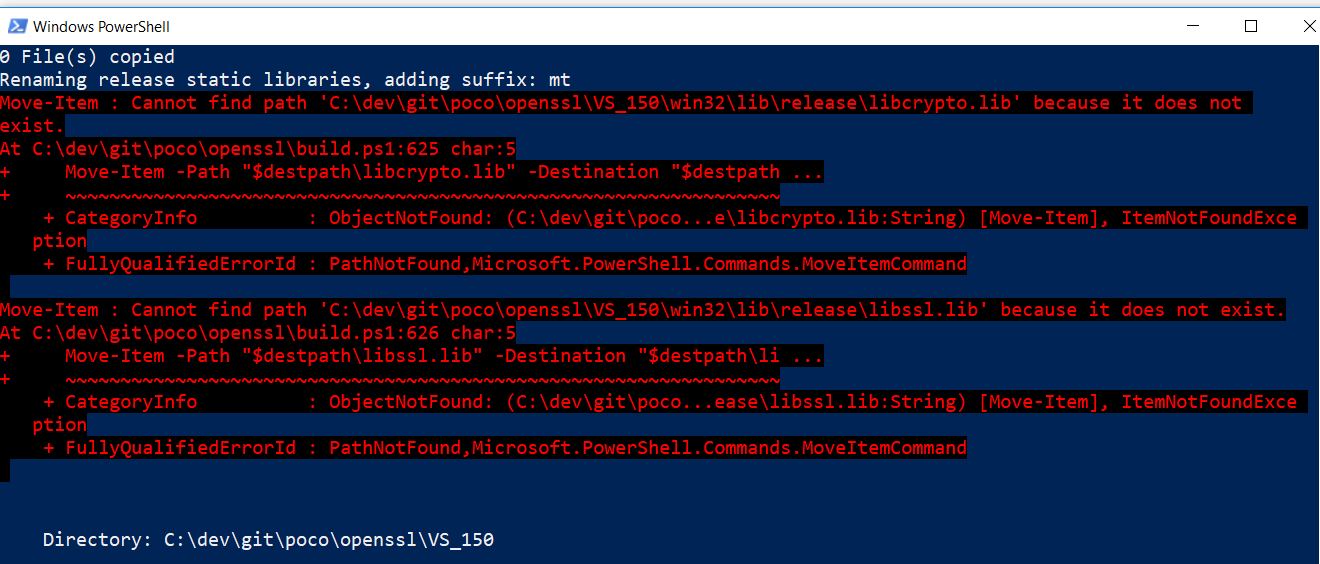

If I use the x86 Native Tools Command Prompt for VS 2017, nmake path is set. Will the build.ps1 work in VS command prompt? The Getting Started page suggested using a clean cmd window. 'i.e. not in the one provided by Visual Studio for 32/64-bit builds '.
This issue is stale because it has been open for 365 days with no activity.
![github-actions[bot] avatar](https://avatars.githubusercontent.com/in/15368?v=4 "Published by a pub.dev verified publisher")
This issue was closed because it has been inactive for 60 days since being marked as stale.