

 pocl
pocl
segmentation fault in clGetDeviceIDs on arm64(Jetson AGX)
Hi,
after successfully compiled the pocl on Jetson AGX platform using LLVM 15, I have encountered a segmentation fault while calling the clGetDeviceIDs function. The compilation was successfully only after applying the patch mentioned in https://github.com/pocl/pocl/issues/1196
Trying to debugg, the issue, I could trace it till here:
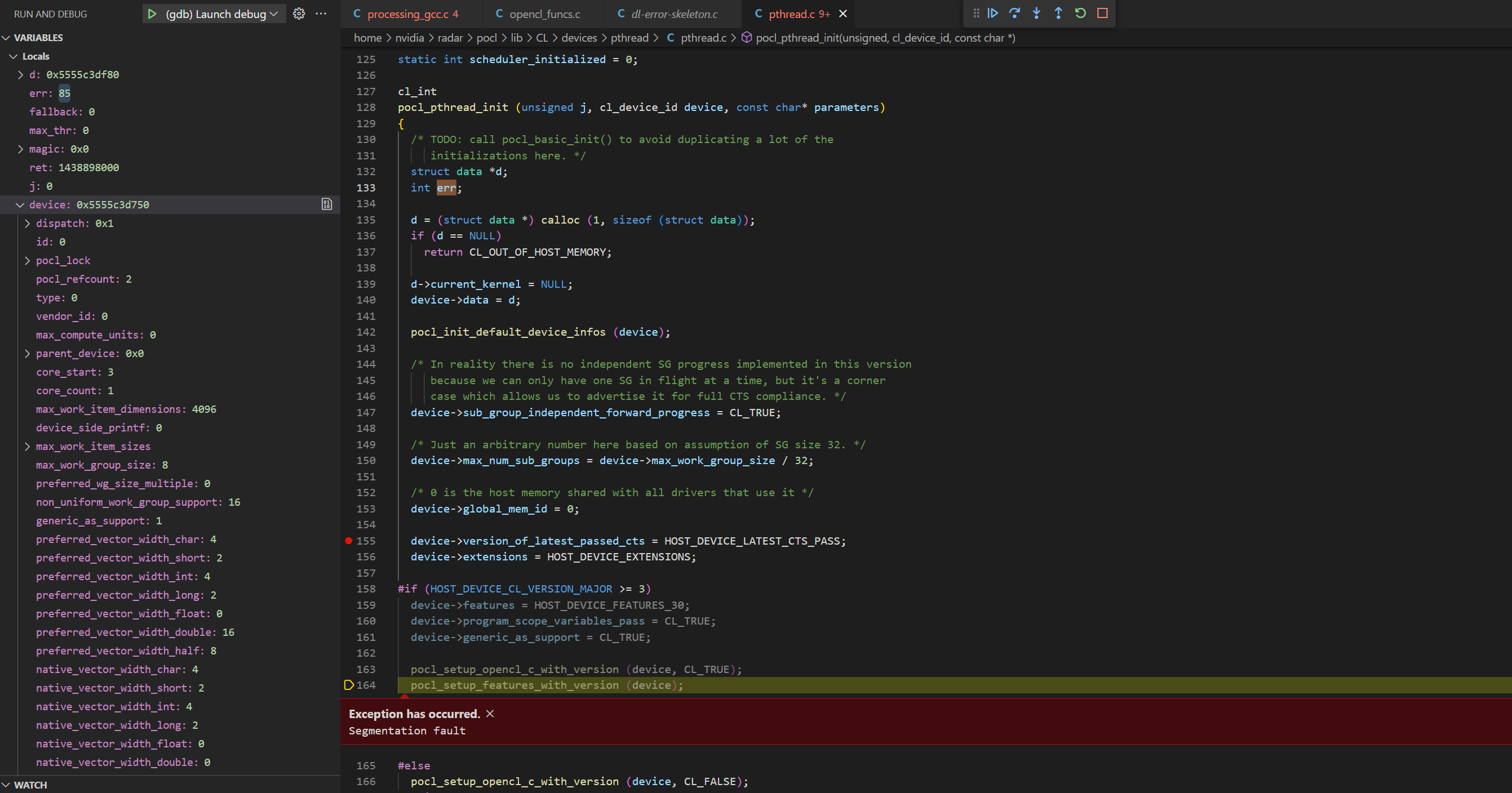

Hi. Generally the first step in debugging segfaults is usually to get a backtrace with the debug build. Does that show something more useful?

This seems like a different issue than #1196. Do you have a backtrace ? Screenshots aren't too useful, but i see one problem: dev->dispatch is 0x1 - not a valid pointer. Are you using an ICD (libOpenCL.so) ? Is it Nvidia's ICD ? i would not bet that Nvidia's ICD works with anything but Nvidia's own OpenCL runtime. Can you try with opensource OCL-ICD or Khronos' ICD, or build PoCL without ICD (-DENABLE_ICD=0) ?

Hi again,
ICD:
As stated in the documentation for OpenCL 3.0, ocl-icd (2.3.x) is necessary (which seems to no be available on my system)
Furthermore, clinfo reports the following
The crash I have reported earlier happens under the HOST_DEVICE_CL_VERSION_MAJOR >= 3 which would make sense according to the message reported by clinfo.
I have checked where the HOST_DEVICE_CL_VERSION_MAJOR is set, and it looks like it is somehow hardcoded to the compiler version: https://github.com/pocl/pocl/blob/release_3_1/CMakeLists.txt#L1187
On my side, I have installed LLVM 14 and 15; I am wondering if is possible to compile pocl using these compilers and not using OpenCL 3.0
I have built pocl with (-DENABLE_ICD=0) and afterwards clinfo outputs Number of platforms 0
On my side, I have installed LLVM 14 and 15; I am wondering if is possible to compile pocl using these compilers and not using OpenCL 3.0
I think not with the current code, it is indeed hardcoded, however if you remove that code if(LLVM_VERSION VERSION_GREATER_EQUAL 14.0) and just hardcode it to 1.2, it should be possible to build.
Hi @buni-rock ,
Are you able to run POCL (opencl version 3.0) on Jetson AGX ? I am considering to purchase an Jetson Orin nano to running POCL, but not sure if it is viable, appreciate if you can advise

If you are okay with using binaries, you can try the instructions at https://github.com/pocl/pocl#pocl-with-cuda-driver

I've tried it on an aarch64 server, but not a Jetson in particular. If it does not work there, I'll be happy to fix it.
Hi @buni-rock ,
Are you able to run POCL (opencl version 3.0) on Jetson AGX ? I am considering to purchase an Jetson Orin nano to running POCL, but not sure if it is viable, appreciate if you can advise
Hi,
on our side we had 2 Jetsons, the one I tried to use failed to run POCL out of the box. The other one, which my colleague used, could run POCL without much effort. On the second device we could build POCL from sources and install it successfully. In principle, you can run POCL on Jetson, but the questions would be: how much effort you have to put in in order to achieve it?
PS: regarding this issue, I am afraid I can't proceed further due to lack of time.
@isuruf I followed the instruciton in https://github.com/pocl/pocl#pocl-with-cuda-driver, installed the pocl-cuda via mamba. But the clinfo still shows nothing. Do you have idea how could i utililize the pocl installed? BTW, i am still using an old jetson nano, not orin nano.
Hi @buni-rock , Are you able to run POCL (opencl version 3.0) on Jetson AGX ? I am considering to purchase an Jetson Orin nano to running POCL, but not sure if it is viable, appreciate if you can advise
Hi,
on our side we had 2 Jetsons, the one I tried to use failed to run POCL out of the box. The other one, which my colleague used, could run POCL without much effort. On the second device we could build POCL from sources and install it successfully. In principle, you can run POCL on Jetson, but the questions would be: how much effort you have to put in in order to achieve it?
PS: regarding this issue, I am afraid I can't proceed further due to lack of time.
what are the differences between these two Jetson? why one works but the other one fails?
I followed the instruciton in https://github.com/pocl/pocl#pocl-with-cuda-driver, installed the pocl-cuda via mamba. But the clinfo still shows nothing. Do you have idea how could i utililize the pocl installed?
You will see a pocl.icd file in ~/mambaforge/etc/OpenCL/vendors/pocl.icd. Copy that to /etc/OpenCL/vendors/pocl.icd.
If you have the ICD loader from Khronos or ocl-dev, then you can set OCL_ICD_VENDORS=~/mambaforge/etc/OpenCL/vendors/pocl.icd instead of copying.
I followed the instruciton in https://github.com/pocl/pocl#pocl-with-cuda-driver, installed the pocl-cuda via mamba. But the clinfo still shows nothing. Do you have idea how could i utililize the pocl installed?
You will see a
pocl.icdfile in~/mambaforge/etc/OpenCL/vendors/pocl.icd. Copy that to/etc/OpenCL/vendors/pocl.icd. If you have the ICD loader from Khronos or ocl-dev, then you can setOCL_ICD_VENDORS=~/mambaforge/etc/OpenCL/vendors/pocl.icdinstead of copying.
Hi @isuruf
yes, i got the clinfo output, but some error from that , do you have any idea of that?
According to this handy table -33 is CL_INVALID_DEVICE which would point towards something going wrong in device initialization. Try running with POCL_DEBUG=error,cuda and see if that spits out anything useful.

According to this handy table -33 is
CL_INVALID_DEVICEwhich would point towards something going wrong in device initialization. Try running withPOCL_DEBUG=error,cudaand see if that spits out anything useful.
Hi @jansol
Thanks very much for your reply. I add the debug environment variable, and got below log:
It seems related to the hardware architecture, i am using the Jetson nano devkit, the spec could be found at https://developer.nvidia.com/embedded/jetson-nano-developer-kit
A good sanity check is to install nvidia-cuda-toolkit and see if you can pickup the GPU with nvidia-smi. I've found the Nvidia drivers for aarch64 are a bit picky. Not that this will necessarily solve your issue, but I ended up re-installing my Nvidia drivers on an AVA devkit.
I'm looking forward to seeing your progress on this issue.

I guess the following works?
#include <stdio.h>
#include <cuda.h>
#include <cuda_runtime.h>

#define CUDA_CHECK(ans) { gpuAssert((ans), __FILE__, __LINE__); }
void gpuAssert(cudaError_t code, const char *file, int line)
{
   if (code != cudaSuccess)
   {
      fprintf(stderr,"GPUassert: %s %s %d\n", cudaGetErrorString(code), file, line);
      exit(code);
   }
}

int main()
{
  CUDA_CHECK(cuInit(0));
  CUdevice device;
  CUDA_CHECK(cuDeviceGet(&device, 0));
  CUcontext ctx;
  CUDA_CHECK(cuCtxCreate(&ctx, 0, device));
  CUDA_CHECK(cuCtxCreate(&ctx, 0, device));
  int sm_maj, sm_min;
  CUDA_CHECK(cuDeviceGetAttribute(&sm_maj, CU_DEVICE_ATTRIBUTE_COMPUTE_CAPABILITY_MAJOR, device));
  CUDA_CHECK(cuDeviceGetAttribute(&sm_min, CU_DEVICE_ATTRIBUTE_COMPUTE_CAPABILITY_MINOR, device));
  printf("sm_%d%d\n", sm_maj, sm_min);
  CUDA_CHECK(cuCtxDestroy(ctx));
  return 0;
}
A good sanity check is to install
nvidia-cuda-toolkitand see if you can pickup the GPU withnvidia-smi. I've found the Nvidia drivers foraarch64are a bit picky. Not that this will necessarily solve your issue, but I ended up re-installing my Nvidia drivers on an AVA devkit.I'm looking forward to seeing your progress on this issue.
Thanks Edward for the suggestion. It's weird i cannot install nvidia toolkit at my jetson nano. I will try to figure it out later.
From the log of this example code, the Jetson nano compute capability truely is sm53:
Hi @isuruf
any other ideas?
Now it seems cuda able to report correct compute architecture, but POCL failed to read it and cannot pass initialization, even manually set it. Maybe any logic inside POCL could be optimized?
Can you try https://github.com/pocl/pocl/issues/1206#issuecomment-1631029796 ?
Can you try #1206 (comment) ?
@isuruf Do you mean the code below you mentioned? I tried the example code SimpleTextureDrv, which include the same function you provided, and it does able to read the SM major and minor value via cuda api, and the value is 53, same as previous we manually set to the environment variable.
#include <stdio.h>
#include <cuda.h>
#include <cuda_runtime.h>

#define CUDA_CHECK(ans) { gpuAssert((ans), __FILE__, __LINE__); }
void gpuAssert(cudaError_t code, const char *file, int line)
{
   if (code != cudaSuccess)
   {
      fprintf(stderr,"GPUassert: %s %s %d\n", cudaGetErrorString(code), file, line);
      exit(code);
   }
}

int main()
{
  CUDA_CHECK(cuInit(0));
  CUdevice device;
  CUDA_CHECK(cuDeviceGet(&device, 0));
  CUcontext ctx;
  CUDA_CHECK(cuCtxCreate(&ctx, 0, device));
  CUDA_CHECK(cuCtxCreate(&ctx, 0, device));
  int sm_maj, sm_min;
  CUDA_CHECK(cuDeviceGetAttribute(&sm_maj, CU_DEVICE_ATTRIBUTE_COMPUTE_CAPABILITY_MAJOR, device));
  CUDA_CHECK(cuDeviceGetAttribute(&sm_min, CU_DEVICE_ATTRIBUTE_COMPUTE_CAPABILITY_MINOR, device));
  printf("sm_%d%d\n", sm_maj, sm_min);
  CUDA_CHECK(cuCtxDestroy(ctx));
  return 0;
}