
teams-dev-samples
 teams-dev-samples copied to clipboard
 pnp
pnp
Need Help to setup the Prerequisites for bot-microsoft-search-api
Sample
bot-microsoft-search-api
Author(s)
@AhmadiRamin
Question
Hi! I tried to setup the Prerequisites for bot-microsoft-search-api but unfortunately, I wasn't able to to start the bot locally. The 9. Setup SSO is a link to another URL that explain again the setup of AAD and bot service and SSO connection.
Can you please point out what exactly need to be done in this step 9. Setup SSO and what exactly permissions do we need to add to the AAD App.
Would appreciate If you can provide details setup of the Prerequisites as this is the important steps to make the bot works.

Hi Mohammad,
I'm on holiday and do not have my laptop with me, if you can wait until May 8, I will give you the required permissions and everything you need to setup the bot.

Hi @AhmadiRamin
Have a good holiday. I'll be waiting you to be back :)
Hi @AhmadiRamin Hope you had a good holiday and took some rest. Can you help me make sure that I have all enough configurations for the solution to work.
Hi @mohammadamer, thanks :)
Here are the permissions you need for the app:
- Calendars.Read
- Files.Read.All
- Mail.Read
- Sites.Read.All
- User.Read
- profile
- openid
- offline_access
Also make sure you add the above permissions to the Scopes when creating the SSO connection like this:
User.Read email offline_access openid profile Sites.Read.All Files.Read.All Calendars.Read Mail.Read
Let me know if you need any help.
Hi @AhmadiRamin,
I'm a bit confused. I see that there is only one place to add the permissions which is the app permissions. I didn't get this part:
"Also make sure you add the above permissions to the Scopes when creating the SSO connection like this:
User.Read email offline_access openid profile Sites.Read.All Files.Read.All Calendars.Read Mail.Read"
Can you please elaborate more?
Hi @mohammadamer
If you follow the steps from this article, the last step is creating the OAuth Connection Settings, and you need to update the scopes here:
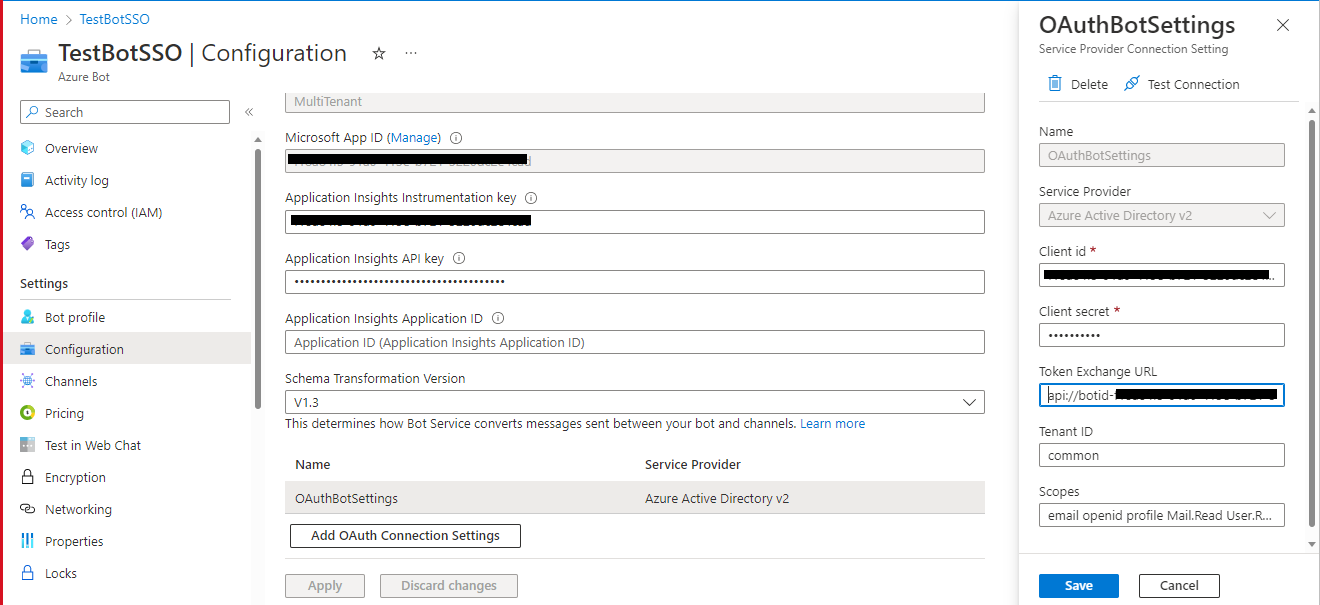
Hi @AhmadiRamin, Okay, will update permissions then test it. Thanks a lot for helping :)
Hi @AhmadiRamin,
I updated the app permissions but still have issues when test the bot locally. I got 400 Bad Request in the ngrok shell windows. Also If I test the bot connection from Azure I got error.
I feel like there is something messing or something is not correct in my app or bot configuration.
{
  "error": {
    "code": "ServiceError",
    "message": "Missing required query string parameter: code. Url = https://token.botframework.com/.auth/web/redirect?error=invalid_client&error_description=AADSTS650053%3a+The+application+%27Graph+Search+API+Bot%27+asked+for+scope+%27AccessAsUser%27+that+doesn%27t+exist+on+the+resource+%2700000003-0000-0000-c000-000000000000%27.+Contact+the+app+vendor.%0d%0aTrace+ID%3a+33002f6d-e03b-4530-9c34-2c0677ac3900%0d%0aCorrelation+ID%3a+815d62df-9b88-4257-991b-945bfc4e1803%0d%0aTimestamp%3a+2023-05-10+15%3a48%3a29Z&state=3e2b029ff2d94254ac77b594e3c2cb7b"
  }
}
Hi @mohammadamer
Are you sure you correctly configured the SSO? can you send some screenshots from "Expose API endpoint" page?
Hi @AhmadiRamin,
Thanks a lot for helping. I would like to share the findings that I have.
Debugging locally
Debugging locally seems to be working however I got this message in "Bot Framework Emulator" which is, I think fine.
Debugging in teams
I managed to add the bot manifest to teams but it seems to be not working. Still, something is missing in the manifest file to expose the app.
Changes in the bot in teams doesn't trigger the exposed app that is running locally however I added the ngrok url in the validDomains in the maifest file.
   "validDomains": [
        "token.botframework.com",
        "online.microsoftlogin.com",
        "1234-123-12-12-1234.ngrok-free.app"
    ]
@AhmadiRamin, Could you please advice on what could be missing or where might be the issue because I'm able to debug locally but within MS Teams, the code does not get triggered.