
powershell
 powershell copied to clipboard
 pnp
pnp
[FEATURE] - Add-PnPApp/Publish-PnPApp - add parameters to add/remove to 'all sites' and/or 'all teams'
Is your feature request related to a problem? Please describe. At the moment it seems not possible to enable/disable Apps in the Tenant App Catalog for usage in All Sites or All Teams, by means of a PnP cmdlet
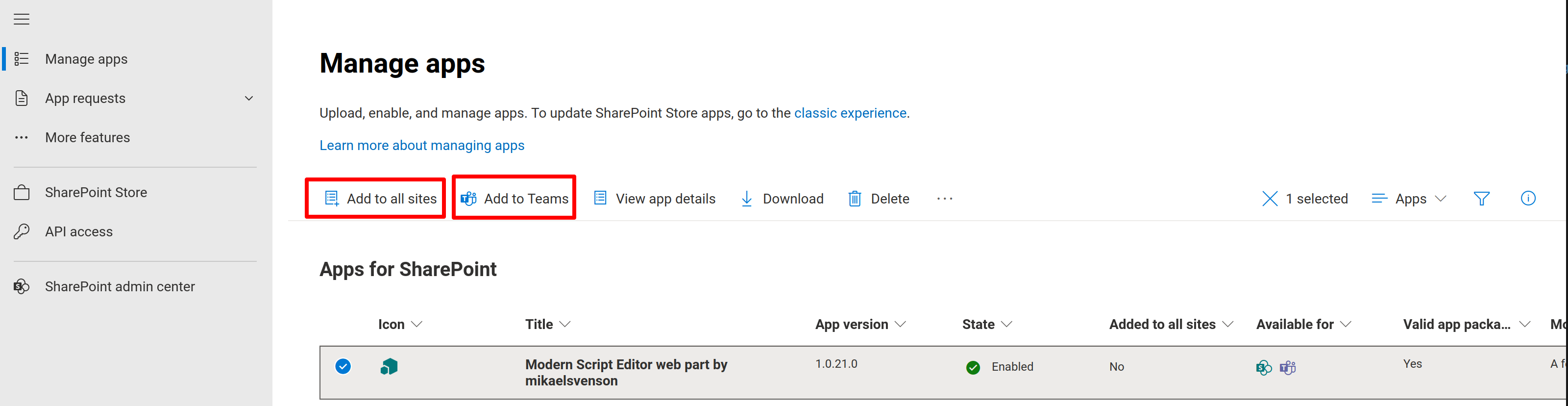
Describe the solution you'd like I would like the options in the screenshot below to have corresponding cmdlet options (especially when adding/publishing apps to a catalog)
For instance:
- add the parameters
AddToAllSitesandAddToAllTeamsto theAdd-PnPAppandPublish-PnPAppcmdlets - These parameters should support setting
:$falseand:$true, so we can enable and disable these options just like in the UI (both on Adding the App AND on Republishing an existing App)
Describe alternatives you've considered I could do this manually, but this would require documenting what has been done. I prefer the script based approach and Documentation-as-Code.
Additional context

For pushing the app to teams, you can use Sync-PnPAppToTeams
https://pnp.github.io/powershell/cmdlets/Sync-PnPAppToTeams.html

Ah OK, in that case I would also expect the cmdlets Unsync-PnPAppToTeams, Sync-PnPAppToSites and Unsync-PnPAppToSites to be available. What do you think @gautamdsheth ?
For pushing the app to teams, you can use
Sync-PnPAppToTeamshttps://pnp.github.io/powershell/cmdlets/Sync-PnPAppToTeams.html
Hi, when i use this command i get this error Sync-PnPAppToTeams -Identity F8FBB38C-26DB-4B17-B506-35D0706BBA46. I'm logged into a Tenant Admin account.
