
powershell
 powershell copied to clipboard
 pnp
pnp
[BUG] Get-PnPSitePolicy returns empty on recent sites while synced Site policy is visible in UI
Reporting an Issue or Missing Feature
I reuse the #1645 as i haven't see it well formatted and encounter same behaviour currently.
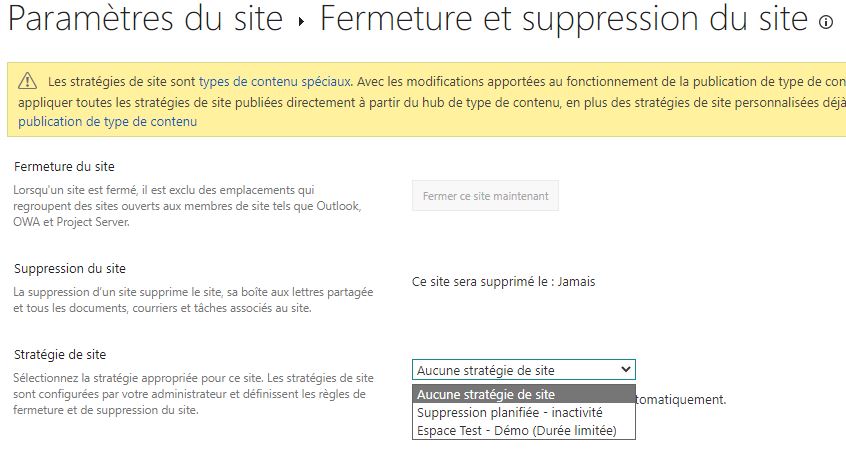
On recently created sites (less than few hours), when we execute Get-PnPSitePolicy, site policies synced from the contenttypehub are not retrieved. At the same time we do see the site policies in the SharePoint UI. Also from the UI the policy can be applied successfully.
We also see that the hidden contenttype which used to be created once the sync was done, is also not available.
We see the same behaviour on multiple tenants. On older sites the policy is retrieved without any problem.
Expected behavior
It would be nice if we can apply site policies immediatly after site creation, without having to wait many hours the contenttypehub sync, as we can do it directly from the UI.
Actual behavior
On fresh created sites, the Get-PnPSitePolicy -AllAvailable give no results. The Set-PnPSitePolicy doesn't seem to aply anything too. We must wait few hour the automatic sync to do it.
We can apply the policy immediatly only from the UI, wich shows available policies immediatly.
Steps to reproduce behavior
Please include complete script or code samples in-line or linked from gists
- Create some Site Policies on ContentType Hub, Publish them & wait few hour at least.
- Create a new site
- Enable Site Policy Feature (
Enable-PnPFeature -Identity "2fcd5f8a-26b7-4a6a-9755-918566dba90a" -Scope Site) - Try getting all available policies with cmd
Get-PnPSitePolicy -AllAvailable
You get nothing as a result. No error, no result. Just nothing. At the same time, when getting on the UI (/_layouts/15/ProjectPolicyAndLifecycle.aspx), you can see the available Site Policies from the contenttypehub.
- Few hour later, try again the cmd. This time, policies are available as the cmd result too.
What is the version of the Cmdlet module you are running?
PnP.Powershell v1.10.0
Which operating system/environment are you running PnP PowerShell on?
- [x] Windows
- [ ] Linux
- [ ] MacOS
- [ ] Azure Cloud Shell
- [x] Azure Functions
- [ ] Other : please specify
Screenshots
List of available policies from the UI
Results of cmdlets

