
powershell
 powershell copied to clipboard
 pnp
pnp
[BUG] Invoke-PnPSiteTemplate with Service Principal creates duplicate documents folder and list views
Reporting an Issue or Missing Feature
I'm reporting a bug/issue.
Context
We use Azure Functions to automate site creation. To ensure that all created site are configured in the same way, we configured manually a model site, created a template from that model and apply the template during automated site creation in Azure Function. We execute the functions with Service Principal, using user credentials is not an option, as we use MFA.
Expected behavior
After template application the target site should be correctly configured as defined in model site / template.
Actual behavior
For sites with other LCID than 1033 Invoke-PnPSiteTemplate creates duplicate documents folder and duplicate list views in documents and in site pages when executed with Service Principal. Details see below under steps. When executed with real user, it works as expected.
Steps to reproduce behavior
Create a template file: This describes only sample steps to repoduce the issue, real template has a lot more configurations.
- Create a Communication Site using PnP with LCID 1033
New-PnPSite -Type CommunicationSite -Title TestModelEN -Url https://####.sharepoint.com/sites/TestModelEN -LCID 1033 - Open new site
- Create two new site columns (Managed Metadata)
- Create two new site content types (one for site pages / one for documents) in one new group
- Add both site columns to both new content types
- Add the content type for pages to the /site pages/ and allow only to use this new one
- Allow content type in /Shared Documents/
- Add content type for documents in the /Shared Documents/, change order to allow using only the new one content type
- Disallow the content type usage
- Connect to site using PnP
Connect-PnPOnline -Url https://####.sharepoint.com/sites/TestModelEN -ClientId $ClientId -ClientSecret $ClientSecret - Exporte the Site Template using PnP
Get-PnPSiteTemplate -Out "masterTemplate.xml"
Create new Communication Sites with other LCID:
New-PnPSite -Type CommunicationSite -Title TestSiteDE -Url https://####.sharepoint.com/sites/TestSiteDE -LCID 1031
New-PnPSite -Type CommunicationSite -Title TestSiteDE -Url https://####.sharepoint.com/sites/TestSiteDE2 -LCID 1031
Invoke-PnPSiteTemplate:
-
with Service Pricipal as we use in Azure Function
Connect-PnPOnline -Url https://####.sharepoint.com/sites/TestSiteDE -ClientId $ClientId -ClientSecret $ClientSecretInvoke-PnPSiteTemplate -Path "./masterTemplate.xml"--> leads to described issue -
with real user executed in PowerShell to compare the results
Connect-PnPOnline -Url https://####.sharepoint.com/sites/TestSiteDE2 -UseWebLoginInvoke-PnPSiteTemplate -Path "./masterTemplate.xml"--> works as expected
Issue details
Following details are wrongly configured
1. Duplicate documents folder
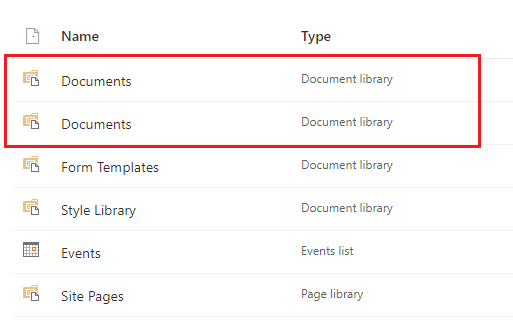
- Path of first folder: https://####.sharepoint.com/sites/TestSiteDE/Freigegebene%20Dokumente
- Path of second folder: https://####.sharepoint.com/sites/TestSiteDE/Shared%20Documents
2. Wrong list view in first documents folder List view (AllItems.aspx) does not contain the added colums
3. Duplicate list view in second documents folder
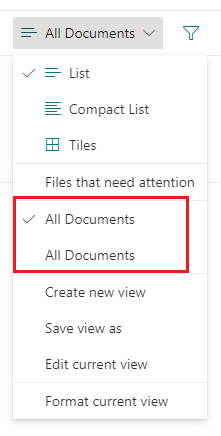
- First list view (AllItems.aspx) does not contain the added colums
- Duplicate list view (AllItems1.aspx) contains the added colums
4. Duplicate list view in Site Pages
 For every list view:
- First list view does not contain the added colums
- Duplicate list view contains the added colums
What is the version of the Cmdlet module you are running?
PnP.PowerShell 1.5
Which operating system/environment are you running PnP PowerShell on?
- [ ] Windows
- [ ] Linux
- [ ] MacOS
- [ ] Azure Cloud Shell
- [X] Azure Functions
- [ ] Other : please specify

@dbritta - You mentioned in the issue that you are using PnP PS 1.5.0 , can you please update to the latest 1.9.0 release , check and let us know ??

@gautamdsheth - I updated to PnP.PowerShell 1.9.0 and tried again, but result is the same.
This issue is stale because it has been open 14 days with no activity. Remove stale label or comment or this will be closed in 5 days
![github-actions[bot] avatar](https://avatars.githubusercontent.com/in/15368?v=4 "Published by a pub.dev verified publisher")
@dbritta - Please update to the latest release and reopen is the issue persists.
However please note you will need PS 7.2 or later to benefit from the improvements. PS5 support has been dropped in the new release.
