
powershell
 powershell copied to clipboard
 pnp
pnp
Unable to add user to SharePoint Site security group when site name has special characters
Expected behavior
The expected behavior here is to execute Add-PnPGroupMember and get the member added to the SPO group but instead got error and when tried with a site which has no special characters it worked fine.
Actual behavior
Error: Add-PnPGroupMember : Invalid request.
Steps to reproduce behavior
A SharePoint Site that has a name with special characters EX: Økonomi
$site = "https://tenant.sharepoint.com/sites/Økonomi"
$client1 = "00000000-0000-0000-00000000"
$cert1 = "C:/Cert1.pfx"
$certPass1 = (ConvertTo-SecureString -String "Password1" -AsPlainText -Force)
Connect-PnPOnline  -Url $site -ClientId $client1 -CertificatePath $cert1 -CertificatePassword $certPass1 -Tenant "tenant.onmicrosoft.com"

$MembersGroup = Get-PnPGroup -AssociatedMemberGroup
Add-PnPGroupMember -LoginName "AD Group Title" -Identity $MembersGroup.Title

Error:
Add-PnPGroupMember : Invalid request.

Add-PnPGroupMember -LoginName "AD Group Title" -Identity  $MembersGroup.Id
Same error:
Add-PnPGroupMember : Invalid request.
What is the version of the Cmdlet module you are running?
1.7.0
Which operating system/environment are you running PnP PowerShell on?
- [x] Windows


@mohammadamer How did you even manage to create a sitecollection with Økonomi in the URL? If I try it through the web UI it will just take out that entire letter. If I try it using New-PnPSite it will normalize it to Okonomi instead.
@KoenZomers I am using PnP Powershell and the site has been created with this title "ØkonomiOgFinansiering" and this name "ØkonomiOgFinansiering" :) Even different sites with special characters have been created using PnP Powershell without getting the normalizing of names but when it came to different power shell commands like Add-PnPGroupMember I found out the issue as I described.
I need more information to try to reproduce this. When I simply use New-PnPSite to try to create a site with this name, it normalizes it to a normal o:

How exactly did you create a site where the Ø would be retained in the URL?
@KoenZomers This is how we create site using PnP Powershell. The only difference is that I am using a JSON file which contains every site Title, URL etc. Urls in my Json file has URL and title with these special characters as I explained.
I a for loop I am using the following line to create sites using the data in JSON file.
New-PnPSite -Type $Site.SiteType -Title $Site.Title -Url $Site.URL -Owner $Site.SiteOwner
Which version of PnP PowerShell are you using? New-PnPSite does not have a -Url parameter. New-PnPTenantSite does, but that does not have a Type parameter. So I'm still confused :)
Can you share the output of:
Get-InstalledModule *PnP* | Select Name, Version | FT
@KoenZomers, After you specify the type parameter, Url parameter will be present.
PnPPowershell Version PnP.PowerShell 1.7.0
@mohammadamer - I think its a bug in SharePoint's side that you were able to create a site with a URL having special characters. As Koen mentioned, its not possible to create a site from UI with this URL. We added a fix in the site creation code to normalize these characters.
Can you try with the latest nightly to create a new site and then add members ? In any case, we are not going to be able to fix the issue because it is the server that is sending us this response.

@gautamdsheth
Well, I knew now that even SharePoint is not supporting it but I had tried before with PnPPowerShell and it worked that's why I thought it's supported. Now, I am trying with PnPPowerShell 1.8.0 and the site created without any normalization which means that bug still present.
Can you provide the minimal repro steps that you used for site creation ? Am not able to create sites with special chars, so I could be missing something.
We are using the latest PnP version , so maybe you can try with that ?
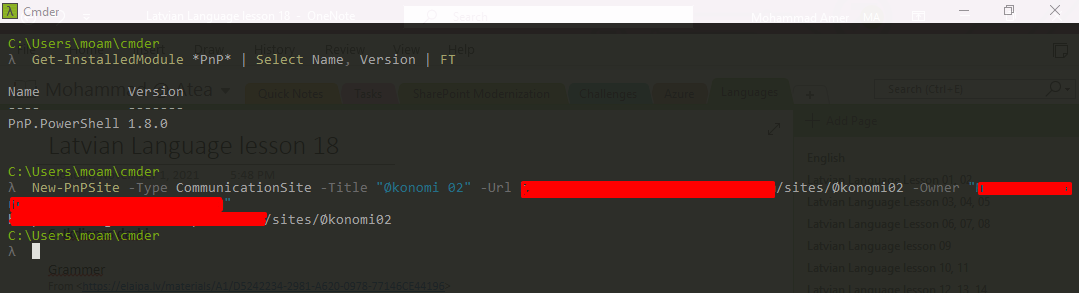
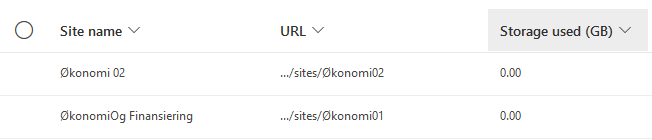
I can create a site with that character in the URL now using:
new-pnpsite -type TeamSite -title "ØkonomiOgFinansiering1" -Url https://tenant.sharepoint.com/sites/ØkonomiOgFinansiering1 -owner [email protected]
When I then connect to that tenant and try to add a user to the group, it works without any problems:

Still must be missing something here, but no idea what.