

 pnp
pnp
Sensitivity Label not applied when using TeamSiteCollectionCreationInformation object to Create Team Site
Hello ,
I have validated that this method doesn't support yet applying the sensitivity label to the SharePoint Team Site/Group.
Class PnP.Framework.Sites.SiteCollection
Method: public static Task<ClientContext> CreateAsync(ClientContext clientContext, TeamSiteCollectionCreationInformation siteCollectionCreationInformation, int delayAfterCreation = 0, int maxRetryCount = 12, int retryDelay = 10000, bool noWait = false, string graphAccessToken = null, AzureEnvironment azureEnvironment = AzureEnvironment.Production);
Please check and include this & also advise if any alternative exist in PnP Framework to apply sensitity label for team site.

Hello Ashu,
thanks for your Feedback. Please note, that I'm not representing Microsoft on this Issue, while working for Microsoft.
The Parameter of Type TeamSiteCollectionCreationInformation should have a SensitivityLabel and SensitivityLabelId property. They are however not available through the constructor.
Do you mean, that you created a Site through CreateAsync, providing a value to this property but it did not apply this correctly?

Hello @NikoMix , Indeed , if i set SensitivityLabel property of the object TeamSiteCollectionCreationInformation then the Sensitivity Label is not applied to the site after creation. In addition if i check the source code of the CreateAsync method with signature mentioned above, it does not have implementation for applying sensitivity label .
thanks for checking.
@ashu57 thank you for clarification.
So I've checked again and indeed, it seams like there is no SensitivityLabel set. I'll try to propose a PR for it. Just to be sure, this will address your Issue - what would be your expectation based on the set SensitivityLabel/SensitivityLabelId? As the TeamSite is creating a modern SharePoint Site with a Unified Group and can create a Teams Team based on that Group.
The Label should be applied to:
- [ ] Modern Site
- [x] Unified Group
- [ ] Team
Personally I'd would like to have three parameters, to be able to set different labels based on the resource - but not sure, if they will even be synced anyway.
Fix has been merged, thx @NikoMix !
@ashu57 : please try with the next nightly release and see if your issues are gone. If so please close this issue

@NikoMix @jansenbe The fix is not working for me, and it seems that the creation of the team site is not working anymore. thanks
I tried: var teamsite = new TeamSiteCollectionCreationInformation { Alias ="AnAlias", DisplayName = "dispaly name", SensitivityLabelId = new Guid("f65747d6-b2bb-41b0-8294-ef2dd3879513") // label guid }; var result = await SiteCollection.CreateAsync(context, teamsite, graphAccessToken: _token);
and I have this error:
Microsoft.Graph.ServiceException HResult=0x80131500 Message=Code: InternalServerError Message: { Microsoft.Graph.ServiceException
HResult=0x80131500
Message=Code: InternalServerError
Message: {
"@odata.context":"https://substrate.office.com:444/CompliancePolicy/$metadata#Microsoft.Exchange.Compliance.Policy.Environment.MicrosoftGraphException","error":{
"code":"Unauthorized","message":"App-only token is not supported.","innerError":{ [...]`
This exception was originally thrown at this call stack: [External Code] PnP.Framework.Utilities.PnPHttpRetryHandler.SendRetryAsync(System.Net.Http.HttpRequestMessage, PnP.Framework.Utilities.PnPHttpRetryHandler.HttpPerformRequest, System.Threading.CancellationToken) in PnPHttpRetryHandler.cs [External Code] PnP.Framework.Graph.PnPHttpProvider.Microsoft.Graph.IHttpProvider.SendAsync(System.Net.Http.HttpRequestMessage, System.Net.Http.HttpCompletionOption, System.Threading.CancellationToken) in PnPHttpProvider.cs [External Code] PnP.Framework.Graph.UnifiedGroupsUtility.CreateUnifiedGroup.AnonymousMethod__0() in UnifiedGroupsUtility.cs [External Code] PnP.Framework.Graph.UnifiedGroupsUtility.CreateUnifiedGroup(string, string, string, string, string[], string[], System.IO.Stream, bool, bool, int, int, PnP.Framework.AzureEnvironment, PnP.Framework.Enums.Office365Geography?, System.Guid[]) in UnifiedGroupsUtility.cs PnP.Framework.Sites.SiteCollection.CreateTeamSiteViaGraphAsync(Microsoft.SharePoint.Client.ClientContext, PnP.Framework.Sites.TeamSiteCollectionCreationInformation, int, int, int, bool, string, PnP.Framework.AzureEnvironment) in SiteCollection.cs [External Code]

@ashu57 / @renabar : so you're both using application permissions then? @NikoMix : assume you then did test with delegated permissions?
@jansenbe Sorry, work kept busy.
I've used a delegated graph access token, but was not able to fully verify the label application as I do not have a test tenant with AIP enabled. Based on the Code Sample from @renabar I'll try with a temporary Test Tenant if I can setup correct access.
But based on: https://docs.microsoft.com/en-us/graph/permissions-reference#information-protection-policy-permissions only Read Permissions are possible. So not sure if this can even be set in general over the API's, even less if over app permissions.
Code I've used:
IPublicClientApplication app = PublicClientApplicationBuilder.Create(clientId)
   .WithAuthority(AzureCloudInstance.AzurePublic, tenantId)
   .WithRedirectUri("http://localhost")
   .Build();

var token = await app.AcquireTokenInteractive(new[] { "Group.ReadWrite.All", "User.ReadWrite.All", "Sites.FullControl.All", "TermStore.ReadWrite.All", "User.ReadWrite.All", "InformationProtectionPolicy.Read" }).ExecuteAsync();

using (var manager = new PnP.Framework.AuthenticationManager(clientId, "<cert>", "<pw>", tenantId))
using (var context = manager.GetContext(target))
{
   var teamsite = new TeamSiteCollectionCreationInformation
   {
       Alias = "Test",
       DisplayName = "dispaly name",
       SensitivityLabelId = new Guid("f65747d6-b2bb-41b0-8294-ef2dd3879513") // label guid
   };

   var result = await SiteCollection.CreateAsync(context, teamsite, graphAccessToken: token.AccessToken);
}
@NikoMix @jansenbe this is the approach I'm using to get my graph token:
private string getGraphAPIAccessToken()
{
string accessToken = string.Empty;
string result = string.Empty;
HttpClient client = null;
HttpRequestMessage httpRequestMessage = null;
HttpResponseMessage httpResponseMessage = null;
try
{
string tenantName = "tenantName.onmicrosoft.com";
string requesrUrl = "https://login.microsoftonline.com/{TENANATNAME}/oauth2/token";
requesrUrl = requesrUrl.Replace("{ TENANATNAME}", tenantName);
var values = new Dictionary<string, string>
{
{ "grant_type", "client_credentials" },
{ "client_id", "id"},
{ "client_secret", "YourSecretKey"},
{ "resource","https://graph.microsoft.com" }
};
var content = new FormUrlEncodedContent(values);
client = new HttpClient();
httpRequestMessage = new HttpRequestMessage(HttpMethod.Post, new Uri(requesrUrl));
client.BaseAddress = new Uri(requesrUrl);
client.DefaultRequestHeaders.TryAddWithoutValidation("Content - Type", "application / x - www - form - urlencoded");
httpRequestMessage.Content = content;
httpResponseMessage = client.SendAsync(httpRequestMessage).Result;
result = httpResponseMessage.Content.ReadAsStringAsync().Result;
var resultObj = JsonConvert.DeserializeObject
[...] thanks
Sorry, is there any fix for this? We're using app-only permissions and now we can't create groups. We are not providing any sensitivity label, but we are getting the error "App-only token is not supported"

@magarma I can take a look at it, but please open a new issue to track it down (or reference me an existing one) to keep those issues seperated. Also please provide some sample code.
Also please note, that I'm helping out in my spare time, not in an official matter as I'm not related to either SharePoint or PnP Framework Development.
Thanks @NikoMix , I understand and thank you for your efforts but I think that the issue is totally related with this one and with the proposed PR. It's only failing after using the associated nightly build.
We are using app-only permissions and due to the changes, the request sent now during the creation is...
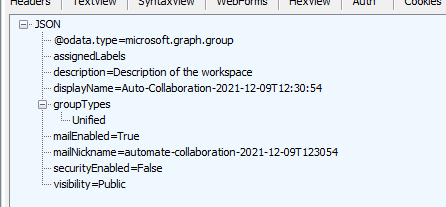
As you can see assignedLabels is empty but it's being sent anyway. I think that the easier fix for my case is to check if AssignedLabels are empty before sending them, but I was wondering also if setting Sensitivity Labels is supported by Graph with app-only permissions.
Anyway I will send a PR checking AssignedLabels.
@magarma ah yes, now I've understood.
I've created a fix with pull request for it, sorry for the hazzle. Also I've requested a new M365 Tenant in which I hopefully can test AIP Labels soon (takes 24-48 hours to provision)
@jansenbe Sorry, work kept busy.
I've used a delegated graph access token, but was not able to fully verify the label application as I do not have a test tenant with AIP enabled. Based on the Code Sample from @renabar I'll try with a temporary Test Tenant if I can setup correct access.
But based on: https://docs.microsoft.com/en-us/graph/permissions-reference#information-protection-policy-permissions only Read Permissions are possible. So not sure if this can even be set in general over the API's, even less if over app permissions.
Code I've used:
IPublicClientApplication app = PublicClientApplicationBuilder.Create(clientId)
   .WithAuthority(AzureCloudInstance.AzurePublic, tenantId)
   .WithRedirectUri("http://localhost")
   .Build();

var token = await app.AcquireTokenInteractive(new[] { "Group.ReadWrite.All", "User.ReadWrite.All", "Sites.FullControl.All", "TermStore.ReadWrite.All", "User.ReadWrite.All", "InformationProtectionPolicy.Read" }).ExecuteAsync();

using (var manager = new PnP.Framework.AuthenticationManager(clientId, "<cert>", "<pw>", tenantId))
using (var context = manager.GetContext(target))
{
   var teamsite = new TeamSiteCollectionCreationInformation
   {
       Alias = "Test",
       DisplayName = "dispaly name",
       SensitivityLabelId = new Guid("f65747d6-b2bb-41b0-8294-ef2dd3879513") // label guid
   };

   var result = await SiteCollection.CreateAsync(context, teamsite, graphAccessToken: token.AccessToken);
}
@NikoMix @jansenbe Did you get a chance to check why applying the sensitivity label fails with this method now in application context ?
@ashu57 @NikoMix @jansenbe I'm receiving this exception:
Code: InternalServerError Message: { "@odata.context":"https://substrate.office.com:444/CompliancePolicy/$metadata#Microsoft.Exchange.Compliance.Policy.Environment.MicrosoftGraphException","error":{ "code":"Unauthorized","message":"App-only token is not supported.
Hello @jansenbe @NikoMix Do you guys have any progress on this request ?
I can see that it is possible to assign labels when creating Unified Group , not sure why it is failing above in App context.
https://docs.microsoft.com/en-us/MicrosoftTeams/sensitivity-labels#:~:text=However%20Modern%20Groups%20Graph%20APIs%20and%20PowerShell%20cmdlets%20do%20allow%20creation%20of%20groups%20with%20labels
@NikoMix Did you get a chance to test this with your new tenant with AIP enabled?
Hi @jansenbe @NikoMix
Im facing the same issue when try to set the label using app only context. Any progress in this topic to be able to set the label with app-only context?
Code: InternalServerError Message: { "@odata.context":"https://substrate.office.com:444/CompliancePolicy/$metadata#Microsoft.Exchange.Compliance.Policy.Environment.MicrosoftGraphException","error":{ "code":"Unauthorized","message":"App-only token is not supported.
