pnp
pnp
Fix import-order of Angular-Elements to support legacy Browsers (e.g. Edge 18)
General Information
- [x] Development
Specific generator
- [x] Angular Elements
What Version you are running?
- NodeJS: 10.22.0
- NPM: 6.14.6
- @pnp/spfx: 1.16.1
Describe your problem
A plain hello-world webpart created with @pnp/spfx works in modern browsers but not in Legacy Edge 18. The fix would be quite easy by just changing the order of the imports in MyWebPart.ts, as described at https://stackoverflow.com/a/51072257/4049371:
import 'my-webpart/polyfills'# loads Zone.jsimport 'my-webpart/main
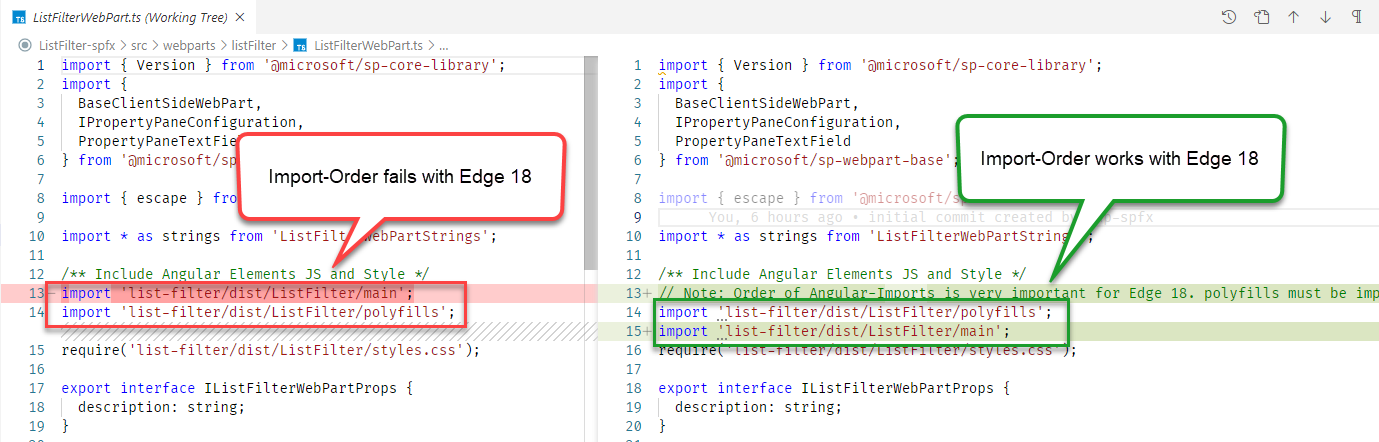
Edge 18 whould show that error otherwise: [object Error]: {description: "Function expected", message: "Function expected", number: -2146823286, stack: "TypeError: Function expected at h ....

Thank you @BeniFreitag for pointing this out. If you like to become a contributor to this project then you can submit a PR, which the changes in this file. https://github.com/pnp/generator-spfx/tree/master/generators/angularelements/templates/spfx
Does it make any difference in other browsers?