

 pnp
pnp
New command: 🔐 spo list roleassignment add
Usage
m365 spo list roleassignment add [options]
Description
adds a role assignment to list permissions
Options
| Option | Description |
|---|---|
-u, --webUrl <webUrl> |
URL of the site where the list is located |
-i, --listId [listId] |
ID of the list. Specify either listId, listTitle or listUrl but not multiple. |
-t, --listTitle [listTitle] |
Title of the list. Specify either listId, listTitle or listUrl but not multiple. |
--listUrl [listUrl] |
Relative URL of the list. Specify either listId, listTitle or listUrl but not multiple. |
--principalId [principalId] |
SharePoint ID of principal it may be either user id or group id we want to add permissions to. Specify principalId only when upn or groupName are not used. |
--upn [upn] |
upn/email of user to assign role to. Specify either upn or princpialId |
--groupName [groupName] |
enter group name of Azure AD or SharePoint group.. Specify either groupName or princpialId |
--roleDefinitionId [roleDefinitionId] |
ID of role definition. Specify either roleDefinitionId or roleDefinitionName but not both |
--roleDefinitionName [roleDefinitionName] |
enter the name of a role definition, like 'Contribute', 'Read', etc. Specify either roleDefinitionId or roleDefinitionName but not both |
Additional Info
this command was actually my goal since I added this #3184 idea 🙂 so I am really excited we are getting close 🤩.
since we are able to break/reset permissions on list, items (some done some open PR's) (files/folders need aliasing to be added... need to open a issue for that 😉) and we are able to list roledefinitions (add/get/remove are open issues) and since we already have commands which allow us to get user or group id, the last and final step is to use all this in order to add or remove user or group with specific roledefinition on list or item (lets start with list 😉).
for this we may use this POST endpoint
/_api/web/lists/getbytitle("SomeList")/roleassignments/addroleassignment(principalid='{SomeGroupOrUserIDHere}',roledefid='{SomeRoleIdHere}')

@pnp/cli-for-microsoft-365-maintainers any comments or second opinion on this one 🙂?
Hi @Adam-it, this will be super helpful functionality I think. I'd like it to be a little easier though to add permissions for a user or group. What if we added the following options: '--upn' --> enter upn/email of user to assign role to. '--roleDefinition' --> enter the name of a role definition, like 'Contribute', 'Read', etc '--groupName' --> enter group name of Azure AD or SharePoint group.

Great spec @Adam-it and awesome suggestions to make it more convenient to use @martinlingstuyl. Let's update the spec and take it from there 👏

@martinlingstuyl thanks for you comment. Will recheck it and update the spec 🙂. After I update it I will mark this issue as open for work 😉
@martinlingstuyl I updated the spec. May I kindly ask you to have a double check on this 🙏 and if you feel its ok open this to the community ... I hope I will develop it 😉
Hi @Adam-it, we're forgetting one option: '--listUrl [listUrl]'.
Considering the principalId, what kind of Id are we expecting here? Azure Ad object Id? SharePoint site user Id? We should write that down.
No further comments 😀
@martinlingstuyl thanks for the double check. I will update the spec on my next coding night 😋
@martinlingstuyl I updated the spec. @waldekmastykarz thanks for the double check. since I am already assigned to some other work and I would not like to block this one I will open it open it up for the community to be taken
ok I finished my last command to the CLI and opened a PR so I guess I may start working on this one
Hi @Adam-it, are you still working on this, or is it better to open it up again?
@martinlingstuyl I was waiting for that comment 😋. Yes I am working on this, sorry it is taking so long 🙏. TBH this is one of the most important commands for me I would like to have in CLI that's why I started this all 'add CLI commands which will allow permission management' kind a thing 😉. I will try to increase my priority on this one 👍 Usually when I have CLI open source time I try to focus on other people work and push/help out in other PRs as much as I can 😉.
This is really an important one indeed, and odd that it is still missing I think.
It's OK if you still want to implement it. I'm waiting for your PR 🫵
Other people can process PR's as well, so it's okay if you shift the focus a bit 😀 #teameffort
yes I will try to shift it a bit 😊. Thanks for understanding 👍. Will try to improve on this one 😉
@martinlingstuyl to give some proof I added 3 ⭐s priority on this one .... in my head you can get bigger than that 😉
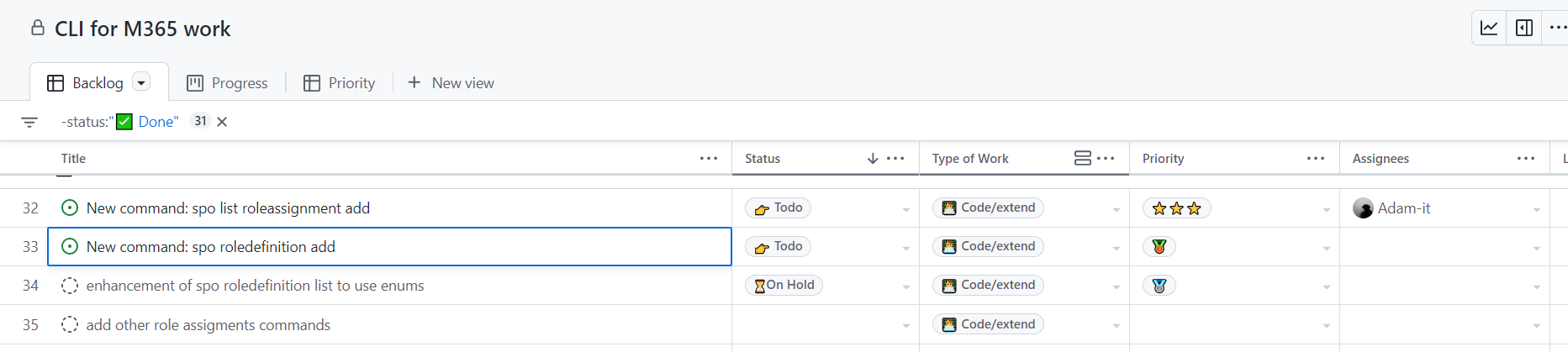 ... unless of course there is something like with 4 ⭐s in my head 🤔🤔
It's GitHub projects. But the new one that just was released. I used it a since early beta and I organize all opens source work with it
putting this on hold before we agree on some on the approach here https://github.com/pnp/cli-microsoft365/issues/3540