

 pmndrs
MipMapBlur ugly rendering on mac with transparent background
Description of the bug
When using the BloomEffect/SelectiveBloom effect with mipmapBlur: true on windows with a transparent background the effect has a
nice roll-off, especially with higher radius and low smoothing values.
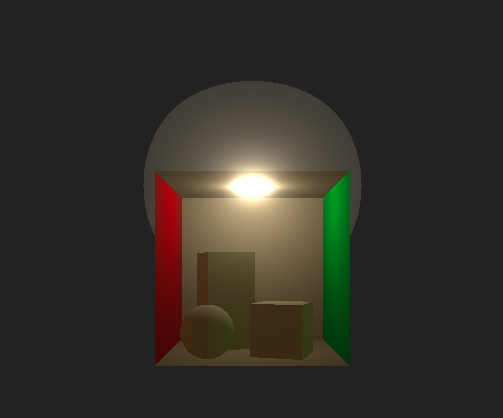
The exact same setup on MacOS renders with ugly banding and what seems like significantly lower mipMap levels, to the point that there is no roll-off.
To Reproduce
I have replicated the exact settings used by <model-viewer> in this sandbox.
https://codesandbox.io/s/bloom-transparent-zpn7iw?file=/src/App.js
Screenshots
Windows, IOS render like this:
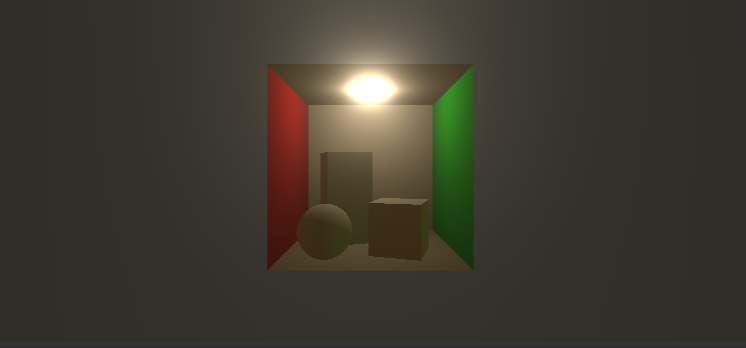
MacOS renders like this:
Library versions used
- Three: [e.g. 1.151.3]
- Post Processing: [e.g. 6.30.2]
Desktop
- OS: MacOS
- Browser [Chrome, Firefox]
- Graphics hardware: [M1, Intel HD Graphics]
Additional comments:
I have checked all WebGL compatibility issues I could have thought of, with https://webglreport.com/?v=2.
Both desktops that created the screenshots support OES_texture_float_linear, 'highp' precision. The max samples is different (16 vs 8), but that is not enough to explain the difference since the default mimapblur uses 8 levels and I have not altered it. I can also confirm this does not happen with alpha: false on the WebGLRenderer.

After several hours of testing different options and playing with chrome://flags and comparing chrome://gpu settings I have found the issue: The sRGB transfer function of the display. The default display color profile Color LCD on macbooks has the following transfer function:
0.0777*x + 0 if x < 0.0450 else (0.9495*x + 0.0495)**2.3955 + 0.0003
I'm not too sure how exactly the transfer function works, but switching the color profile from Color LCD to sRGB (which is the default transfer function on windows) completely fixed the issue. I'm interested to figure out if this could be considered a WebGL/three.js issue; I noticed that if I take a screenshot using the firefox screenshot tool, the end result does not have the transfer function issue. However if I screenshot using the inbuilt mac screenshot tool then the issue persists.
Thanks for reporting and investigating this :+1:
It doesn't look like this can be fixed in postprocessing. I'll add the device issue tag for now.

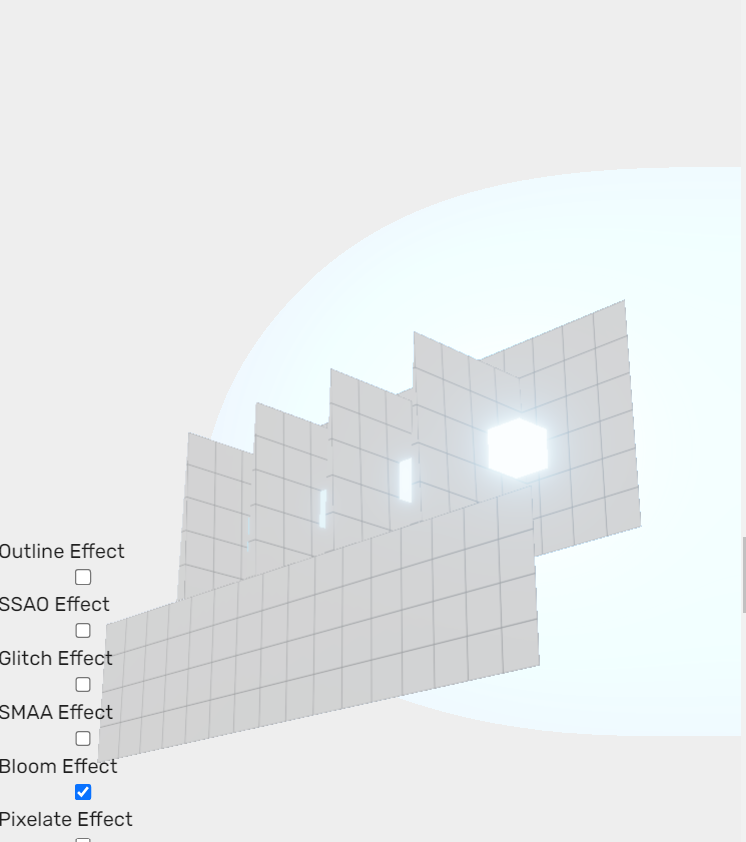
I have reproduced it on windows as well by setting the Color Profile to anything but the default sRGB IEC61966-2.1, so this isn't a platform specific issue at all, just that only macOS sets the default Color Profile to something other than sRGB.
@mrdoob Any idea if this is a three.js issue? I'm hoping since the results are consistent across devices and browsers (only affected by the color profile) that it's not a WebGL problem.

@Beilinson The fullscreen materials in postprocessing all use NoBlending. Could you please try setting that to NormalBlending on macOS to see if that changes anything?
  effectPass.fullscreenMaterial.blending = NormalBlending;
  bloomEffect.luminanceMaterial.blending = NormalBlending;
  bloomEffect.mipmapBlurPass.upsamplingMaterial.blending = NormalBlending;
  bloomEffect.mipmapBlurPass.downsamplingMaterial.blending = NormalBlending;
@WestLangley This is the example I was talking about where colorspace is causing a very visible artifact. FYI @donmccurdy since you've been working on related things. I have no idea what exactly is causing this bug, but hoping one of you might have an idea.
A couple notes:
- The issue goes away if the luminance pass is disabled, or if the luminance threshold is decreased to zero.
- On macOS with an sRGB display, the issue only appears if I force the OS into using a Display P3 profile.
- On macOS with a Display P3 display, the issue appears by default but goes away if I force the OS into using an sRGB profile.
- Is it intentional that alpha is multiplied by intensity here?
Some color changes at the OS level are to be expected, but I'm not sure why the alpha behaves so differently depending on the display profile here. It would be interesting to try exporting the canvas output to a transparent PNG or EXR, loading that image back into a WebGL canvas, and seeing if the issue persists.

Is it intentional that alpha is multiplied by intensity here?
I don't think much thought went into that part. Does changing it fix the issue on macOS?
bloomEffect.fragmentShader = `#ifdef FRAMEBUFFER_PRECISION_HIGH

	uniform mediump sampler2D map;

#else

	uniform lowp sampler2D map;

#endif

uniform float intensity;

void mainImage(const in vec4 inputColor, const in vec2 uv, out vec4 outputColor) {

	vec4 texel = texture2D(map, uv);
	outputColor = vec4(texel.rgb * intensity, texel.a);

}`;
Same with this updated sandbox? https://codesandbox.io/s/bloom-transparent-forked-8l4ds6

After testing a few more things, I found that you can get results that look similar to the cutoff issue on an sRGB display when you multiply the output colors with the alpha channel. The issue with Display P3 might be related to premultipliedAlpha in some way.
Adjusting the luminance material to keep the original input alpha instead of setting alpha to luminance fixes the cutoff, but this introduces undesired dark haloing and bad gradients: https://codesandbox.io/s/bloom-transparent-forked-hlwyf7?file=/src/App.js https://hlwyf7.csb.app/
Simply setting the clear alpha to 1 also fixes the issue without having to change any materials, which could mean that this is a canvas compositing issue: https://codesandbox.io/s/bloom-transparent-forked-yfc992?file=/src/App.js https://yfc992.csb.app/
I've tested this again with this sandbox which uses the latest alpha of postprocessing v7 and there is no cutoff. Tested on macOS, Sonoma, Chrome 121.
There's also been a fix for the luminance threshold in v6.34.3, so it would be great if someone could test with that version.
I thought at first that you'd fixed it based on this before/after (6.33.3 vs 6.34.3):
But unfortunately, the problem still persists in other examples, unchanged:
I see, thanks for checking! That's such an annoying bug :grimacing: Could you also test this sandbox with different bloom intensities like 1, 3, 5, 10, 100?
Maybe the clipping is related to HalfFloatType buffers (luminance/bloom) and/or mediump sampler2D precision declaration :thinking: I'll experiment with that next.
Your sandbox looks just fine on all those bloom settings. Maybe you can grab the models from our examples and see if you can make a local repro with those? I think tone mapping may be affecting it too.