

 pmndrs
Select: order of keys does not follow insertion orders when mixing string and numbers
For now, options with custom labels in a select input is achieved by passing an Object: Story Book Demo. However, the order of the rendered options is determined by Object.keys() or Object.values(), and does not (always) follow the insertion order, which makes this feature kind of a no-go. AFAIK, Map seems to be a more feasible option?

Wait so order of insertion is only messed up when keys are a mix of strings an numbers?

Wait so order of insertion is only messed up when keys are a mix of strings an numbers?
Well, yes, but in my case I need to define my options as sth like this:
console.log(Object.keys({
    "-1": -1,
    "0": 0,
    "1": 1,
    "1,000": 1000
}))
and the order will become
[ '0', '1', '-1', '1,000' ]
And it seems impossible to manually reorder the keys using object literals, even with only numbers or strings:
console.log(Object.keys({
    "1": 1,
    "0": 0
}))
output:
[ '0', '1' ]
Why don't you use arrays then? Just for formatting (1,000)? This is a really niche use case to be calling the feature "kind of a no go" :)
Why don't you use arrays then? Just for formatting (1,000)? This is a really niche use case to be calling the feature "kind of a no go" :)
Arrays may be suitable for this case but the real issue here is that one cannot manually tweak the order of his options when he uses custom labels, for example using Monday, Tuesday, etc. to label 1, 2, ... or using January, Fabuaray, ... to label 1, 2, ... with a proper order.
I don't understand. How is that not working?
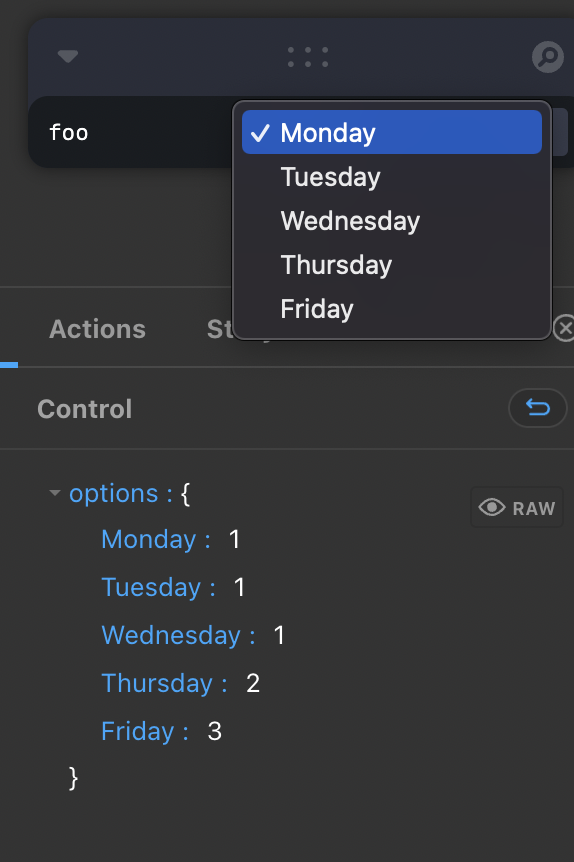
My bad, I apologize. I took it for granted and wasn't testing. I take back my words regarding the "no-go" and am sorry about wasting your time. So indeed the order of insertion is only messed up when keys are a mix of strings and numbers.
No worries, this can still be considered as a valid concern in some situations so I'll leave this open.
No worries, this can still be considered as a valid concern in some situations so I'll leave this open.
Thanks. Hope I don't bother you, I'd love to describe my situation in more details.
I'am using Leva to build a ui for serial port manipulation, and one of its input is baudrate/bitrate. While there're common standard baudrates, you can also use custom baudrates as long as the two ports have agreement on it. At first I want to use something like a "selectable number input" to serve this purpose, where select options are standard baudrates and number input receives custom baudrates and also reacts on the selected option. But there aren't such input in Leva so I split it up into two inputs: a number and a select and use set functions exposed by useControls to control their behaviors (Just like the grouped buttons storybook demo).
So far, so good.
Yet, for large baudrates, counting the digits or zeros may be tricky and not intuitive, so I decide to use commas to format these numbers, and hence replace these numbered array options with custom labeled object options. Though the object keys are a mix of numbers (no comma when the number is smaller than 1,000) and strings (larger numbers with commas), the string keys comes after number keys and they are all sorted in an ascending way, so everything is sorted well.
Later, I decide to introduce a special select option 'custom' in the select input to indicate the user when he or she uses the number input to set a custom baudrate. And when I add this option to the select, I find it appears in the middle of my options and then realize the problem. I try to change it to '' or '-1' and because they are also not valid indices so same result as before. For now, to keep the order, I'm using '0' to indicate that the baudrate is a custom value, but I find this might be confusing to users.
Another reason is that I also want to change the order of these options based on the user's last or frequent selection.
I was hoping maybe we could extend the type of what the select component receives to support Map as a reliable sorted list and in the meanwhile keep the Object type for not breaking the API and some more general situations.
Sure I wouldn't mind the Map. Feel free to propose a PR. In the meantime, although this is not a very elegant solution, you can always add a space after the number key so that it considered a string. Therefore the order should be respected.
Sure I wouldn't mind the Map. Feel free to propose a PR. In the meantime, although this is not a very elegant solution, you can always add a space after the number key so that it considered a string. Therefore the order should be respected.
OK, I'll see what I can do.