

 plotly
Sunburst leaf opacity does not apply to black text
Description of the Issue
When you change the opacity of the leaf for a sunburst trace, text that is supposed to be black (based on the background color of the sector the text belongs to), it does not get affected by the opacity.
See the codepen here: https://codepen.io/Kully/pen/QWdyvJg
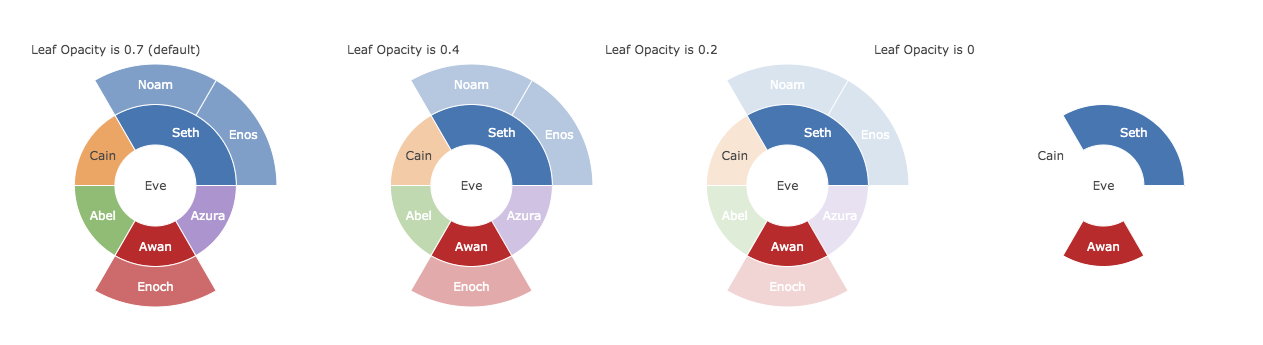
_Notice that all the text in the leaves of the chart move towards translucent as the opacity knob is turned, except for Cain.
This issue first came up in creating parity tests for the new icicle trace here #5546.

If you set paper_bgcolor you'll see it's not just the black text:
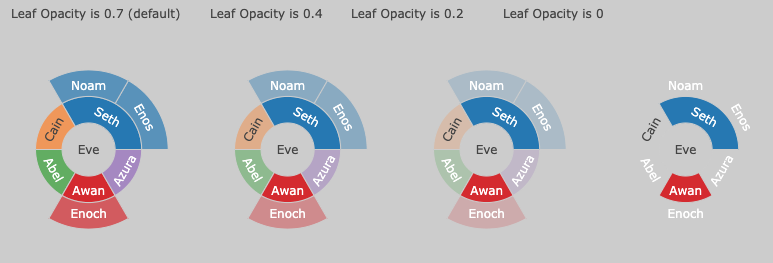 The right solution to this is to apply the opacity to a group that contains both the shape and the text. If you apply the opacity to the shape and the text separately, then for partial opacity the shape color will start to bleed through the text color, which is not what we want.
