plone
plone
Proposal for cut/copy/paste of Volto blocks
I'd like to implement a cut/copy/paste of Volto blocks, I'm looking for feedback on my ideas. I can try to make this as an addon, but I'm missing some plug in points into Volto to make this painless.
So: we either add new buttons in the Toolbar or in the Blocks/Edit.jsx component. The buttons would be:
- copy the current block
- cut the current block
- (if a clipboard exists) paste the current block
We could also think about a toggle to enter a multi-selection state, where we can checkbox-select multiple blocks (maybe even applying an overlay on top of each of the blocks, and just click-select them).
The paste would only be enabled for empty text blocks, so it's easy to understand what happens.
This is a sensitive area, I'd want to be involved in the implementation of this idea because I know (our) other form block frameworks. Should we pursue this before or after the Form.jsx refactoring?

@tiberiuichim this is something that I would consider to be a core-feature of Volto. Clients always ask us for this feature. Maybe we can ask @albertcasado where we should put the buttons to copy/cut/paste the current block (maybe below the trash can?). Pasting might be harder to figure out (where to put the button).

Below the trashcan is not a good place, the block can be limited to a single line of text. The current blocks editing wrappers are a bit limited, there's not a lot of room for expansion. If we go with something in the block editing area, I'd put it left of the drag/choose block button. Facebook implements their editor like this.
@tiberiuichim @tisto Here is the pr which I implemented a few months back https://github.com/plone/volto/pull/1567/files

@iFlameing So we put the paste button in the block chooser and the copy button in the block sidebar. I like it. There could be some pitfalls around this, but the initial pain is small. Could you add some screenshots maybe?
@tiberiuichim I am just checking the copy/paste functionality and I was wondering if it is possible to copy/paste a set of blocks from one page to another. I tried to copy a few blocks "SHIFT+COMMAND" on an existing page, then I created a new page and tried to paste with "SHIFT+COMMAND+P" or "COMMAND+P". I guess this is not yet supported, right?
@tiberiuichim I found the paste button in the toolbar. Sorry for the noise. :)
@tisto I'll close the ticket, the feature is in Volto already. Could use UX improvements, but works ok.
@tiberiuichim I'd prefer to keep this ticket open because we will still have to invest time into the feature itself. I am about to present the functionality to a client today and did some testing. One thing that would be especially important to fix (in the current state) would be that users can select the currently selected block as copy. This might be the biggest UX issue that we currently have and if we fix that we could maybe start to advertise this more.
Let's make a list of features or changes to be added?
For your use case, I propose that we always show the Cut/Copy block buttons when you have a block selected. What do you think?
Maybe we can ask @albertcasado where we should put the buttons to copy/cut/paste the current block (maybe below the trash can?). Pasting might be harder to figure out (where to put the button).
you can consider where notion puts its menu for duplicate and other block actions. In the drag marker.
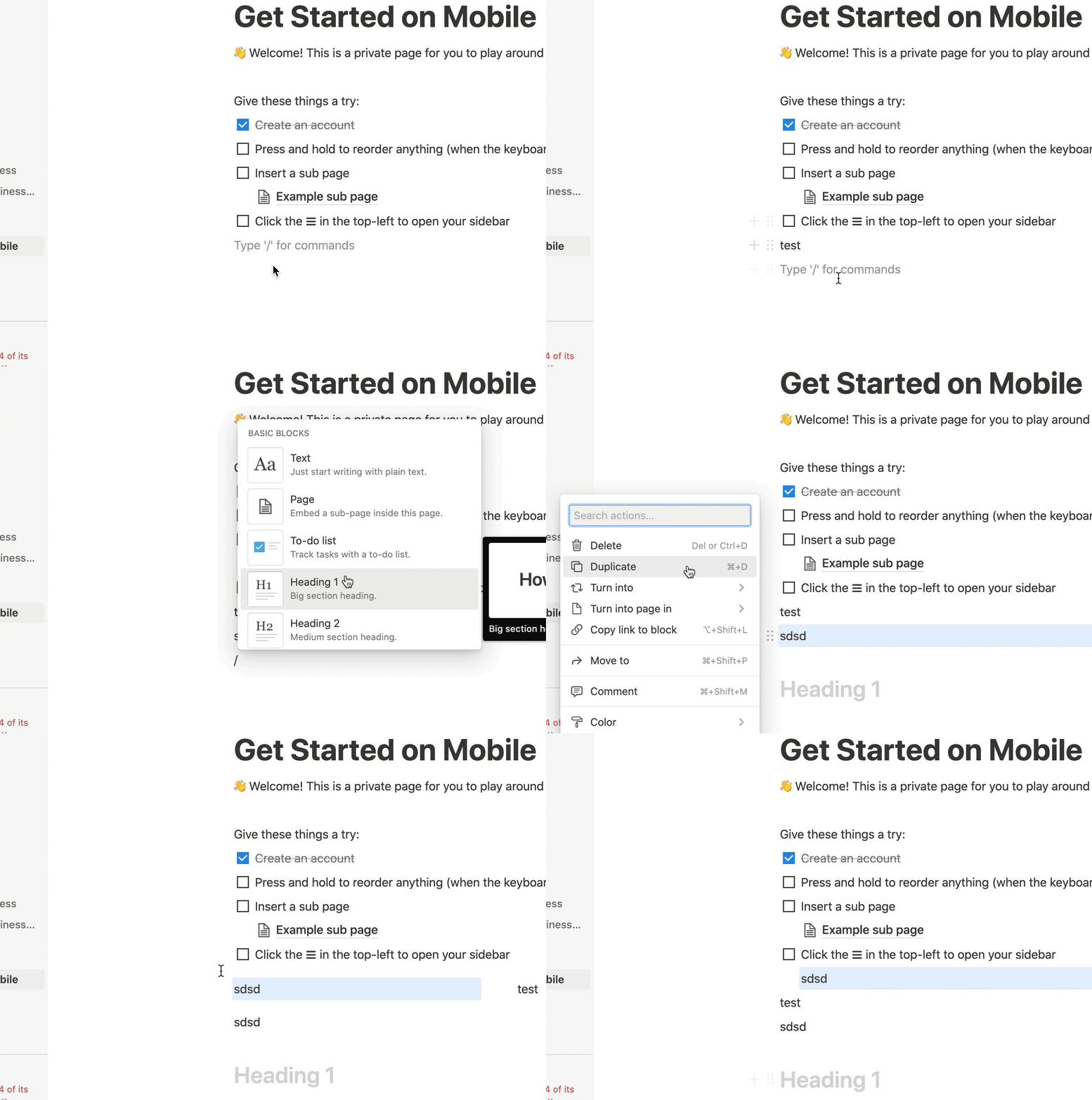
However how notion does its multiple selection is still pretty confusing IMO and doesn't work that well. (they use text selection and you have to have enough room left or right to select a whole block). in addition they reuse the same menu when multiple blocks are selected, ie you have to know to click on one of the drag markers and that will apply to all you selected.

I've given this some thought and I think that whats been implemented has a few problems that could be fixed by a few tweaks.
Problems
- [ ] no way to do multiple select blocks on mobile
- [ ] cut, copy and paste are context actions for a block but mixed with page actions (undo, save, cancel) which is confusing
- [ ] cut, copy and paste icons combined with undo and save and cancel doesn't leave enough room on the toolbar on mobile
- [ ] proposal to show cut and copy on single select look kind of ugly as big icons on toolbar
Proposed solution
material design select mode
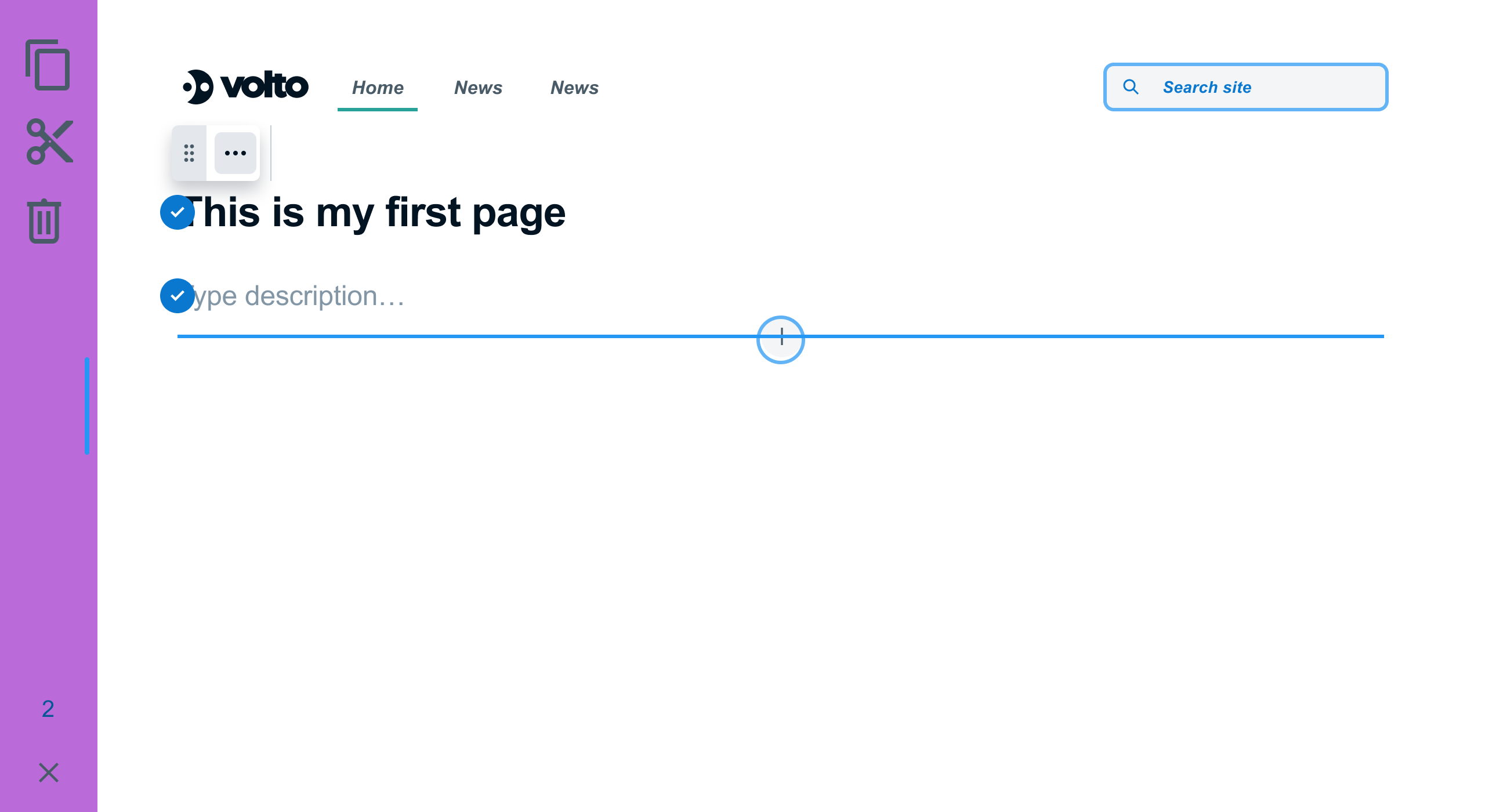
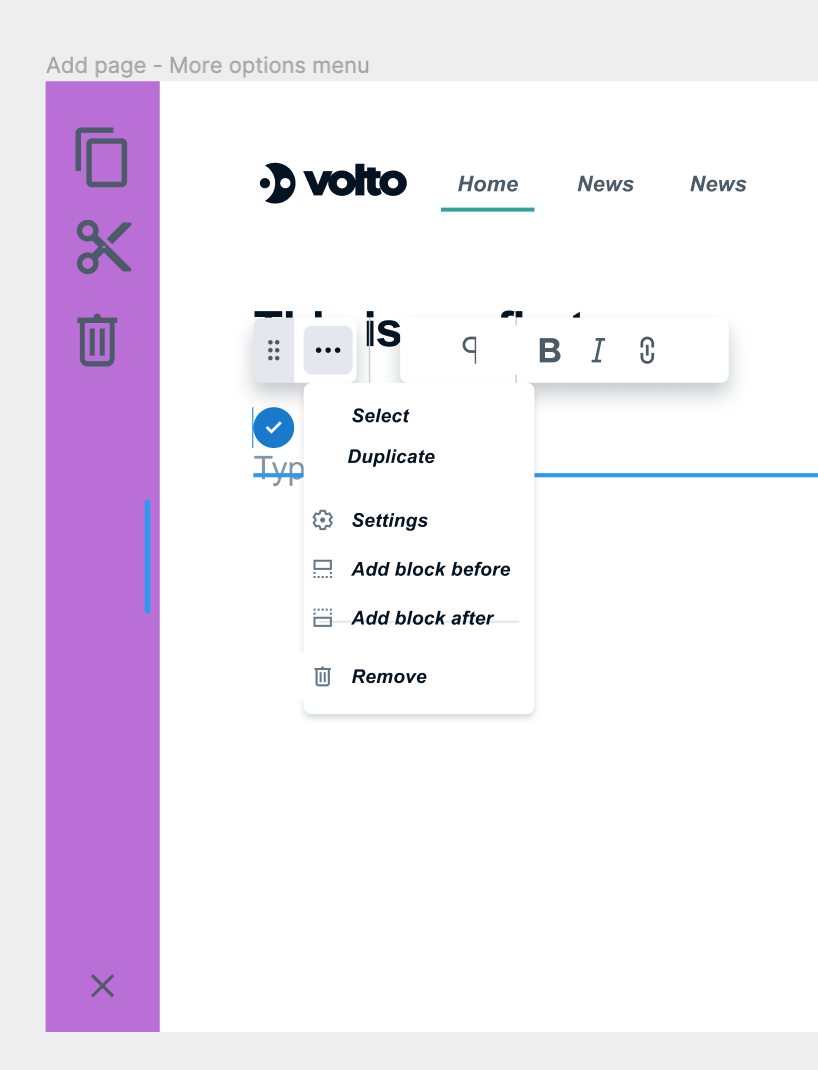
- follow material design selection pattern (has videos)
- enter select mode via
- long press anywhere on block (mobile way)
- shift click
- alt click
- "select" in block menu in quanta toolbar (helpful to have it visible somewhere)
- replaces toolbar with new select bar with cancel, cut copy paste and delete.
- different background colour to show its different
- puts checkboxes on all blocks and clicking anywhere on a block checks
- checkboxes top right?
- pressing cancel forgets the selection and removes the checkboxes
- if copy or cut are pressed then toolbar select mode switches to paste mode
- current selection shown as faded/locked
- click on a block and then click paste after button on toolbar
- if quanta toolbar then can also pick paste after from the block menu
- can also be in the add menu
- put block toolbar only on the first selected block
- since it overlaps its going to get in the way if on every selected block
- actions now apply to whole selection including DND (maybe can leave until later)
- why?
- fixes mobile selection
- fixes single and multi-selection
- quanta toolbar "select" option gives obvious UI element to guide the user to select and cut, copy etc
- fixes weirdness of block actions and page actions in same bar
- fixes limited space for cut and paste in actions bar
- its a standard that people know
- clean and doesn't clutter up the toolbar
Alternatives considered
- only support duplicate instead of copy and paste as it avoids the special paste mode
- how to copy to another page though?
- doesn't allow for pasting into a different page since you would have to cancel the selection in order to get to the cancel or save on the whole page
- maybe after you click copy or cut you get a back button rather than a cancel selection button... and then you have an indicator on the toolbar that there is a selection kept. going to another page you can click on this clipboard indicator and go back into paste mode?