

 playfulprogramming
Dedicated code embed / preview component
Many of our posts use stackblitz, codepen, or other external code embeds to show interactive previews of code snippets or allow readers to run the code and see a result. However, this can significantly slow down the loading speeds of these pages, and lacks some customizability in terms of styling or appearance.
Also, in articles that are available in EPUB format, these embeds cannot be used as their code will not be included in the generated EPUB file.
I've additionally noticed that many uses of code blocks have a need to communicate a filename or directory structure in addition to their content, for which there is not currently any provided styling.
A specific code embed + preview component would allow for these snippets to be written inline with the post markdown, include a static result preview, and optionally link to an interactive codepen/stackblitz page where the user can edit or experiment with it further.
Proposed syntax / rough mockup for this component:
<!-- code:start -->
# src/index.js [Edit on CodePen](https://codepen.io/example)

```js
console.log("Hello!");
```

# Result

Hello!
<!-- code:end -->
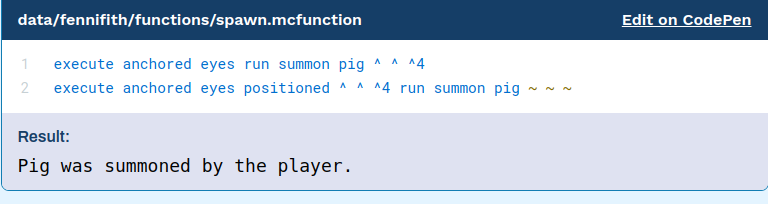
Because this uses static content, it could also allow for other uses of this component than what codepen or stackblitz can enable (e.g. in the Minecraft datapacks article, different "results" like tables or images showing the results of different commands could be formatted here).

I really like this idea, but am not sold on the syntax yet. Ideally, it should be something that's memorable, but also able to render out to an epub (or other non-web mediums from Markdown) pretty well.
To this end, I think that making Result a heading is a bit of an off choice. Because if you're looking at the headings on the sidebar, it's confusing when looking at an overview of the article from a headings outline.
<!-- code:start -->
```js
# src/index.js
console.log("Hello!");
```

> [Edit on CodePen](https://codepen.io/example)

**Result**:

```
Hello!
```
<!-- code:end -->
Which renders to the following visual of Markdown:
# src/index.js
console.log("Hello!");
Result:
Hello!
Implementation notes on this idea:
- We could use
Twoslash/Shikito parse out the initial code block to detect the code comment and remove it - The
:at the end ofResultcould be optional - The text in
Resultcould be optional, just so long as it's bolded

I agree, the headings could be entirely removed. In my syntax example, I was more thinking about simplicity of implementation (and allowing the writer more control over the formatting) with the way it's laid out - the contents could effectively be split around the first code block, so everything before it is in the "header" and everything after in the "results".
e.g. that would also make the following possible:
<!-- code:start -->
[src/index.js](https://github.com/...)
*Note: This snippet only contains part of the full code*

```js
doSomething();
```

<details>
<summary>Hidden Result</summary>

**CSV Output:**
| Lorem | Ipsum |
| ----- | ----- |
| Lorem | Ipsum |
| Lorem | Ipsum |

</details>
<!-- code:end -->
We have the mockups for this from @PrattiDev for a v2 of the site:
And can probably combine them without a browser preview like so: