
editor

editor copied to clipboard
 playcanvas
Drag element on input fields is preventing double click field selection.
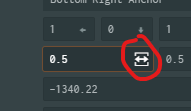
Clicking on the drag element, the pointer locks the mouse cursor. Attempting to double click on an input field to select its content, often leads to misclicks on drag, and modifies value as the mouse is moved. Basically: the user wants to select field content, but often ends up clicking on the drag icon.
This is highly annoying.
Possible solutions:
- Get rid of the drag icon, and implement dragging only when a user mouse down on the element and moves at least a certain distance from the initial mouse event, to enable dragging state.
- Show drag icon only when shift or other hotkey is held.
- Double click to select field content, and avoid pointer lock. Just like you would double click on an input field.

- Place the click+drag element just outside the text input area to the right so there's no overlap.

- Place the click+drag element just outside the text input area to the right so there's no overlap.
That might solve the original issue. But it look to cluttered? Also, drag element is visible only when hovering on element. But being it outside, it will be harder to interact with it.