

 platformio
Windows WSL: I can't open any files(projects) in the PIO open browser.
Configuration
Operating system: Windows 10 20H2 with WSL Ubuntu 20.10 (Groovy Gorilla)
VScode 1.53.2
PlatformIO Version (platformio --version):
PlatformIO Core, version 5.1.0
Description of problem
Steps to Reproduce
- Press button Make Project or open Project
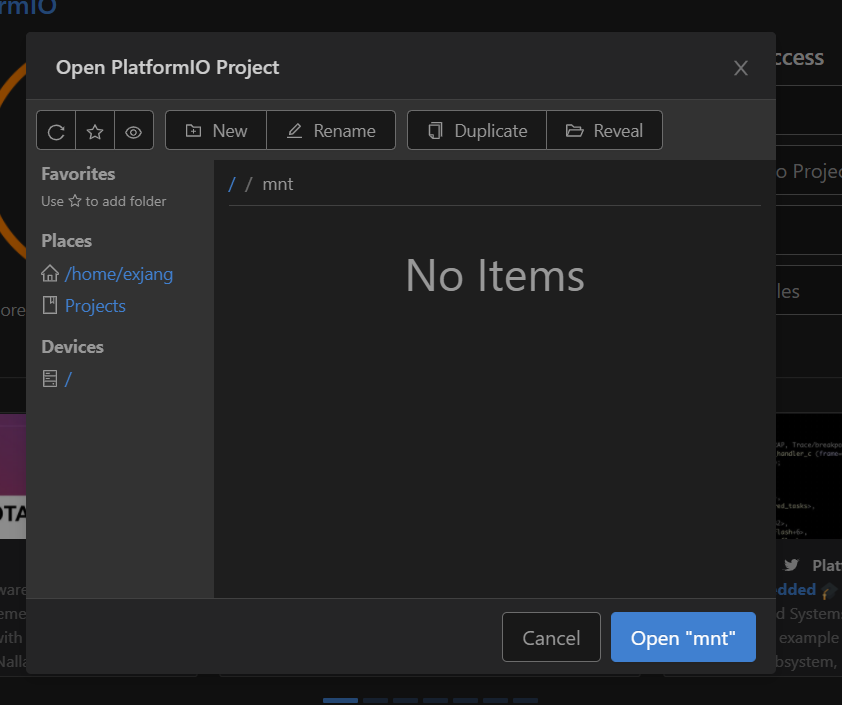
Actual Results
No Items is displayed in most directories.
(I guess it's probably a permission issue)

Expected Results
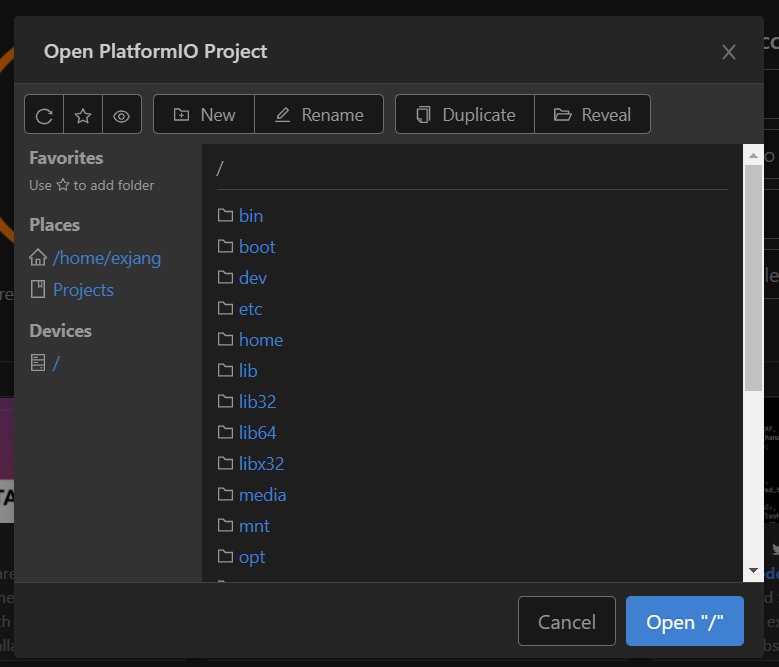 I should be able to open the project in the path I want.
If problems with PlatformIO Build System:
Additional info
I will provide any additional information needed. I apologize for the lack of information.

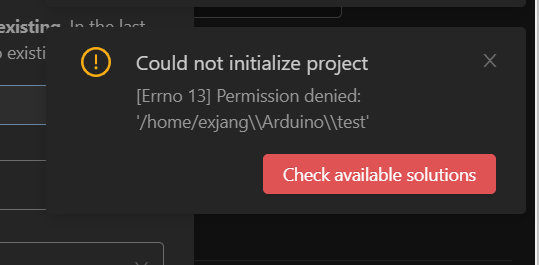 I found a slash that looked suspicious. Is it related to the problem?
I've managed to hack together a possible solution by changing Ln 19 in app/modules/core/paths.js
This is obviously very poor practice, but if you're only using Platformio by remoting in from a windows host to WSL or a Unix host then it may work.
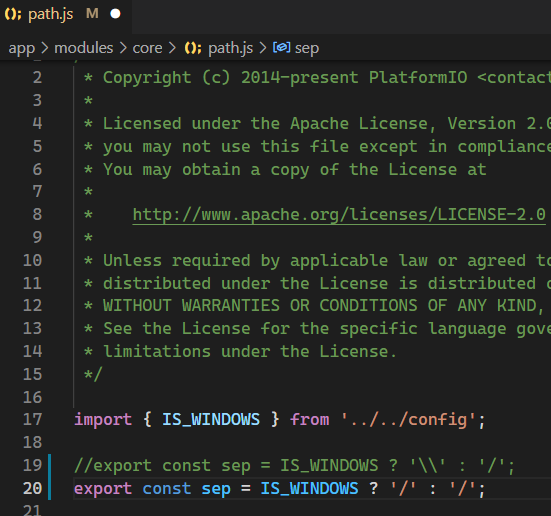

I've managed to hack together a possible solution by changing Ln 19 in app/modules/core/paths.js This is obviously very poor practice, but if you're only using Platformio by remoting in from a windows host to WSL or a Unix host then it may work.
I couldn't figure out the path to that, but I just checked. It worked for me :)
When the app bootstraps initially, it gets the platform architecture from the host - e.g. coreSystype: "linux_aarch64" - could the front end use the host's OS/architecture instead of that of the browsers?


I know this is like a year old but how exactly do I solve this?
Maybe I modified the plug-in path directly at the time.. I don't remember well because it's been a while, but is the problem still there?
Maybe I modified the plug-in path directly at the time.. I don't remember well because it's been a while, but is the problem still there?
Yeah, I saw that the solution involved editing the source code and stuff, how exactly did you guys edit the source code?
So ive long forgotten how I originally did this, but I came back to it and ended up editing the file at /home/$USER/.platformio/packages/contrib-piohome/main.*********.min.js . I then searched the code for "\\":"/" and replaced that with "/":"/" . Very unorthodox, but it worked for me this time around.
So ive long forgotten how I originally did this, but I came back to it and ended up editing the file at /home/$USER/.platformio/packages/contrib-piohome/main.*********.min.js . I then searched the code for "\":"/" and replaced that with "/":"/" . Very unorthodox, but it worked for me this time around.
@unsplorer, you are a genius! This solved my problem after hours of trying to find the reason for the "Invalid Params" issue I was receiving on WSL 2 with a Devcontainer setup. As a temporary fix, I created a bash command to automate the steps post-installation.
#!/bin/bash
cd /home/$USER/.platformio/packages/contrib-piohome/
find . -maxdepth 1 -name "main*" -exec sed -i 's#"\\\\":"/"#"/":"/"#g' {} +
This should be added as a setting for PlatformIO IDE so that users can decide to use \ on windows or / on Linux

Just encountered this issue, and the posted fixes do not work for me. How is it so difficult to solve this issue? The program is running on a Linux system, what possible reason could the program have to use Windows path separators? Why would you translate separators client-side based on the client browser OS instead of the server process?? What if I want to run the program on a separate machine from the one I access it with?
Edit: While I still have the above comment regarding the ridiculousness of the fix and its necessity, I was able to have success with the posted fix after clearing my browser cache.

VSCode in Win10 Remote -> WSL Windows 10 understands Posix path separators so this is not a Windows bug, it is a bug in internal path parsing in PlatformIO. Opening the same folder in VSCode (not in PlatformIO inside VSCode) opens the folder correctly.
If you create a new project 'Test1' in PlatformIO under WSL it creates a folder called 'Projects/Test1' instead of two folders, one called 'Projects' that contains a folder called 'Test1'. Note the slash direction.
If you try and correct that and make a folder called Projects containing Test1 and copy the above project into it and then try and 'Add existing' it says the folder 'Test1' is empty.
Conclusion file open and file save are both badly broken.
Proof Windows 10 understands Poxix path separators. START -> RUN -> CMD
U:\folder> c:
C:\home> cd "/Windows/System32"
C:\Windows\System32>

VSCode in Win10 Remote -> WSL Windows 10 understands Posix path separators so this is not a Windows bug, it is a bug in internal path parsing in PlatformIO. Opening the same folder in VSCode (not in PlatformIO inside VSCode) opens the folder correctly.
I have no idea why PIO doesn't use POSIX style paths.
Has anyone come up with a workaround or solution to this issue?
Edit (16 Oct 22): So this problem still exists. None of the above workarounds worked for me, I'm using WSL Windows 10 and vscode, I launch vscode from within WSL (Ubuntu 20.04). My workaround was to force the detection of Windows to "False" in $USER/.platformio/penv/lib/python3.8/site-packages/platformio/compat.py . I commented out the line where IS_WINDOWS is set and added a line below it where it's simply forced to "False":
34 #IS_WINDOWS = WINDOWS = sys.platform.startswith("win") 35 IS_WINDOWS = WINDOWS = False
Since I use a Linux file system for my code storage and have no intention of using the Windows file system, this works for me. I have not tried to use folders in Windows after this change. So I can't guarantee this will work in that instance.

I had a fork of this working previously, but I never got enough testing done to create a PR.
Essentially, the platform we are detecting needs to be that where PIO is running, not the front end (in my case, linux via SSH for PIO and VS Code on Windows for the front end)
I will try and get it setup again, though I'm not particularly familiar with what testing we'd require maybe it would be a start
I've created a PR here: https://github.com/platformio/platformio-home/pull/5018
can somebody revisit the PR? It's a really annoying issue that makes it quite hard to use dev containers with platform io

+1
Can't even get PlatformIO to open existing projects because it can't figure out how to navigate the folder structure.


Tip: i found that i get a LOT more performance by installing platformio and cloning the project inside wsl, then connecting to it remotely.
I5 10300H Windows 11 ~10min non chached | 4min cached I5 10300H Win 11 WSL ~ 3min non cached | 7s cached
