pkulchenko
Code snippets manager
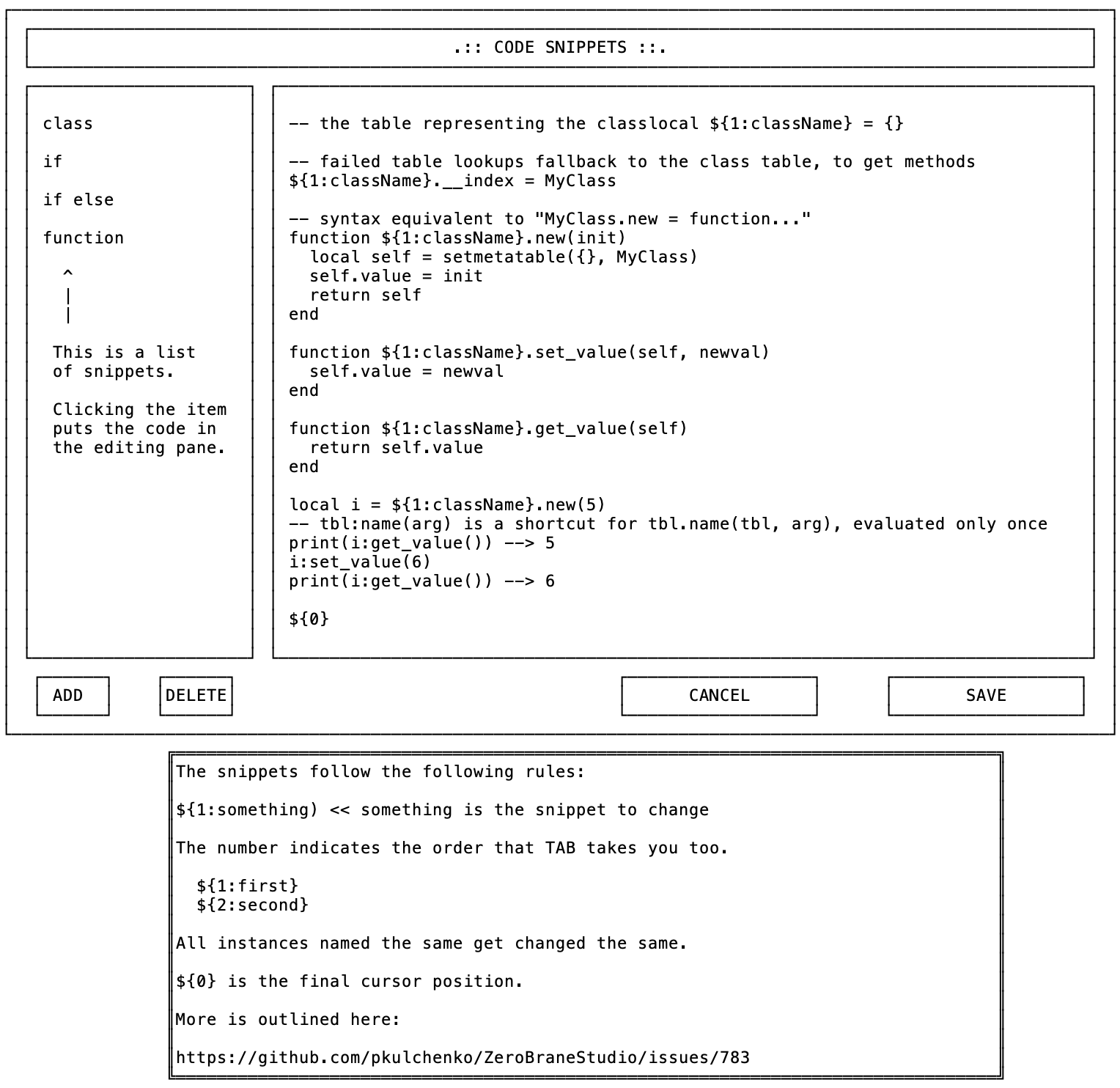
This feature is implemented in many IDEs. And Lua people need it too!
And there are 2 main use-case scenarios:
- Typing keyword and then pressing tab/space/enter like with auto-completion, but instead of variable whole chunk of code appears. :fn (TAB) ->
local function _ ()
end
- Shortcut like Ctrl-P with pop-uping window, where you can scroll list of snippets and do simple search among them.
In discussing with Paulk, he has mentioned cool stuff like jumping right to empty spaces to fill without manual cursor moving (i.e. function names , params and etc.) Also, it'd be good to have easy way to add new snippets. I.E. select chunk of code -> shortcut -> place cursor waypoints -> you are ready to use new snippet.

I see several additional functions that may be needed to handle of the aspects of snippets:
- Ability to specify variables and their default values; for example:
do_something('${1:this}', ${2:foo}, ${3:100}, ${4:{'${3:that}', '${5:something-else}'}});will have 5 variables with different default values and one variable (3) begin used twice - Ability to use the same variable in several places. An example of this is variable
$3in the previous snippet; when its value is updated in one location, it's updated in others as well using multi-cursor, but only for the first time when visited. - Ability to change values for variables before expanding. This can be used with
abc var1 var2TABto load snippet namedabcand to set variables 1 and to tovar1andvar2values. - Ability to specify current selection to wrap it into the code in the snippet. For example,
abc$SELECTION$defwill generateabcCODEdefifCODEis the current selection. Also see #257. - Ability to specify where the cursor should be positioned after insertion.
- Ability to support
TABexpansion when typed and commandbar search; the latter option allows searching for specific snippet in the command bar using fuzzy search, similar to file and symbol searches. The search results will show the name of the snippet and its code and will insert and expand it upon selection. - Indentation support. Using tabulation (
\t) in code snippets would replace it with the correct indentation currently used in the file; using spaces will keep things as is in the snippet. The indentation is always relative: all the lines in the code snippet get the indentation based on the existing indentation of the first line when the snippet is inserted.
Other nice-to-have features:
- Ability to link a snippet to a shortcut (although less of a need if commandbar snippet search is provided)
- Ability to designate scope for snippets:
ifelsefor Lua and for C should produce different results. This can be done by specifying a spec or extension that the snippet should be associated with.

Just some thoughts on this based on other similar snippet engines I have seen.
$0 or ${0} is where the cursor ends up at the end
${1:this | or | that} would pop up a window and allow the user to choose from a list of predefined items. You could change it to ${choice: this | or | that} using the keyword choice to cause different functionality and it would be pretty obvious in the snippet itself what is going on. I write a lot of shell scripts and sometimes it's BASH and sometimes it's KSH or SH. So a snippet would look like this when I want a shebang line: #!/usr/bin/env ${choice: sh | ksh | bash}
A popup menu for snippet name completions. So if I have 3 snippets for if statements called if ife ifee and I typed if a menu would show up so I could choice one either after hitting tab to run the snippet or as I am typing. You could just have it pop up if a word meets a snippet name as well. I think VS Code gives you the name of the snippet and the short description.