

 pivotal
Permitted licenses marked as "not approved" in CSV report
AspNetCore license is determined as https://raw.githubusercontent.com/aspnet/AspNetCore/2.0.0/LICENSE.txt by license_finder, but when I add that as a permitted license, it still shows up as "not approved" in a CSV report.
excerpt from dependency_decisions.yml:
- - :permit
  - https://raw.githubusercontent.com/aspnet/AspNetCore/2.0.0/LICENSE.txt
excerpt from CSV report:
name,version,licenses,license_links,approved,homepage,install_path,package_manager,groups
Microsoft.AspNetCore.Authentication.Abstractions,2.2.0,https://raw.githubusercontent.com/aspnet/AspNetCore/2.0.0/LICENSE.txt,"",Not approved,"",,Nuget,""
In the HTML report, permitted licenses are marked. In the CSV report, only explicitly approved dependencies are showns as "approved".
I'm using the latest docker image with the dlf script.

The call to dlf is like so:
dlf license_finder report --format=csv --save=repo/report.csv --columns=name version licenses license_links approved homepage install_path package_manager groups --use-spdx-id --decisions-file=/full/path/to/doc/dependency_decisions.yml --recursive --project-path="repo"
Hey! I'm wondering if you are looking for the approvals coommand instead. Can you try something like this out? license_finder approvals add awesome_gpl_gem

No, I want to allowlist the entire license - for some reason LF is not resolving it beyond the URL and reports the license as https://raw.githubusercontent.com/aspnet/AspNetCore/2.0.0/LICENSE.txt instead of e.g. "MIT". There are a number of other packages in the dotnet/nuget ecosystem where LF finds only the license URL. So I thought, fine, I can just allowlist that - but it doesn't seem to take.
I don't want to approve single packages/versions because there is literally 2500 of them in the project I'm scanning that LF doesn't find the license "identifier" for, but only about 10 different license URLs.
My expectation would be that after permitting the license (by the URL that LF outputs as the license column) it would show up as "approved" there, but I realize now that I might be confused between the HTML report and CSV - is the approved column only referring to the individual dependency and not the license? Is there some way to get the license permission status as a CSV column? Because the HTML report splits that by permitted.
And to elaborate on the source of my confusion, the HTML report lists things like this:
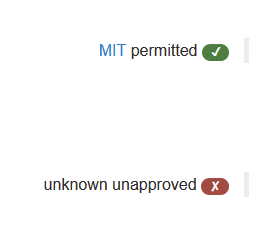
and clearly appears to subtract "permitted" from the total count (cf. number of unapproved):
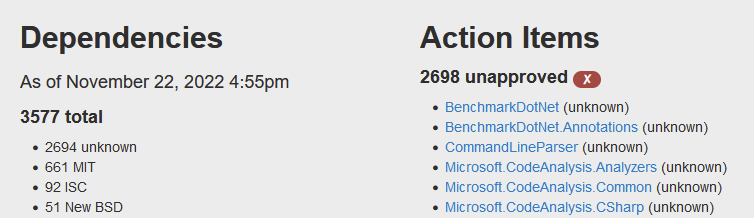
Yet there seems to be no way to get that "permitted" status in the CSV report.
Ah ya you are right. Sorry I misunderstood. Approvals are given per dependency at a certain license so I do think this is just confusion in the reports.
I also realize that you are running it on a nuget project which had some broken reporting that was fixed in https://github.com/pivotal/LicenseFinder/pull/903. I just released a new LF version so I'm not sure if it helps with any of this