

 pikvm
pikvm
The audio doesn't work with the example 1920x1080 edid
Describe the bug
The audio feature doesn't work with the example 1920x1080 edid (https://github.com/pikvm/pikvm/blob/master/docs/edid.md#custom-edids).
To Reproduce Steps to reproduce the behavior, like:
- Go to https://github.com/pikvm/pikvm/blob/master/docs/edid.md#custom-edids
- Copy the
1920x1080 as preferred. Useful for Gigabyte GA-H77-DS3H, Intel NUC or [ASRock H670 PG Riptide]edid - Open a shell on the pikvm device
- Edit the edid e.g. with
nano /etc/kvmd/tc358743-edid.hex - Remove all the content
- Insert the copied edid from the website
- Enable the audio mode in the edid file with
kvmd-edidconf --set-audio=1 - Apply the new edid with
kvmd-edidconf --apply
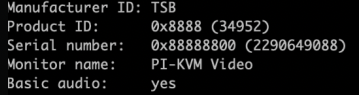
Expected behavior
The connected device should recognise the audio mode via HDMI.
Desktop (please complete the following information):
- OS: e.g. Windows 11 or Ubuntu 22.04
- Browser Chrome 103.0.5060.53
PiKVM info:
- Raspberry Pi board version: RPi 4
- PiKVM platform: PiKVM v3 HAT
- KVMD version: 3.117-1
- uStreamer version: 5.11-1
- Linux kernel:
Linux pikvm 5.15.34-2-rpi-ARCH #1 SMP Fri Jun 3 06:14:48 MSK 2022 armv7l GNU/Linux

Just for information. So far I don't understand what is the cause of the problem :/

Try this:
00FFFFFFFFFFFF0031D8888800888888
1C150103800000780AEE91A3544C9926
0F505425400001000100010001000100
010001010101D32C80A070381A403020
350040442100001E7E1D00A050001940
3020370080001000001E000000FC0050
694B564D0A20202020202020000000FD
00323D0F2E0F000000000000000001B3
02030F406A030C0000000000300080DE
0D20A03058122030203400F0B4000000
18E01500A04000163030203400000000
000018B41400A050D011203020350080
D810000018AB22A0A050841A30302036
00B00E11000018000000000000000000
00000000000000000000000000000000
000000000000000000000000000000D1
@mdevaev thank you, still no sound with this edid file and Windows 11 as guest system on the server.
I've fixed all EDIDs and added more video modes: https://www.reddit.com/r/pikvm/comments/1ars4lx/kvmd_3304_video_quality_and_compatibility/
Should be fixed now.