

 pi-hole
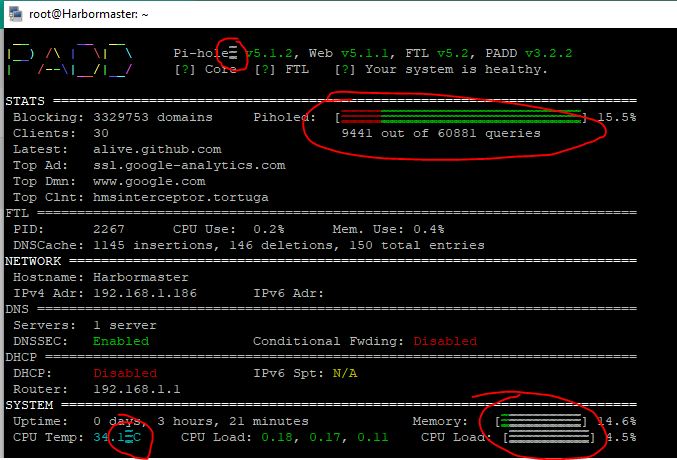
Some characters failing to display
Describe the bug Several characters display incorrectly, such as the degrees symbol by the temperature, and the word Pihole at the top.
To Reproduce Run PADD
Expected behavior No funny characters displayed
Screenshots
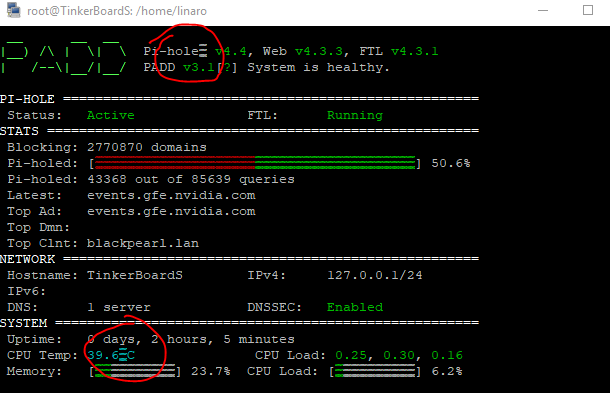


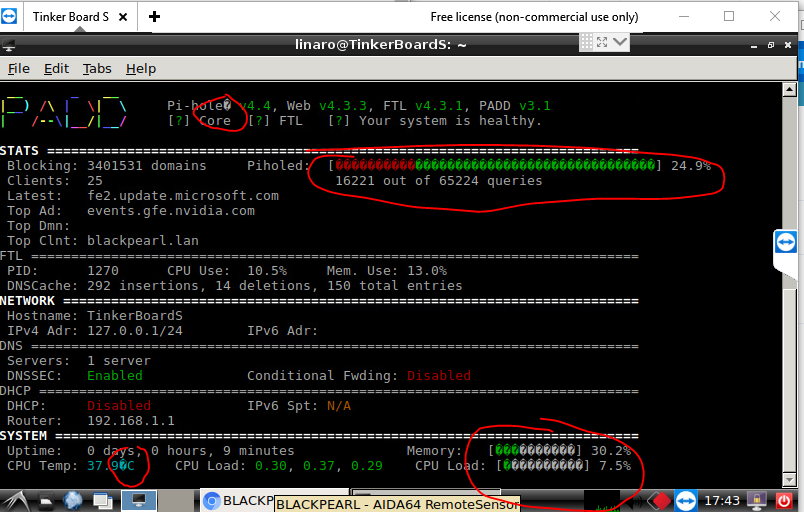
What is the environment you are running under?
echo $TERM
What font are you using in the terminal emulator? I'm guessing you're missing the unicode glyphs, your commit is fine by me if you'd like to PR against this repo. I don't see a need for either the degree symbol or the circle-c. I'm pretty sure there's a way to check if the current term is UTF capable and display/not display depending but function over form at this point.

I am using the xterm environment, apparently
The pull request: https://github.com/pi-hole/PADD/pull/99
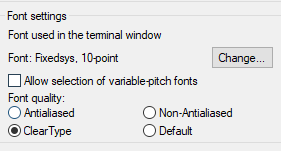
I am using the default Kitty (Putty replacement) font- Courier New
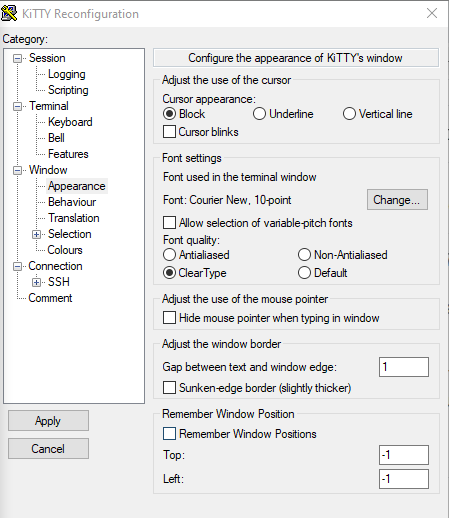
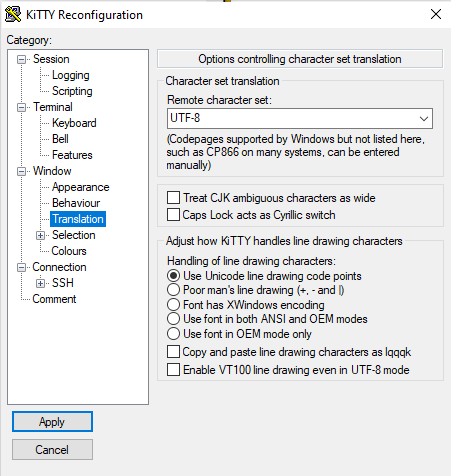
Thanks for your help as always Dan!
Courier New should be UTF8. https://www.fileformat.info/info/unicode/font/courier_new/list.htm
It may be the glyphs need to be called out differently. What is the locale set on the PADD devices OS? Run locale at a command prompt and paste the output here please.
Also, just to check, please run the below commands and see if they display the degree symbol.
echo -e '\u00B0'
printf '\u00B0'
locale
LANGUAGE=
LC_CTYPE="C.UTF-8"
LC_NUMERIC="C.UTF-8"
LC_TIME="C.UTF-8"
LC_COLLATE="C.UTF-8"
LC_MONETARY="C.UTF-8"
LC_MESSAGES="C.UTF-8"
LC_PAPER="C.UTF-8"
LC_NAME="C.UTF-8"
LC_ADDRESS="C.UTF-8"
LC_TELEPHONE="C.UTF-8"
LC_MEASUREMENT="C.UTF-8"
LC_IDENTIFICATION="C.UTF-8"
LC_ALL=
echo -e '\u00B0'
°
printf '\u00B0'
°
Thanks again for the help!
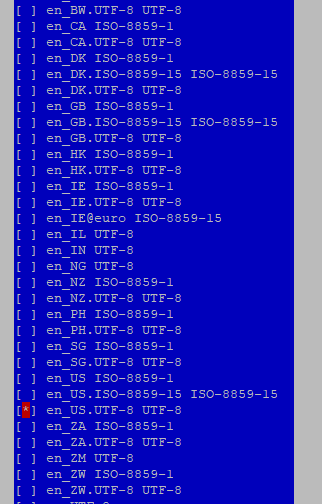
Try setting the locale to something other than the default c. For example, United States English is LANG=en_US.UTF-8
On Debian-based systems the command is sudo dpkg-reconfigure locales.
I can change the script to use the unicode glyph values instead of trying to copy the glyph icon itself and that may fix it.
Actually it is already set to en_US.UTF-8
If you want to change the script, let me know, and I will try it again Thanks!
If it was set to that you would see it in the locale output. You may need to regenerate locales and then set the locale to the right one. Though that dpkg-reconfigure should have asked you to select the locale to use, and given you the option of c or the country code one.
dan@Pi-hole:~$ locale
LANG=en_US.UTF-8
LANGUAGE=en_US.UTF-8
LC_CTYPE="en_US.UTF-8"
LC_NUMERIC="en_US.UTF-8"
LC_TIME="en_US.UTF-8"
LC_COLLATE="en_US.UTF-8"
LC_MONETARY="en_US.UTF-8"
LC_MESSAGES="en_US.UTF-8"
LC_PAPER="en_US.UTF-8"
LC_NAME="en_US.UTF-8"
LC_ADDRESS="en_US.UTF-8"
LC_TELEPHONE="en_US.UTF-8"
LC_MEASUREMENT="en_US.UTF-8"
LC_IDENTIFICATION="en_US.UTF-8"
LC_ALL=en_US.UTF-8
Thanks, I have followed the instructions. You were right, the c option was selected. I selected the country code one, then rebooted
My locale now shows:
LANG=en_US.UTF-8
LANGUAGE=
LC_CTYPE="en_US.UTF-8"
LC_NUMERIC="en_US.UTF-8"
LC_TIME="en_US.UTF-8"
LC_COLLATE="en_US.UTF-8"
LC_MONETARY="en_US.UTF-8"
LC_MESSAGES="en_US.UTF-8"
LC_PAPER="en_US.UTF-8"
LC_NAME="en_US.UTF-8"
LC_ADDRESS="en_US.UTF-8"
LC_TELEPHONE="en_US.UTF-8"
LC_MEASUREMENT="en_US.UTF-8"
LC_IDENTIFICATION="en_US.UTF-8"
LC_ALL=
Looks like the following are still blank. But, the rest match with yours.
LANGUAGE=
LC_ALL=
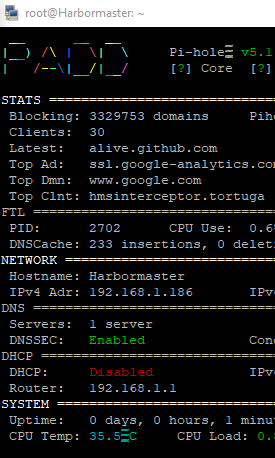
However, PADD still shows the characters incorrectly:
I left a suggestion on https://github.com/p1r473/PADD/commit/0ae70fa82f15e625a2e6c642994a00ac6704ac2e that should handle everything nicely now, no matter what the locale. Please give that a try?
 Sorry, doesnt seem like it worked.
dan@Pi-hole:~$ echo "$(printf "%.1f%b%s"  "$(echo "${cpu}" | awk '{print $1 * 9 / 5000 + 32}')" "\u00B0" "F")"
120.5°F
I am indeed able to replicate that through the command line
root@Harbormaster:~# echo "$(printf "%.1f%b%s"  "$(echo "${cpu}" | awk '{print $1 * 9 / 5000 + 32}')" "\u00B0" "F")"
32.0°F
However, running the script still remains troublesome
Okay, that's something we can work out. It may just be a matter of single vs double quotes, somethings get converted to literal strings when double quoted and they need to be left alone. As long as that sample does output the unicode symbol then we can fix the rest.
I'm trying to duplicate your setup and I'm not able to. I notice that your output has [?] for all the status sections as well.
Is there anything unique about your system? Can you share the output from the env command?
Does the display look the same when you pick another font in kitty?
env:
LS_COLORS=rs=0:di=01;34:ln=01;36:mh=00:pi=40;33:so=01;35:do=01;35:bd=40;33;01:cd=40;33;01:or=40;31;01:mi=00:su=37;41:sg=30;43:ca=30;41:tw=30;42:ow=34;42:st=37;44:ex=01;32:*.tar=01;31:*.tgz=01;31:*.arc=01;31:*.arj=01;31:*.taz=01;31:*.lha=01;31:*.lz4=01;31:*.lzh=01;31:*.lzma=01;31:*.tlz=01;31:*.txz=01;31:*.tzo=01;31:*.t7z=01;31:*.zip=01;31:*.z=01;31:*.Z=01;31:*.dz=01;31:*.gz=01;31:*.lrz=01;31:*.lz=01;31:*.lzo=01;31:*.xz=01;31:*.zst=01;31:*.tzst=01;31:*.bz2=01;31:*.bz=01;31:*.tbz=01;31:*.tbz2=01;31:*.tz=01;31:*.deb=01;31:*.rpm=01;31:*.jar=01;31:*.war=01;31:*.ear=01;31:*.sar=01;31:*.rar=01;31:*.alz=01;31:*.ace=01;31:*.zoo=01;31:*.cpio=01;31:*.7z=01;31:*.rz=01;31:*.cab=01;31:*.jpg=01;35:*.jpeg=01;35:*.mjpg=01;35:*.mjpeg=01;35:*.gif=01;35:*.bmp=01;35:*.pbm=01;35:*.pgm=01;35:*.ppm=01;35:*.tga=01;35:*.xbm=01;35:*.xpm=01;35:*.tif=01;35:*.tiff=01;35:*.png=01;35:*.svg=01;35:*.svgz=01;35:*.mng=01;35:*.pcx=01;35:*.mov=01;35:*.mpg=01;35:*.mpeg=01;35:*.m2v=01;35:*.mkv=01;35:*.webm=01;35:*.ogm=01;35:*.mp4=01;35:*.m4v=01;35:*.mp4v=01;35:*.vob=01;35:*.qt=01;35:*.nuv=01;35:*.wmv=01;35:*.asf=01;35:*.rm=01;35:*.rmvb=01;35:*.flc=01;35:*.avi=01;35:*.fli=01;35:*.flv=01;35:*.gl=01;35:*.dl=01;35:*.xcf=01;35:*.xwd=01;35:*.yuv=01;35:*.cgm=01;35:*.emf=01;35:*.ogv=01;35:*.ogx=01;35:*.aac=00;36:*.au=00;36:*.flac=00;36:*.m4a=00;36:*.mid=00;36:*.midi=00;36:*.mka=00;36:*.mp3=00;36:*.mpc=00;36:*.ogg=00;36:*.ra=00;36:*.wav=00;36:*.oga=00;36:*.opus=00;36:*.spx=00;36:*.xspf=00;36:
SSH_CONNECTION=192.168.1.69 52376 192.168.1.186 22
LANG=en_US.UTF-8
QT_GSTREAMER_WIDGET_VIDEOSINK=rkximagesink
MONITOR_PORT=/dev/tty96B0
JAVA_TOOL_OPTIONS=-Dgnu.io.rxtx.SerialPorts=/dev/tty96B0
XDG_SESSION_ID=c6
USER=root
PWD=/root
HOME=/root
SSH_CLIENT=192.168.1.69 52376 22
SSH_TTY=/dev/pts/0
MAIL=/var/mail/root
TERM=xterm
SHELL=/bin/bash
SHLVL=1
LOGNAME=root
XDG_RUNTIME_DIR=/run/user/0
PATH=/root/.local/bin:/usr/local/sbin:/usr/local/bin:/usr/sbin:/usr/bin:/sbin:/bin
I once ran the following commands, if that makes anything unique
echo "LC_ALL=en_US.UTF-8" >> /etc/environment
echo "en_US.UTF-8 UTF-8" >> /etc/locale.gen
echo "LANG=en_US.UTF-8" >> /etc/locale.conf
locale-gen en_US.UTF-8
Slightly different results with a different font. I see squares now (running official latest padd.sh- no modifications)
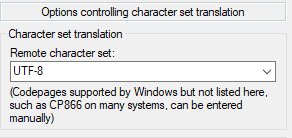
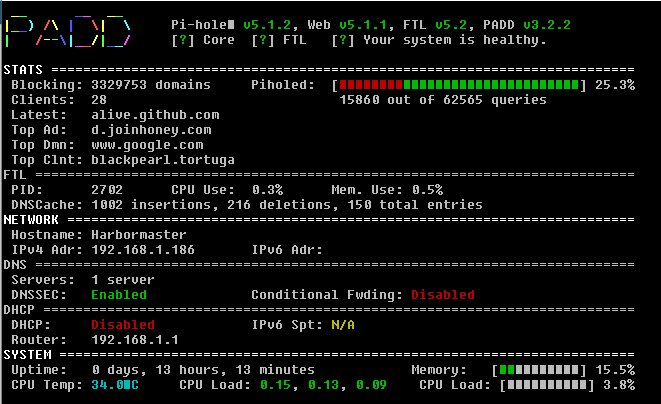
Thanks for keeping at it with me Dan! We can solve this!
This is a Tinkerboard? Can you either flash a new OS image and see if it still happens or let me know what image you are running? I have an original Tinkerboard (first gen) that I can try to play with. And what OS is the client Kitty running on?
It is a TinkerBoard S, slightly newer than the TinkerBoard. How'd you know??
Running Tinker Board Debian OS V2.1.11
Kitty running on Win10 Pro x64
Thanks!
How'd you know??
https://github.com/pi-hole/PADD/issues/88#issuecomment-609454794
Haven't forgotten, just haven't had a chance to move the stuff running on the Tinker to another home.
I am seeing a different problem on my Raspberry Pi 4B running PADD v3.5.1
- the bar indicators show up color correct as (e.g.)
Pi-holed: [â â â â â â â
locale LANG=en_US LANGUAGE=en_US LC_CTYPE="en_US" LC_NUMERIC="en_US" LC_TIME="en_US" LC_COLLATE="en_US" LC_MONETARY="en_US" LC_MESSAGES="en_US" LC_PAPER="en_US" LC_NAME="en_US" LC_ADDRESS="en_US" LC_TELEPHONE="en_US" LC_MEASUREMENT="en_US" LC_IDENTIFICATION="en_US" LC_ALL=en_US
env SHELL=/bin/bash COLORTERM=truecolor XDG_CONFIG_DIRS=/etc/xdg XDG_MENU_PREFIX=lxde-pi- LANGUAGE=en_US _LXSESSION_PID=2801 SSH_AUTH_SOCK=/tmp/ssh-XvRz3pTTrCfn/agent.2801 XDG_CONFIG_HOME=/home/pi/.config DESKTOP_SESSION=LXDE-pi SSH_AGENT_PID=2905 NO_AT_BRIDGE=1 PWD=/home/pi LOGNAME=pi QT_QPA_PLATFORMTHEME=qt5ct XDG_SESSION_TYPE=x11 GPG_AGENT_INFO=/run/user/1000/gnupg/S.gpg-agent:0:1 PULSE_SCRIPT=/etc/xrdp/pulse/default.pa HOME=/home/pi LANG=en_US LS_COLORS=rs=0:di=01;34:ln=01;36:mh=00:pi=40;33:so=01;35:do=01;35:bd=40;33;01:cd=40;33;01:or=40;31;01:mi=00:su=37;41:sg=30;43:ca=30;41:tw=30;42:ow=34;42:st=37;44:ex=01;32:.tar=01;31:.tgz=01;31:.arc=01;31:.arj=01;31:.taz=01;31:.lha=01;31:.lz4=01;31:.lzh=01;31:.lzma=01;31:.tlz=01;31:.txz=01;31:.tzo=01;31:.t7z=01;31:.zip=01;31:.z=01;31:.dz=01;31:.gz=01;31:.lrz=01;31:.lz=01;31:.lzo=01;31:.xz=01;31:.zst=01;31:.tzst=01;31:.bz2=01;31:.bz=01;31:.tbz=01;31:.tbz2=01;31:.tz=01;31:.deb=01;31:.rpm=01;31:.jar=01;31:.war=01;31:.ear=01;31:.sar=01;31:.rar=01;31:.alz=01;31:.ace=01;31:.zoo=01;31:.cpio=01;31:.7z=01;31:.rz=01;31:.cab=01;31:.wim=01;31:.swm=01;31:.dwm=01;31:.esd=01;31:.jpg=01;35:.jpeg=01;35:.mjpg=01;35:.mjpeg=01;35:.gif=01;35:.bmp=01;35:.pbm=01;35:.pgm=01;35:.ppm=01;35:.tga=01;35:.xbm=01;35:.xpm=01;35:.tif=01;35:.tiff=01;35:.png=01;35:.svg=01;35:.svgz=01;35:.mng=01;35:.pcx=01;35:.mov=01;35:.mpg=01;35:.mpeg=01;35:.m2v=01;35:.mkv=01;35:.webm=01;35:.ogm=01;35:.mp4=01;35:.m4v=01;35:.mp4v=01;35:.vob=01;35:.qt=01;35:.nuv=01;35:.wmv=01;35:.asf=01;35:.rm=01;35:.rmvb=01;35:.flc=01;35:.avi=01;35:.fli=01;35:.flv=01;35:.gl=01;35:.dl=01;35:.xcf=01;35:.xwd=01;35:.yuv=01;35:.cgm=01;35:.emf=01;35:.ogv=01;35:.ogx=01;35:.aac=00;36:.au=00;36:.flac=00;36:.m4a=00;36:.mid=00;36:.midi=00;36:.mka=00;36:.mp3=00;36:.mpc=00;36:.ogg=00;36:.ra=00;36:.wav=00;36:.oga=00;36:.opus=00;36:.spx=00;36:*.xspf=00;36: XDG_CURRENT_DESKTOP=LXDE VTE_VERSION=5402 XRDP_SOCKET_PATH=/var/run/xrdp/sockdir XRDP_PULSE_SOURCE_SOCKET=xrdp_chansrv_audio_in_socket_10 XDG_SESSION_CLASS=user TERM=xterm-256color USER=pi XRDP_SESSION=1 DISPLAY=:10.0 XRDP_PULSE_SINK_SOCKET=xrdp_chansrv_audio_out_socket_10 SHLVL=1 XDG_SESSION_ID=c2 XDG_RUNTIME_DIR=/run/user/1000 LC_ALL=en_US XDG_DATA_DIRS=/usr/local/share:/usr/share/raspi-ui-overrides:/usr/share:/usr/share/gdm:/var/lib/menu-xdg PATH=/home/pi/.local/bin:/usr/local/sbin:/usr/local/bin:/usr/sbin:/usr/bin:/sbin:/bin:/usr/local/games:/usr/games SAL_USE_VCLPLUGIN=gtk3 DBUS_SESSION_BUS_ADDRESS=unix:path=/run/user/1000/bus UID=1000 TEXTDOMAIN=Linux-PAM _=/usr/bin/env

Correct. The problem appears to be rendering in LXTerminal 0.3.2. Rendering via ssh is fine.