

 phpipam
IP scan very slow with /16 mask
Hello,
phpIPAM manage to scan ip /20+ without issue, but if i scan /16 it take like 30 min to scan, without error, even if some ip had no host name i don't know why...
I've like 10+ subnet with a mask /16, how could i speed up the scans ?

Of course it is going to be slow, a /16 is more than 65,000 addresses. Do you really want your IPAM box to flood your network with ping/snmp traffic?

Well i've no choice, most of the network was build with a bunch of /16 i was just wondering if i could speed up the scans.
Also, i want to add MIB for my devices, but i don't know how and where find them

WIth fping it even possible to limit icmp packets count to 1 to achive maximum performance for large subnets and probably lower default timeouts.

Ok i setup fping and insert the right path, but i don't know how to use fping with the scan.
What should i change here ?
// script can only be run from cli if(php_sapi_name()!="cli") { die("This script can only be run fr$ // test to see if threading is available if(!Thread::available()) { die("Threading is required for scan$ // verify ping path if ($Scan->icmp_type=="ping") { if(!file_exists($Scan->settings->scanPingPath)) { die("Invalid ping path!"); } } // verify fping path if ($Scan->icmp_type=="fping") { if(!file_exists($Scan->settings->scanFPingPath)){ die("Invalid fping path!"); } }
Enable fping in settings
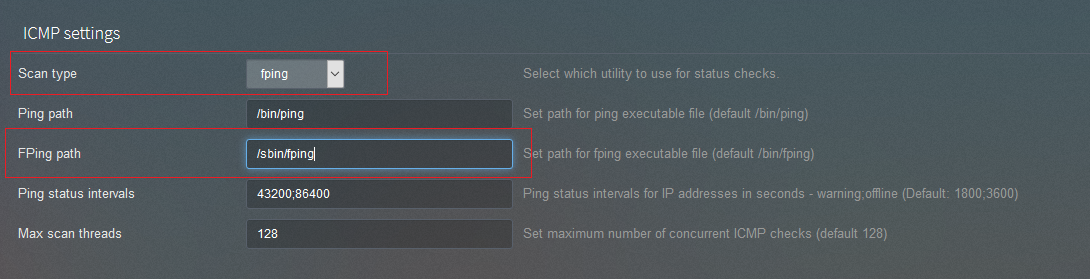
Run "whereis fping" and locate the path to fping. Check that non-root users running fping (like apache) have permission to open raw sockets...
getcap /path/to/your/fping
/usr/bin/fping = cap_net_raw+ep
If cap_net_raw+ep isn't set enable it with...
sudo setcap 'CAP_NET_RAW+ep' /path/to/your/fping
When i try to scan
Warning: Creating default object from empty value in /var/www/html/app/subnets/scan/subnet-update-icmp.php on line 21
getcap /path/to/your/fping /usr/bin/fping = cap_net_raw+ep
return = address not found cap_net_raw+ep address not found
and
sudo setcap 'CAsudo setcap 'CAP_NET_RAW+ep' /usr/local/sbin/fping
open a line like this, but i don't really think it should do that ^^ :>
Also after my installation of fping, i couldn't scan with the ping anymore, even if i select ping instead of fping, all host was alwais offline, so i don't know if when i installed fping all fuk up, or if it's something else...
Thanks for helping though :)
Hi @Ayeto , It's nice to hear that you were able to scan for /16 mask. Can you help me with the machine/VM configuration? I am only able to scan till /20 mask.
Did you change any of the php configurations so that the script runs more than 60 seconds? I tried few steps to increase the timeout of the script but nothing helped till now.
I also tried fping but not sure why I found ping was giving better results than fping.
Any help on this will be really nice.

