

 philc
philc
Could there be a reduced permission mode added?
I was looking at https://addons.mozilla.org/en-US/firefox/addon/vimium-ff/ and before installing, it asked if all the permissions needed by this plugin would be ok. it's a lot.
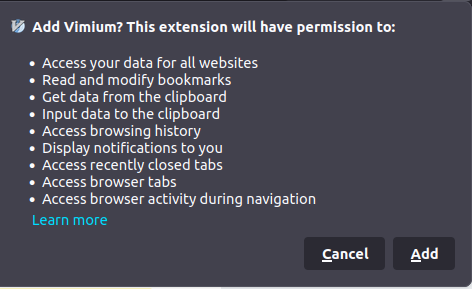
The only feature I really want from vimium is the f / in-page jumping.
Is there a way to opt in to all the things or have only this feature? or is it not possible?
Thanks!
Browser and Vimium version
FireFox 110.0 ❯ lsb_release -a No LSB modules are available. Distributor ID: Ubuntu Description: Ubuntu 22.04.2 LTS Release: 22.04 Codename: jammy

um, you'll have to compile Vimium from source code
---Original--- From: @.> Date: Wed, Feb 22, 2023 21:58 PM To: @.>; Cc: @.***>; Subject: [philc/vimium] Could there be a reduced permission mode added? (Issue#4226)
I was looking at https://addons.mozilla.org/en-US/firefox/addon/vimium-ff/ and before installing, it asked if all the permissions needed by this plugin would be ok. it's a lot.
The only feature I really want from vimium is the f / in-page jumping.
Is there a way to opt in to all the things or have only this feature? or is it not possible?
Thanks!
Browser and Vimium version
FireFox 110.0 ❯ lsb_release -a No LSB modules are available. Distributor ID: Ubuntu Description: Ubuntu 22.04.2 LTS Release: 22.04 Codename: jammy
— Reply to this email directly, view it on GitHub, or unsubscribe. You are receiving this because you are subscribed to this thread.Message ID: @.***>

Likely the navigation keys (h, j, k, l, gg, G, etc.) could also be kept. Maybe a Vimium-lite?

You can basically just remove the permissions from manifest, and as long as you don't use the other features it will work fine.

Been doing some exploration over here: https://github.com/NullVoxPopuli/vimium/pull/1
It's working well!
@krackers Gave the correct answer. So, here's a guide:
- See https://github.com/philc/vimium/wiki/Privacy-policy : (last edited 2020)
Vimium does not handle or transmit user data.
-
Get the extension, download tar.gz here in github for chromium-based browsers or on firefox addons repository for firefox (there is probably something edited specifically for firefox) - I could download it with a chromium-based browser visiting the firefox addon repository page of vimium.
-
Download and extract the extension anywhere. Open the manifest.json.
First, look at the section:
  "permissions": [
    "tabs",
    "bookmarks",
    "history",
    "storage",
    "sessions",
    "notifications",
    "scripting",
    "webNavigation",
    "search",
    "clipboardRead",
    "clipboardWrite"
  ],
I could reduce it to
  "permissions": [
      "webNavigation",
       "storage"
  ],
this was the minimium for buttons j, k to work (up, down).
I could also reduce
  "host_permissions": [
    "<all_urls>"
  ],
to
  "host_permissions": [
    ],
But i couldn't reduce that
 "content_scripts": [
    {
      "matches": [
        "<all_urls>"
      ],
it's probably because there the code happens for making the features available. You might remove in the js parts after that vomnibar or so, if you don't want it to run on every page. Also webaccessable resources may be reduced.
-
Test it, go to about:debugging in firefox (for example), on the left go to firefox, and then temporarly load the addon by opening the saved, edited manifest.json. You can test if everything works like you want to. You can remove more or less permissions and other things, save the manifest.json, reload in about:debugging and open a new tab to look if everything when out correctly for you.
-
Now change the firefox id reandomly (it must be unique for signing, is probably HEX digits allowed, so no z, but a b and so on), save, make zip of the addons contents and rename .zip to .xpi and also load that with about:debugging. If everything works and you are on release firefox you ll get an error of corruption if you want to install the xpi from the normal extensions page. But that is an error, because the addon isn't signed and the error is missleading. Even changing the signature requirement in about:config will probably not work (and might not be recommandble any way) because release firefox doesn't respect that setting probably. Long story short: go and sign the edited extension as an unlisted on mozilla: https://extensionworkshop.com/documentation/publish/signing-and-distribution-overview/ . And then install it via the .xpi link on your firefox addon page settings.
This way I got the permissions lowered to:
I don't use that tridacyl addon how it's called, because i read it add 100ms (compared 30 ms or so by vimium) load to every page and probably had a security issue in high (remote code or so) in the past. Vimium also had a security problem in the past probably but it was less serve. Still it might be usefull to get a news feed or something for new versions published to be up to date if there a security issues with older versions and update the edited vimium (download anew and edit manifest and resign).
Appendix
Searched (also closed) issues via "permissions" or something. Got these links which might have some interesting info:
See what other people changed: https://github.com/denalena/minium/pull/1 https://github.com/NullVoxPopuli/lightspeed.ff/pull/1
Might be interesting when having problems with installation: https://github.com/NullVoxPopuli/lightspeed.ff/blob/main/CONTRIBUTING.md#installing-from-source
__
Why does the Vimium extension require so many Chrome permissions? Vimium's basic functionality requires that the Vimium javascript be loaded into every page. Vimium requires access to bookmarks and history because it has a UI which replaces Chrome's URL bar (called the "Vomnibar bar") which autocompletes queries with suggestions from bookmarks and history. Vimium never talks to any servers and does absolutely nothing with the data. Also see the privacy policy. https://github.com/philc/vimium/wiki/FAQ#why-does-the-vimium-extension-require-so-many-chrome-permissions
__
Read and change all your data on the websites you visitWe need access to every webpage you load so we can listen for keys on it, and to show the Vomnibar, HUD, and help dialog. The extension is useless without this.
Read and change your browsing history on all your signed-in devicesThis is used for showing history in the Vomnibar. We don't necessarily need this, but o and O are pretty useless without it.
https://github.com/philc/vimium/issues/2499
__
Folks, Vimium has had the clipboardRead permission since Jan 2012 (https://github.com/philc/vimium/commit/3ff0518014a51f237d1d98ebc15c0ce4be24c2b5) so I'm not sure why Chrome is prompting about it now. I believe the last time permissions were changed was in 2016 (https://github.com/philc/vimium/commit/dfbd68dd4462181be2e4d61ed255adaee5d39311).
The command "paste URL from clipboard" uses the clipboard read permission. https://github.com/philc/vimium/issues/3489
__
Yes it's unfortunate that Chrome has sort of alarmist messaging around these permissions. I'll add a notice at the top of the Chrome web store page.
"Your data on all websites" is really just Vimium asking for its javascript to run on every page you load. Theoretically we could steal everything on the page by doing so but we don't and never will.
"Your bookmarks" is obviously necessary for us to offer the bookmark feature.
The code is open source. Read it if you're paranoid. We don't communicate with any servers. Do you really think I wrote this Vim browser extension for nefarious purposes?
and
Up to this point they are pretty obvious though assuming you utilize a wide array of commands of Vimium.
All your data on the websites: The scariest-sounding one, already explained by the closing comment above, is basically how Vimium and most Extensions that interact with web pages can work.
Your browsing history: So Vimium can offer the history functions.
Your bookmarks: So Vimium can offer the bookmark functions.
Your copy and paste: So commands like yf, p, and visual mode can work.
Display notifications: The update notification when Vimium is updated.
I am just an average user and know nothing about coding, but as I see and use it, apparently they are most what Vimium is expected being able to do so it naturally needs those permissions.
https://github.com/philc/vimium/issues/366
