

 philc
philc
Feature request: copy image / copy image URL to the clipboard
Current functionality:
- It is possible to use
LinkHints.activateModeToCopyLinkUrl(Copy a link URL to the clipboard) to activate hints, select a hint, and have that hint's destination URL copied to the clipboard.
Desired functionality:
- Add hint-activated functions for images. These include (in my personal desired order):
- Copy image
- Copy image URL / address
- Save image
- Open image in new tab
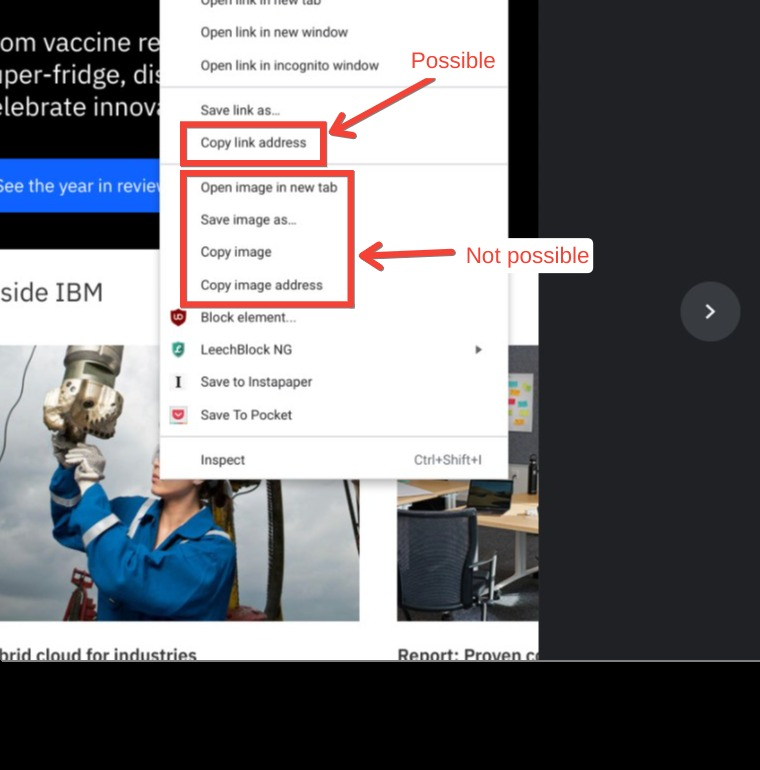
Illustration:
- The Chrome context menu when right-clicking on an image:
Personal note:
- I absolutely love Vimium! Thank you so much to the community for creating this wonderful extension.

I have a customized version of Vimium, named Vimium C, and I added LinkHints.activateModeToOpenImage to open an image in a new tab. Then you can use Ctrl+S / Ctrl+C to download / copy images.
~~Update: seems Ctrl+C breaks... I'll do more tests and try to fix it.~~
With Vimium C, in order to get image URL to copy, you may:
- add the 2 lines below to custom search engines:
v.i: . vimium://show image re=/^(?:\+|%20| )(?:download=[^&]*&)?(.*)$/i
v.i: vimium://show\ image\ auto=once&$S re= Vimium C Display
- map a key sequence to the command named
Vomnibar.activateUrl - then trigger this key on the tab where Vimum C displays an image, so you'll see image URL on Vomnibar's input bar.

use shortcut key with LinkHints.activateModeToOpenImage to open image in new tab then shortcut key withLinkHints.activateModeToCopyLinkUrl to copy its url to clipboard. Thank you, the author for building and maintaining such a wonderfull thing like this!

I have a customized version of Vimium, named Vimium C, and I added
LinkHints.activateModeToOpenImageto open an image in a new tab. Then you can use Ctrl+S / Ctrl+C to download / copy images.~Update: seems Ctrl+C breaks... I'll do more tests and try to fix it.~
With Vimium C, in order to get image URL to copy, you may:
- add the 2 lines below to custom search engines:
v.i: . vimium://show image re=/^(?:\+|%20| )(?:download=[^&]*&)?(.*)$/i
v.i: vimium://show\ image\ auto=once&$S re= Vimium C Display
- map a key sequence to the command named
Vomnibar.activateUrl- then trigger this key on the tab where Vimum C displays an image, so you'll see image URL on Vomnibar's input bar.
Animated GIF are copied as static images.
