

 phase1geo
Option to ignore Markdown Control characters on pdf/image exports
When I have something like this
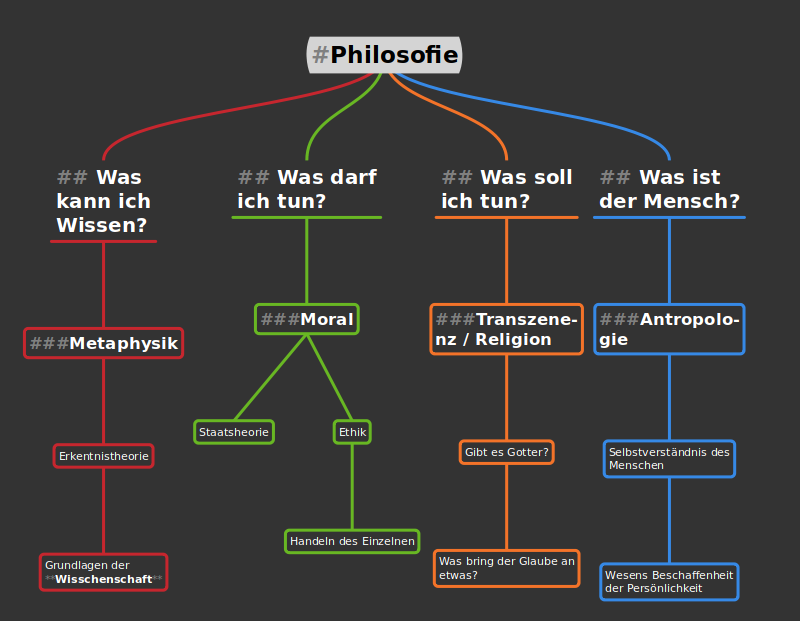
I and I export it as image it looks exactly like the screenshot, even though the # and * are just there for formatting and look bad on the export (especially the #s).
It would be great if you could add an option to the export menu that characters detected as markdown formatters from the export (but keeps the formatting itself)
But they should be shown in the editor. I don't like markdown editors that hide these characters.

I was working on the implementation of this feature and forgot about an issue with doing this. Removing text from a node can change the entire layout of the mindmap. When exporting a mindmap, Minder does not do layout changes (those only occur when the user edits the mindmap in some way). During export, we can do things like change colors, remove selections, etc. which do not affect the layout of the mindmap, but that is it. As a result, I don't know that I can provide this capability without making some major coding changes (which I am not inclined to do).

I could possibly play with the alpha value of the text to make it appear to be hidden (although there would still be spaces in the text where these characters were) or dim them enough so that they don't stick out quite so much when exporting/printing. Would that be an acceptable solution?
I have committed changes to the master branch. I'm lowering the alpha channel of these characters to make them much less prominent. I think this output looks better, but I would appreciate feedback.
Can you please send me a linux build please so I can test it. I am on arch and cant get the old version of vala working.
Unfortunately, I won't be able to to do that. Is there a reason why a newer version of vala won't work?
From your Readme:
valac (any 0.48.x version -- any later version will result in segfaults -- earlier versions have issues with libarchive)
I can confirm this with vala 56.3
Can you export this file (the example above) with the option set and send the result here?

I think its way better as well, but the alpha should be even lower IMO
Also I just got an idea about headings: Maybe you can workaround the issue with the # by manipulating the textbox a bit:
- Convert
## was kann
ich wissen
to
## was kann \n
## ich wissen
Unless newlines in a heading dont interrupt headers in your implementation
- Move the textbox the width of two hastags to the right, but keep the visual indication of the textbox the same (now the hashtags are outside the round box)
- set the alpha value of the hastags to 0
that way, the export should look bery clean and this could be possible with the current export system
Unfortunately, adding characters to headers can also have an impact on the mindmap layout, so it won't be a possibility for export.
I generally don't like the idea that exporting a mindmap to an image visually changes the mindmap in the process. Exporting a mindmap as an image should, in my opinion, be equivalent to taking a screenshot of the mindmap. The major difference being that the image should contain the entire mindmap rather than what is just displayed onscreen.
I decided to drop the alpha value of the special characters down to a small value (but not 0) to make it less noticeable, but still somewhat noticeable. Since I can't get rid of the characters, bringing the alpha value to 0 will create gaps in the text that won't look good (especially if more hash tags are used).
Unfortunately, adding characters to headers can also have an impact on the mindmap layout, so it won't be a possibility for export.
I generally don't like the idea that exporting a mindmap to an image visually changes the mindmap in the process. Exporting a mindmap as an image should, in my opinion, be equivalent to taking a screenshot of the mindmap. The major difference being that the image should contain the entire mindmap rather than what is just displayed onscreen.
I decided to drop the alpha value of the special characters down to a small value (but not 0) to make it less noticeable, but still somewhat noticeable. Since I can't get rid of the characters, bringing the alpha value to 0 will create gaps in the text that won't look good (especially if more hash tags are used).