

 pharring
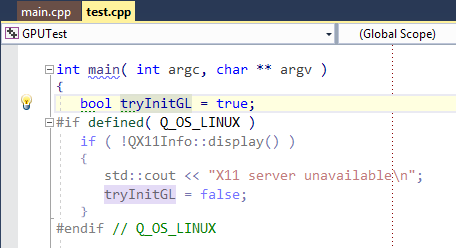
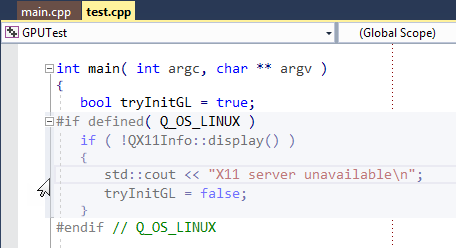
Wrong Z-order causes the guide lines to be overdrawn by ReSharper's Current Line highlight and VS's built-in current outlining block highlight
Please see the brief discussion with one of ReSharper developers (who implemented some editor adornments) starting at this comment (you might wish to choose “Sort: oldest first” in the “Activity settings” drop-down menu on the right).
It might become especially troublesome if some guide lines (e.g. indented ones) are displayed for the current line only in future.
P.S.
Here is how it looks (with an artificially narrow text):
P.P.S.
The guide line is also overdrawn by VS's built-in current outlining block highlight on mouse-over:


What do you propose?
I suggest putting the guide line adornment layer above the text layer, so that the adornment will overdraw the current line highlight. It will not hurt the text readability I believe as the line is thin and dotted.